
Kapik
Known Participant
July 19, 2024
Question

The brush opacity is low even if I pressed the screen really hard

  • July 19, 2024
  • 2 replies
  • 2952 views

Hi,


So I have this brush from an artist and I want to have the same effect which the artist can get a really nice dark stroke when he press the screen harder. But for my case, even if I press hard the stroke doesn't look dark enough. I used the same setting as the artist but it just doesnt work for me. 

How to fix this?
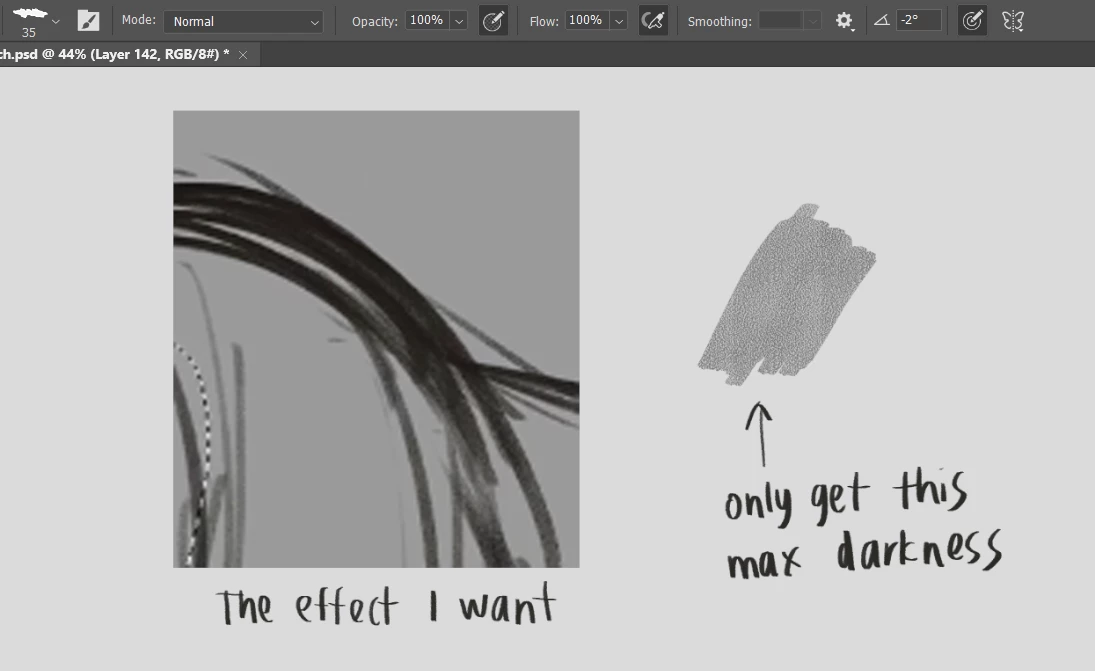
The artist also have the pressure sensitive on, so turning this off will make it a solid dark and lose the brush effect. 

This topic has been closed for replies.

2 replies

NB, colourmanagement
Community Expert
Community Expert
August 5, 2024

@Kapik have you tried the brush at 100% (or other opacities if you want a level of transparency) using a mouse rather than a device with pressure sensing? A Wacom is it? Could the issue be with the device communication?


I hope this helps neil barstow, colourmanagement net - adobe forum volunteer - co-author: 'getting colour right' google me "neil barstow colourmanagement" for lots of free articles on colour management Help others by clicking "Correct Answer" if the question is answered. Found the answer elsewhere? Share it here. "Upvote" is for useful posts.


Kapik
KapikAuthor
Known Participant
August 5, 2024


This is what I got when I use the mouse and wacom. I disable the pen pressure feature, and adjust only the opacity.

I applied the same force when I use the wacom pen, it seems that I can't get dark enough of the stroke even when it is 100% opacity.

c.pfaffenbichler
Community Expert
Community Expert
August 5, 2024

Please uncheck all »Alway use Pressure …« in the Options Bar and what is the Flow value? 


c.pfaffenbichler
Community Expert
Community Expert
July 20, 2024

Could you please post screenshots taken at View > 100% with the pertinent Panels (Toolbar, Layers, Brush Settings, Options Bar, …) visible for each relevant Brush Settings-element (Transfer and all other checked ones)? 

Kapik
KapikAuthor
Known Participant
July 20, 2024

Hi,

This are the screenshots of the brush setting. Please let me know if you need other info

c.pfaffenbichler
Community Expert
Community Expert
July 20, 2024

I cannot make out the Brush Tip for the »Dual Brush« – what is it? 

What happens if you turn off the »Dual Brush«? 


It should not matter but why is this checked?