Participating Frequently
November 7, 2019
Question

The colors suddenly fail. Urgent help.

  • November 7, 2019
  • 3 replies
  • 1033 views

Hi, I would like to ask for help because something very strange is happening to me since this morning.

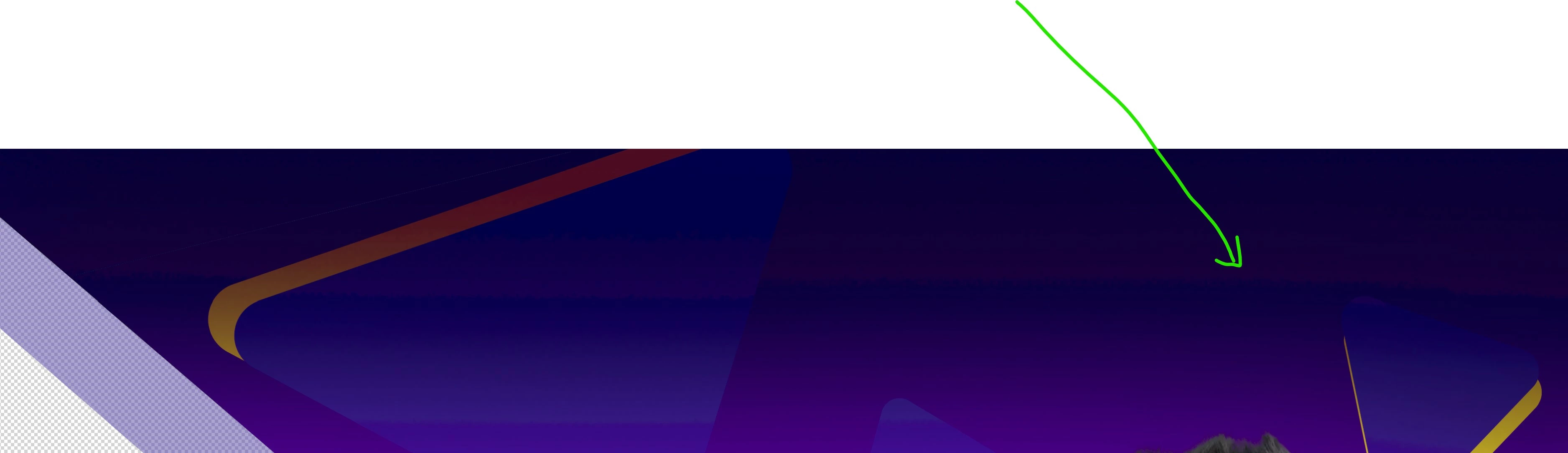
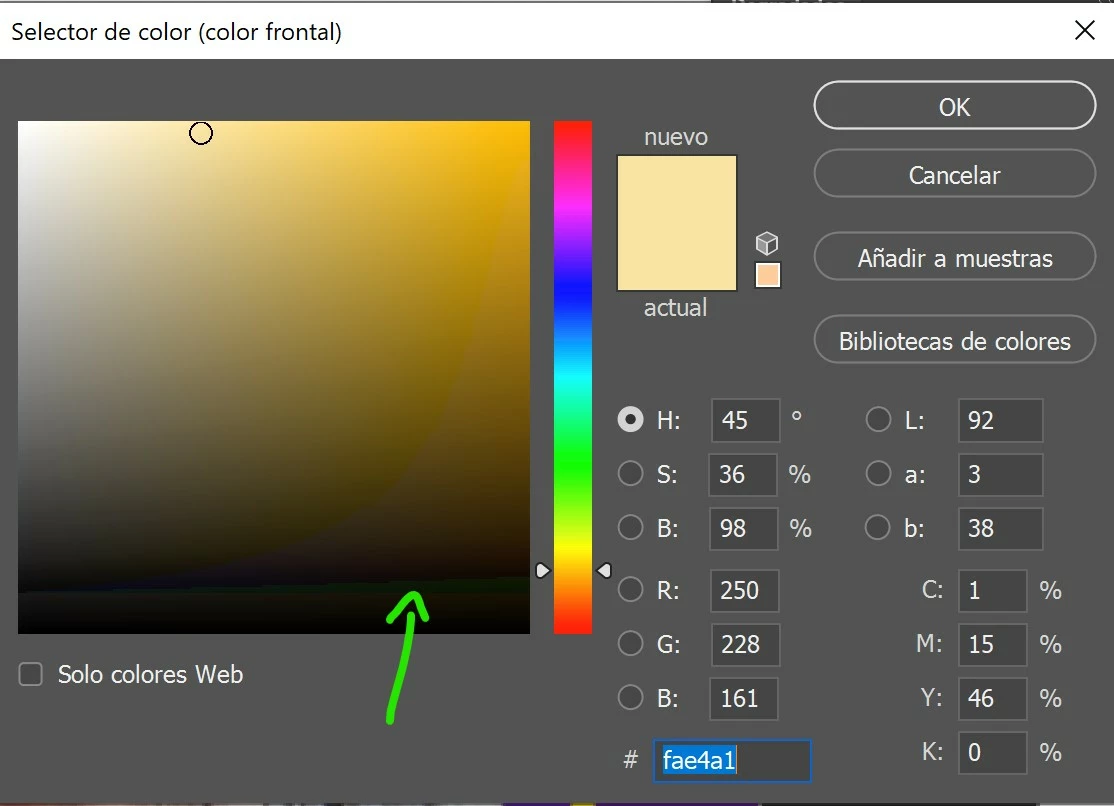
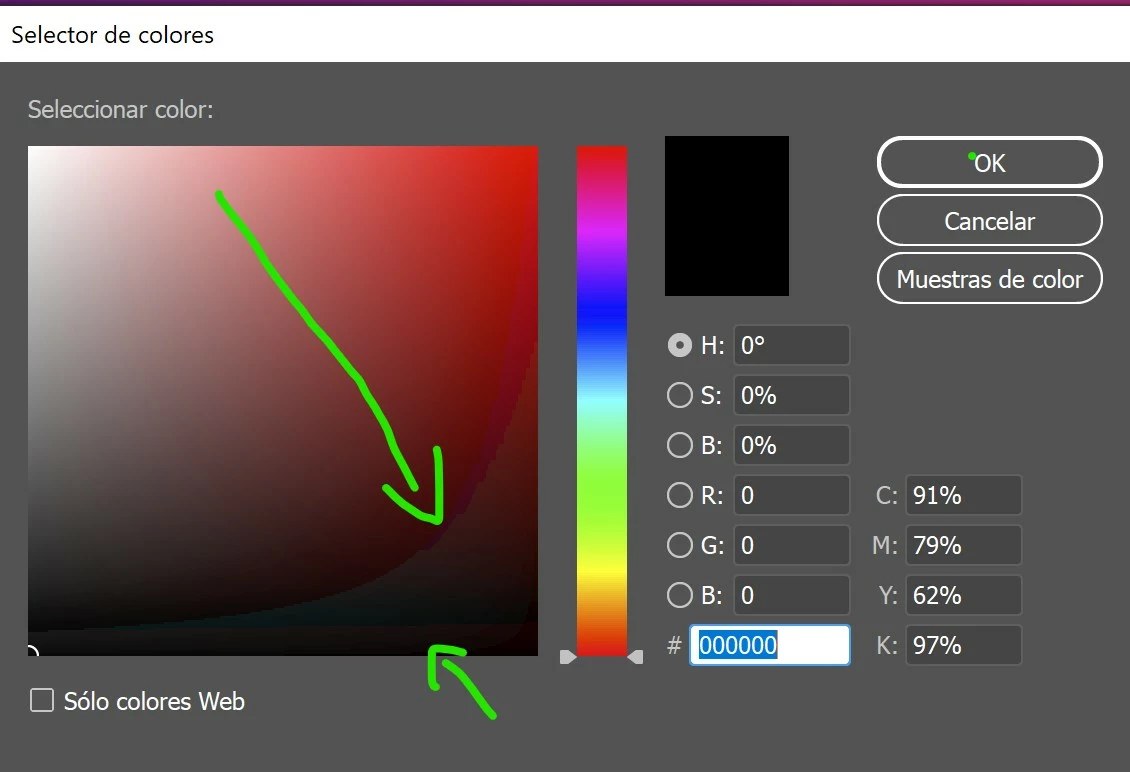
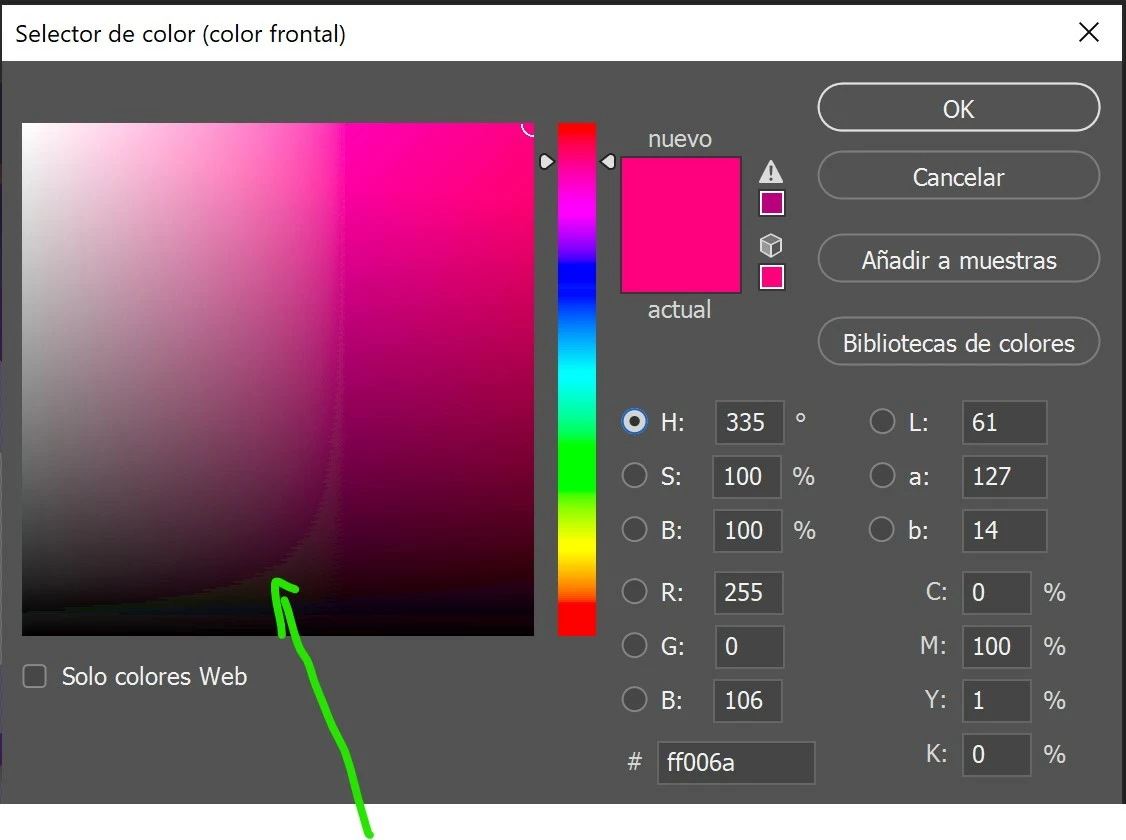
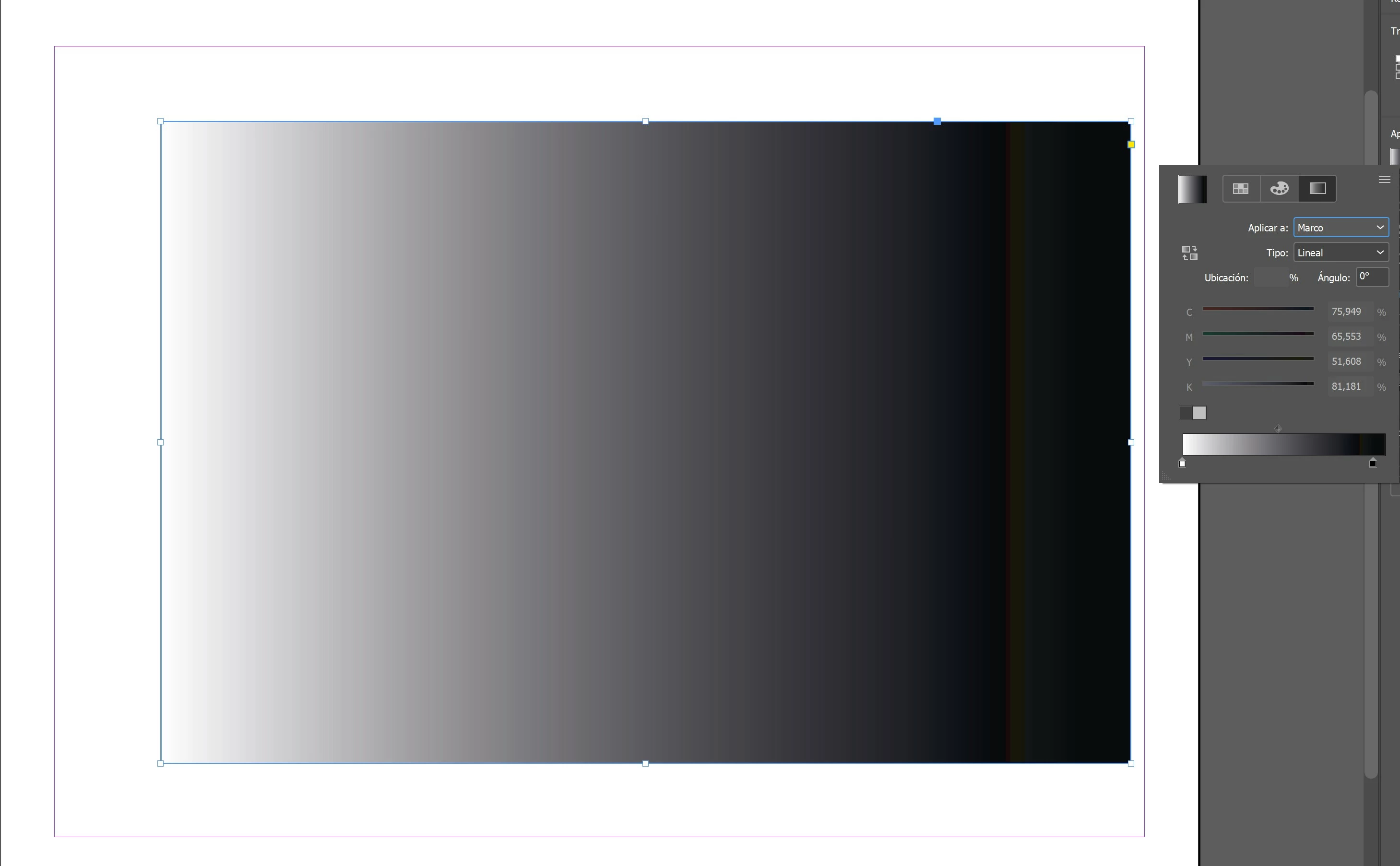
Suddenly, when opening photoshop I realized that I was not showing all the colors in the picker or at the work tables themselves, it's like missing color depth or something (*see attached captures).


After a while trying different things I could not solve it. Then I read that it is probably due to my color profile in windows. I have a gigabyte AERO 15 that is factory calibrated by X-Rite Pantone and this had never happened to me. To make sure it was due to this, I opened illustrator and exactly the same thing happens, the colors don't show well.


As I said, this did not happen yesterday, I don't know what could have happened suddenly so that when starting adobe applications, the color profile of my screen does not load well and the colors do not appear correctly. As I say, the error arises in the process of opening apps, whether photoshop, illustrator or indesign, something has begun to fail suddenly in that process that did not fail yesterday. I have tried to uninstall the apps and reinstall them, same with the nvidia drivers, change the default color profile on windows and put it back but nothing solves the problem.


I have tried all kinds of things and the only thing that works is to put the screen with the SRGB color profile on windows and once photoshop or illustrator is open, switch back to my XRITE calibrated profile. In this way all the colors are shown well like yesterday but I DON'T WANT TO DO THIS ALWAYS THAT I WANT TO OPEN THE APPS BECAUSE IT IS TEDIOUS AND A GREAT TIME LOSS.


So please... Can anything be done to fix it? Please, my work and my life depend on this. Thank you.
 

This topic has been closed for replies.

3 replies

D Fosse
Community Expert
Community Expert
November 8, 2019

I added a final comment which unfortunately got nested and buried mid-thread because I clicked the wrong reply button. So I'm repeating it here:


I googled this laptop and apparently it has a wide gamut DCI-P3 display. So you wouldn't use sRGB, you'd use DCI-P3 as display profile. But the principle is the same. When the manufacturer profile is bad (which it is more often than people think), and you don't have a calibrator to make a proper profile, you use the closest generic profile. It's not entirely accurate, but often close enough for most people.


There is no such thing as factory calibrated. That's just a sales pitch. It sounds convincing, but has no real meaning. No display behaves in a generic manner, and no two are exactly alike. There's manufacturing tolerances. The only way to get an accurate and reliable display profile, is to make one with a calibrator.

davescm
Community Expert
Community Expert
November 8, 2019

I also looked that up and , according to Gigabytes press release, Gigabyte "insists on calibrating each and individual laptop" . So the ICC profile may well be unique to that individual laptop.

https://www.gigabyte.com/Press/News/1691


I don't know how that works in conjunction with any brightness/contrast control which would immediately invalidate the profile, or what version of profile is made.

All that said - the sceenshots above show all the signs of a broken profile so I would follow Dag's advice.


Dave

D Fosse
Community Expert
Community Expert
November 8, 2019

In principle, Dave (and I'm nesting this post on purpose 😉 ) factory calibration could work, if they do it properly and spend time and effort. They would have to measure the primaries and tone response curve very carefully for each unit, and make individual profiles. Do they really go to all that trouble, considering how much that would slow down production?


And of course you're right: any tinkering with display parameters would invalidate the profile. You couldn't touch it.


Just as an example, I know Dell's "factory calibration" because I once did some research into it. What they do is slap a probe onto the center of the screen to see if it's within shouting distance of D65. That's it. The actual profile is generic. And then they enclose a xeroxed sheet with a curve on it to make it look convincing. It's a hoax.


NEC and Eizo factory calibrate, but they don't make a big deal of it. They still sell these units on the assumption that you will use a sensor to calibrate and profile them, and they have dedicated software included to do so. If you don't profile them, they have built-in profiles that get automatically installed, and they are supposedly individual and very accurate. But notably they set the white point automatically and you can't change it. I've never tried them.

D Fosse
Community Expert
Community Expert
November 7, 2019

It's a broken monitor profile. Manufacturer profiles are distributed through Windows Update, and these are surprisingly often corrupt or defective. This happens a lot.


The proper way to deal with it is to use a calibrator to make a new profile. If you don't have one, use sRGB IEC61966-2.1 for now. Relaunch all apps when done, the profile is loaded at application startup:

Participating Frequently
November 7, 2019


First of all, thank you very much for answering.


As for what you say ... I didn't acquire this profile through windows update. I explain:


The laptop I am using is factory calibrated by X-rite with PANTONE certification. That profile is hosted on a security partition to never lose it, even after formatting and reinstalling windows. In addition, that partition you can not access without follow a procedure, so it is impossible to modify the files inside.That is, when being hosted on a partition that is only accessed as recovery, it cannot be corrupted or broken ... The profile is the same forever!


In fact, I have removed it from windows and then I have reinstalled the original from a secure copy that I have, that is, the one I have installed again cannot be corrupted because the copy was made the first day I turned on the laptop.


I don't know what could have happened but it has coincided with the latest adobe updates.

Do you think there may be another solution? I am even thinking of formatting the laptop.

D Fosse
Community Expert
Community Expert
November 7, 2019

A monitor profile isn't kept on a partition. Then it wouldn't work, because the application couldn't get to it. This sounds like someone's trying to sell you something, because it makes no sense whatsoever.


The profile needs to be in Windows > System32 > spool > drivers  > color, along with all other icc profiles. If it's not there, it doesn't work.


The monitor profile is just a standard icc profile, following the icc specification. If you don't make one with a calibrator, you'll usually get one through Windows Update.

Participating Frequently
November 7, 2019

Attached catches of color management on windows


Participating Frequently
November 7, 2019

D Fosse
Community Expert
Community Expert
November 8, 2019

BTW I googled it and apparently it has a wide gamut DCI-P3 display. So you wouldn't use sRGB, you'd use DCI-P3 as display profile. But the principle is the same. When the manufacturer profile is bad (which it is more often than people think), and you don't have a calibrator to make a proper profile, you use the closest generic profile. It's not entirely accurate, but often close enough for most people.


There is no such thing as factory calibrated. That's just a sales pitch. It sounds convincing, but has no real meaning. No display behaves in a generic manner, and no two are exactly alike. There's manufacturing tolerances. The only way to get an accurate and reliable display profile, is to make one with a calibrator.