Participant
April 16, 2018
Answered

the filters in the advanced object are no longer displayed, where did I go wrong?

  • April 16, 2018
  • 2 replies
  • 438 views

help me. the filters in the advanced object are no longer displayed, where did I go wrong?
    This topic has been closed for replies.
    Correct answer teachbit


    Hello,

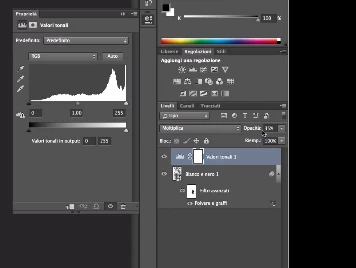
    I suppose you mean smart object by advanced layers, as these specific layers show the filters, you have used. The lower layer in your screenshot seems to be a smart object, but the one above not. If you want the filter to be non-destructive and changeable, you have to convert the layer into a smart object first, before applying the filters.

    hope this answer helps

    2 replies

    Participant
    April 16, 2018

    I understood the error, I applied the filters in the psb file created by the advanced object. In reality I would have to apply them directly to the advanced object, and so they are displayed and modified. thanks anyway to everyone

    c.pfaffenbichler
    Community Expert
    Community Expert
    April 16, 2018

    Good day!

    What do you mean by »advanced object«?

    Could you please post a screenshot taken at View > 100% and with the pertinent Panels (Layers, Channels, Options Bar, …) visible?

    FAQ: How do I capture and post a screen shot or video?

    Regards,

    Pfaffenbichler

    Participant
    April 16, 2018

    Thanks,

    I open the layer as an advanced object, I apply filters in the psb layer, then saving it and closing it, I see the filters. Now they are not seen anymore, and if I want to change the filters in the advanced object there are no more, I think it's a setting problem ... but which one? Thanks for the reply and forgive my translated english ..

    teachbitCorrect answer
    Participating Frequently
    April 16, 2018


    Hello,

    I suppose you mean smart object by advanced layers, as these specific layers show the filters, you have used. The lower layer in your screenshot seems to be a smart object, but the one above not. If you want the filter to be non-destructive and changeable, you have to convert the layer into a smart object first, before applying the filters.

    hope this answer helps