

The HUE slider in an adjustment layer
I would appreciate it if someone would confirm or correct my understanding of how the Hue slider works in a Hue/Saturation adjustment. The image below shows the panel and part of a Photoshop color wheel.
According to Adobe, as I drag the slider, the values displayed in the text box reflect the number of degrees of rotation around the color wheel from the pixel’s original color. A positive value indicates clockwise rotation; a negative value, counterclockwise rotation. Values range from –180 to +180.
Relating the hue slider to the color wheel:
Assume I have pure red on an underlying layer and I move the hue slider to the right. I’m dialing-in positive values (i.e., moving clockwise) on the color wheel. The effect on the underlying layer is to produce a red to orange to yellow transition, again, moving clockwise on the color wheel. However, the slider indicates that I’m moving toward blue
It seems like I’m adding the complementary colors (on the left of the color wheel) to move pure red to the orange and yellow hues on the right. Is that correct? It seems pretty straightforward, but I just want to be sure that really is what’s happening.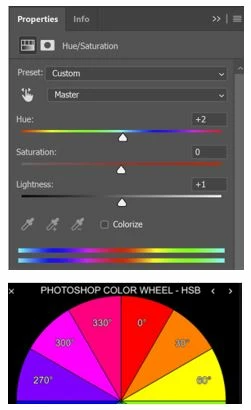
 AdChoices