Copy link to clipboard
Copied
Hello everyone! where can i fynd the white pil on the new version of photoshop. If i need to change size of an object, how can i do?
Thanks
Mauro
Copy link to clipboard
Copied
Hi Maurog,
As you are looking for a button to help you change the size of an object, may I know which version of Photoshop you are using?
Note: You can change the size of any object by going to Edit > Free Transform.
Regards,
Sahil
Copy link to clipboard
Copied
hi Sahil. i using the last version of Photoshop, and i looking for the black and white pil into the toolbar!
Copy link to clipboard
Copied
May I know from where did you come across such information because I'm not sure what you mean by a black & white looking tool which can resize objects.
Copy link to clipboard
Copied
maurog438877 wrote
hi Sahil. i using the last version of Photoshop, and i looking for the black and white pil into the toolbar!
Can you explain what you mean by 'pil' ? I am unable to associate that word with Photoshop.
Copy link to clipboard
Copied
This is a guess, as I am also unsure what you mean by "pil".
Are you looking for the move tool

but seeing the artboard tool ?

If so, hold down the mouse key on the artboard tool and the choice of move tool/artboard tool will become visible
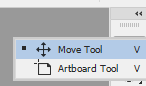
Once you have the move tool on the toolbar ensure "Show transform Controls" is checked in order that you see the handles to resize.

Dave

Find more inspiration, events, and resources on the new Adobe Community
Explore Now


