



The ProPhoto cyan shadow banding bug
Since Noel is back with us, I thought this header might catch his attention. He was the one who first reported it six or seven years ago.
The reason I'm bringing this up now, is that someone in the Lightroom forum had this problem just yesterday (he was sending ProPhoto files to Photoshop and couldn't understand the cyan cast in his dark grays). There's no doubt it's the same issue.
This made me dig up my old ProPhoto test gradient file. I don't use ProPhoto all that much, so I haven't really looked for it in a while. To recap, this is an example of what it could look like (this is an old screenshot that I've kept). Open and view against a darkish background:
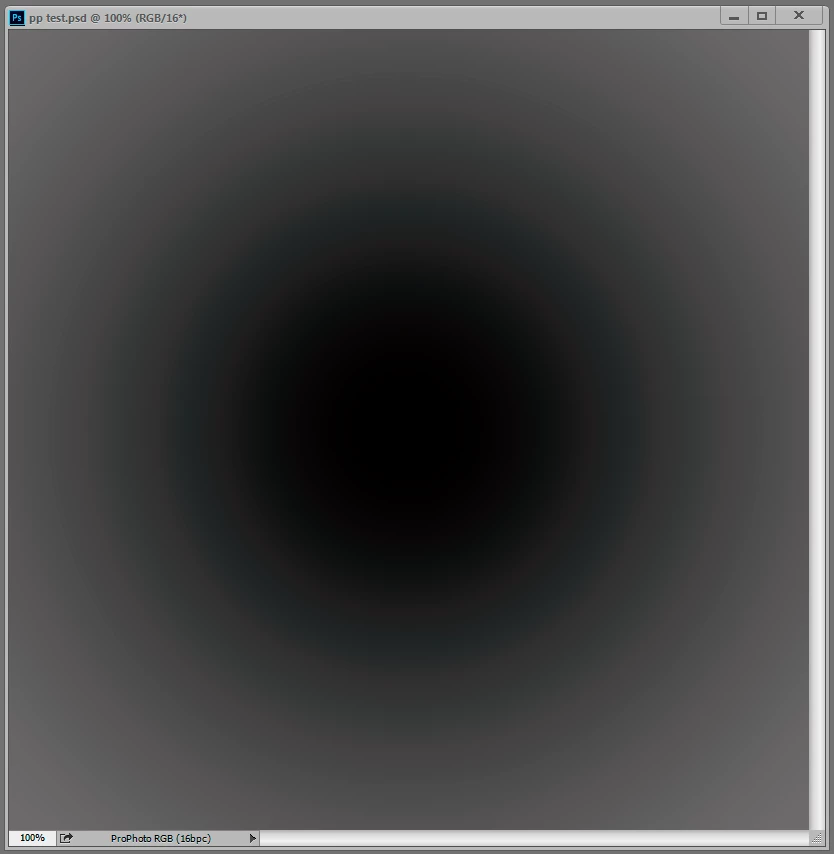
But when I opened the test gradient now, there was no trace of it, zero. The gradient is smooth as silk. That surprised me, because while the effect can vary, it always seemed to be there in some form.
Technically, this is an inaccuracy in the conversion from ProPhoto into the monitor profile. This conversion is performed by OpenGL in the GPU when you have the PS preference set to Normal and Advanced modes. In Basic mode it's shifted back to the CPU, which is more accurate so the problem disappears. And you only see it in ProPhoto files because ProPhoto is very compressed in the shadow values compared to other color spaces. The stratospheric gamut has a price, and that's it. With this compression, inaccuracies get amplified.
So what has changed on my system over the last 12 to 24 months? Not much. I still use Eizo Colornavigator as I did then, still producing similar matrix monitor profiles. But one thing has changed - going from GeForce to Quadro, and with that, 10 bits per ch output.
So Noel, if you're reading this - I understand you have Quadro GPU too, and running displays at 10 bit. Do you still see it?
Anyone else?
 AdChoices