Participant
November 28, 2015
Answered

The smudge tool disappeared from my toolbar and I can't find it\use it

  • November 28, 2015
  • 2 replies
  • 33287 views

I am using photoshop CC latest version November 2015 on a windows and it suddenly disappeared on me

    This topic has been closed for replies.
    Correct answer sarsaxen

    Actually the tool is hidden in the group so  could you please right click (windows) or Ctrl+ click (Mac) on the tool which is highlighted in the below image.
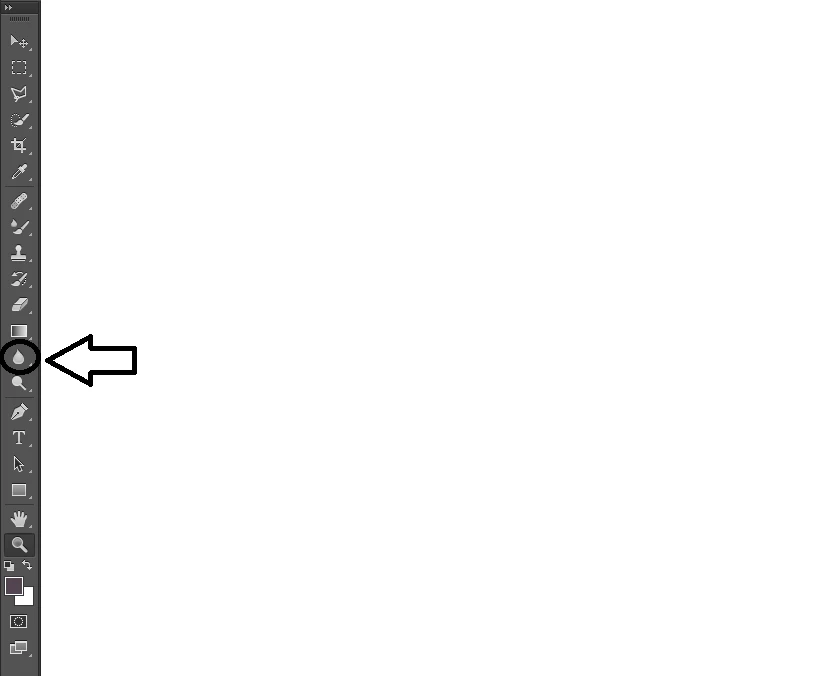
    ~ Sarika

    2 replies

    jstrawn
    Legend
    October 25, 2019

    I'm not liking all the hidden tools down under that ... menu item. I use blur and smudge a lot and I also have to clear my prefs a lot so it's really hard to get to the tools since I don't have the shortcuts memorized.

    sarsaxen
    Participating Frequently
    November 28, 2015

    Hi Idanl,

    Could you please check the the toolbar again and click on the the tool I have selected to get the Smudge tool back.

    Let us know if it helps.

    Regards

    Sarika

    Participant
    November 28, 2015

    this is how my toolbar looks like

    Galathir
    Participant
    June 28, 2023

    Click on the three dots. It will bring up the Edit Toolbox dialog. Click on Reset or Defaults.


    This one here is the real hero. Thank you.


    Several tools were shifted around in my toolbar after opening someone else's PS file. Really not cool that when switching back to my file, it didn't restore MY tool layout. It might behoove Adobe to put a query in that toolbar layout change if it's going to just change the toolbar willy nilly if I happen to load someone's file who has changed their toolbar layout.