
RashaFathi
Participating Frequently
January 22, 2023
Answered

The subcategories tools are gone :(

  • January 22, 2023
  • 7 replies
  • 1703 views

Hi Everyone 

the subcategries tools are gone 

how can i find them 

This topic has been closed for replies.
Correct answer jane-e


@RashaFathi wrote:

the subcategries tools are gone

the tools are either repeated . or it's not there 


Hi Rasha,

It's unclear what you are asking.
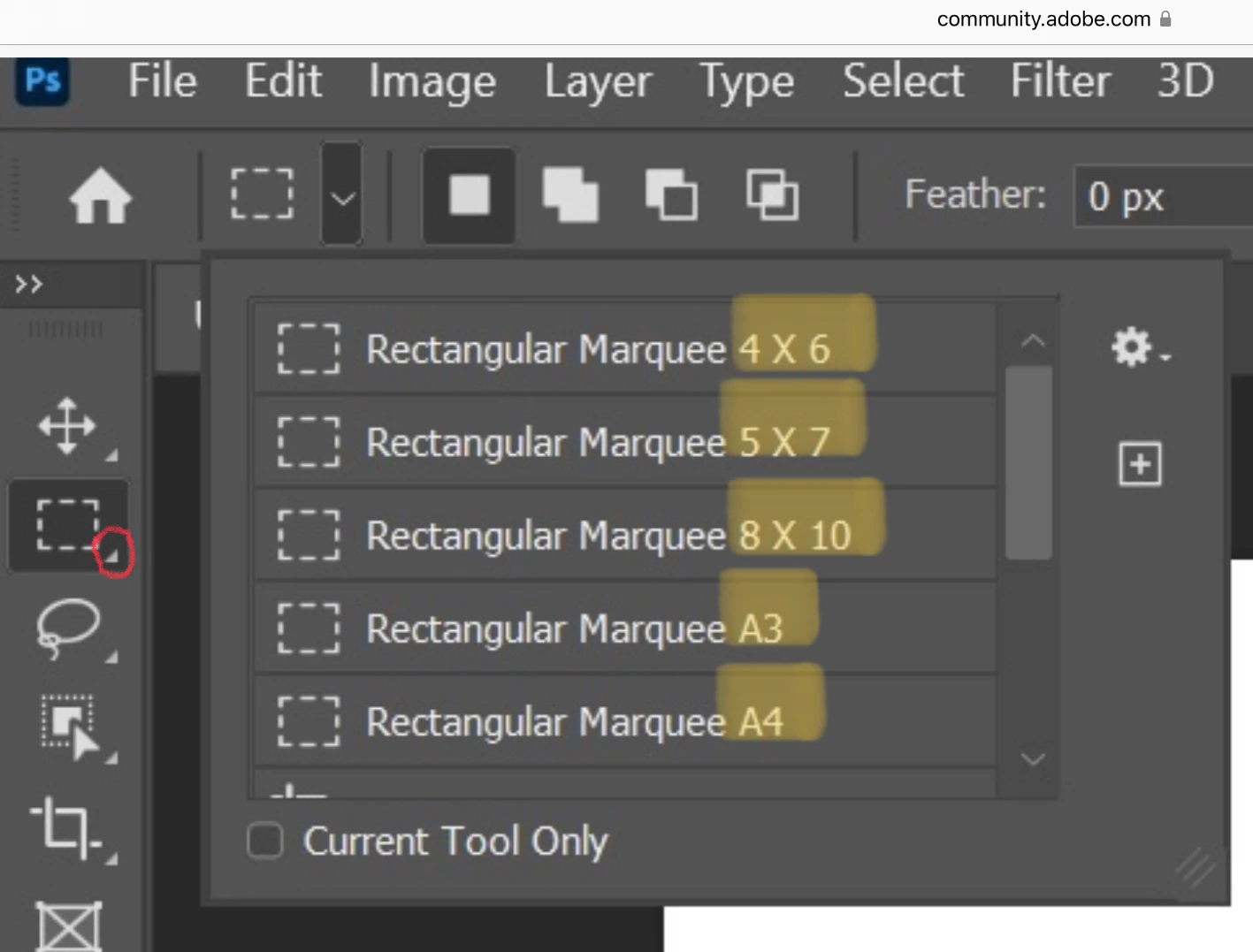
  • The tools with subcategories are the ones with triangles. You didn't show a screenshot where you attempted to show the hidden tools.
  • Your screenshot shows Presets for the Crop tool with five different sizes, none of which are repeated. Some presets come with Photoshop. You can add or delete more yourself by using the Gear icon.


Please clarify your question for us so we can better assist.


Jane


7 replies

PECourtejoie
Community Expert
Community Expert
January 25, 2023

Hello @RashaFathi @could you state if your issue was fixed by one or several of the answers? Please tag the answer(s) that had the exact solution to your issue, in order to help others.

PECourtejoie
Community Expert
Community Expert
January 23, 2023

Hi, you might see the rich tooltips, in order to directly see the alternate tools, either double-click, Right-click, or ALT+click to cycle the selected tool.

jane-e
Community Expert
jane-eCommunity ExpertCorrect answer
Community Expert
January 22, 2023


@RashaFathi wrote:

the subcategries tools are gone

the tools are either repeated . or it's not there 


Hi Rasha,

It's unclear what you are asking.

  • The tools with subcategories are the ones with triangles. You didn't show a screenshot where you attempted to show the hidden tools.
  • Your screenshot shows Presets for the Crop tool with five different sizes, none of which are repeated. Some presets come with Photoshop. You can add or delete more yourself by using the Gear icon.


Please clarify your question for us so we can better assist.


Jane


RashaFathi
Participating Frequently
January 23, 2023

thanks jane

Jeff Arola
Community Expert
Community Expert
January 22, 2023

Left click and hold on the Tool Panel icons to see the other tools.

https://helpx.adobe.com/photoshop/using/tools.html


RashaFathi
Participating Frequently
January 23, 2023

Thank you soooooo Much . i found it .

sorry for bothering you as i am a begginer 

Mylenium
Legend
January 22, 2023

check the hardware acceleration settings in the preferences and update your system's graphics diver. Also make sure the folders where the tool presets are stored are actually accessible (C:\Users\Rasha\Adobe etc.).


Mylenium

RashaFathi
Participating Frequently
January 22, 2023

how can i check hardware acceleration settings

RashaFathi
Participating Frequently
January 22, 2023

Moreover , the tools are either repeated . or it's not there

i have attched photos of the problem 

PECourtejoie
Community Expert
Community Expert
January 23, 2023

Hi, the tool presets can be restricted to the current tool. in image 3, we can see the first of the crop presets below the A4 marquee.

Scroll down, or click on the gear icon menu and select "Show Current Tool Presets" instead of "Show All Tool Presets" in order to only see the presets of the selected tool.

Mylenium
Legend
January 22, 2023

What tools? What exactly? You need to explain better or at least provide a screenshot.


Mylenium

RashaFathi
Participating Frequently
January 22, 2023

Hi Mylenium

i have attched screenshots 


Thanks