
Participant
October 31, 2024
Answered

The tools in photoshop 2025 v. 26.0 do not contain all options, for example, the remove tool does no

  • October 31, 2024
  • 1 reply
  • 1842 views

The tools in Photoshop 2025 v. 26.0 do not contain all options, for example, the remove tool does not contain another option, the brush tool only has a pencil.
This topic has been closed for replies.
Correct answer Ged_Traynor


The tools in Photoshop 2025 v. 26.0 do not contain all options

By @ji?�_150


Your screenshots show the Toolbar, not the options bar that has options for each tool. While you said the tools were missing options, what you meant was that you are missing some tools. No worries, your screenshot makes it clear and we are on the same page now! 😊


Go to Edit menu > Toolbar > and click Restore Defaults (upper right). Details here:

https://helpx.adobe.com/photoshop/kb/bringing-back-tools.html


Jane


@jane-e looks to me like the OP is in the Photography workspace

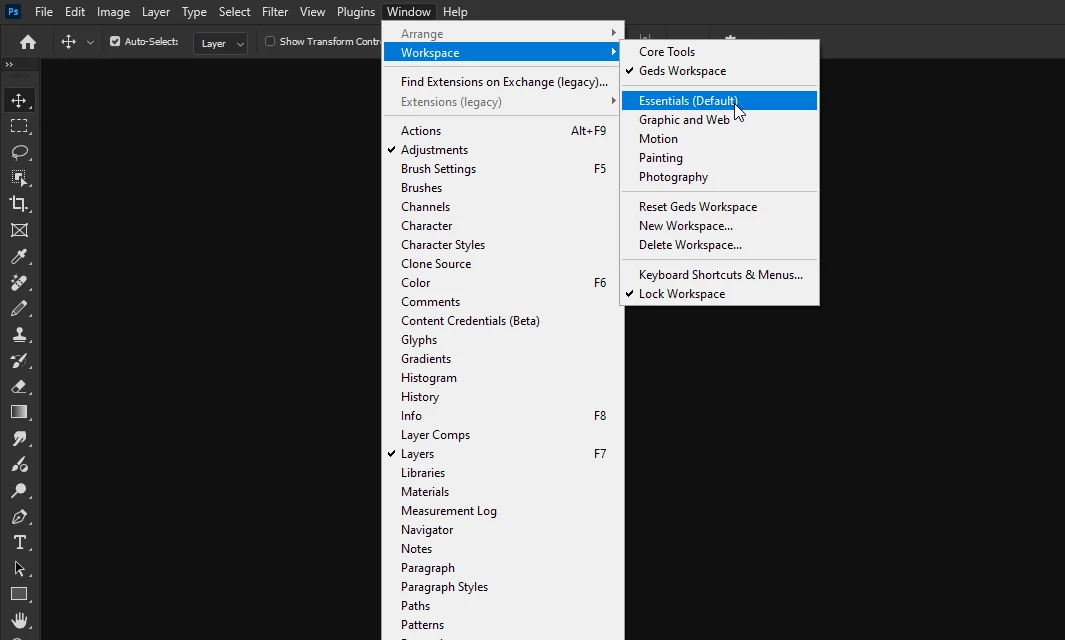
@ji?�_150 Go to Window > Workspace and select Essentials

1 reply

jane-e
Community Expert
Community Expert
October 31, 2024

@ji?�_150 


Please show us two screenshots:

  • the options bar for the Remove tool
  • the options bar for the Brush tool


Jane


Participant
October 31, 2024
the_options_bar_for_the_Remove_tool.png
Ged_Traynor
Community Expert
Ged_TraynorCommunity ExpertCorrect answer
Community Expert
November 1, 2024


The tools in Photoshop 2025 v. 26.0 do not contain all options

By @ji?�_150


Your screenshots show the Toolbar, not the options bar that has options for each tool. While you said the tools were missing options, what you meant was that you are missing some tools. No worries, your screenshot makes it clear and we are on the same page now! 😊


Go to Edit menu > Toolbar > and click Restore Defaults (upper right). Details here:

https://helpx.adobe.com/photoshop/kb/bringing-back-tools.html


Jane


@jane-e looks to me like the OP is in the Photography workspace

@ji?�_150 Go to Window > Workspace and select Essentials