Participant
February 6, 2020
Answered

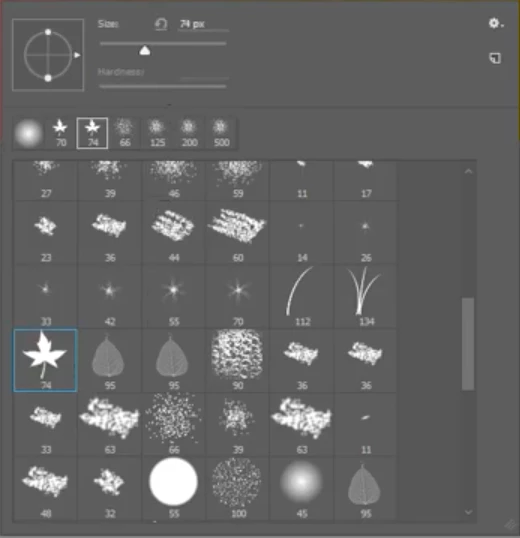
These brushes have disappeared and don't know how to get them back please...
  • February 6, 2020
  • 2 replies
  • 499 views


I can't see these anymore. Any idea how I can get them back please?

This topic has been closed for replies.
Correct answer

Hi

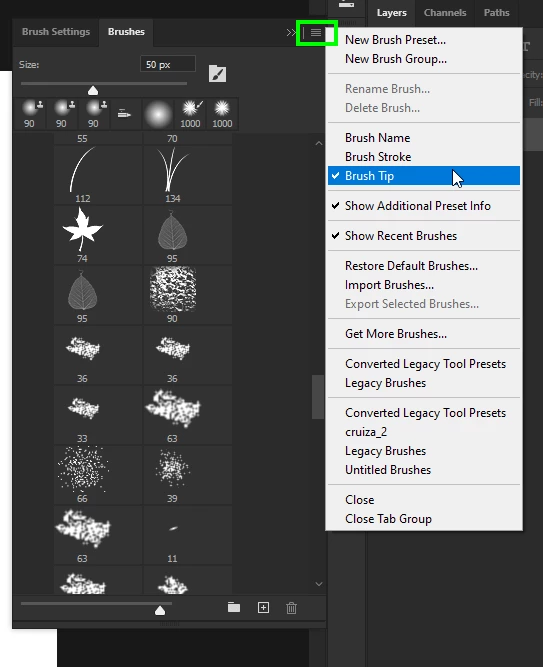
From the flyout menu deselect Brush Name, Brush Stroke and select Brush Tip
 

2 replies

ShayanRAuthor
Participant
February 6, 2020

Hi,

Thank you for you response. I looked under legacy brushes but can’t seem to find them. Any suggestions please?

Kind Regards,

Shayan Rabheru


Correct answer
February 6, 2020

Hi

From the flyout menu deselect Brush Name, Brush Stroke and select Brush Tip


ShayanRAuthor
Participant
February 6, 2020

Thanks Ged, it worked. 🙂 

jane-e
Community Expert
Community Expert
February 6, 2020

Hi Shayan,

Open the Brushes panel from the Window menu. From the panel menu, choose Legacy Brushes.

~ Jane

ShayanRAuthor
Participant
February 6, 2020

This is what I see under legacy brushes