
Photoshop 26.7.0 Opens TIF Files in Camera Raw or Shows Error
Working in Photoshop v. 26.7.0, in Windows 11, there seems to be an issue in attempting to open .tif files. When attempting to open a tif file by simply using the Open menu option, PS opens the file in Camera Raw, or gives error message that file isn't a valid Photoshop file.
The remedy found was to use the Open As... menu option, selecting TIFF file format from the pull-down menu at the right of the File name: box, then selecting the TIF file I want to open, and clicking on the Open button.
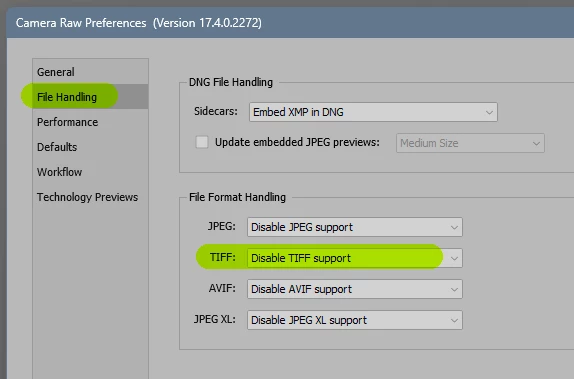
If I don't use this procedure, and PS does open the TIF file from the Open menu option, it opens in Camera Raw, the colors are all WAY OFF. Photoshop never used to work this way, so something has changed to cause this to happen. I looked inFile Handling in Preferences, but didn't find anything that changed the behavior.
This is adding unnecessary extra steps to image handling. So, I request that Adobe investigate and create a bug fix, please.
 AdChoices