
Inspiring
August 12, 2023
Question

Tiff-Datei wird mit einer Bittiefe von 40 exportiert?

  • August 12, 2023
  • 2 replies
  • 498 views

Hallo liebe Community, 


ich bin gerade bei der Überprüfung eines Bildes welches ich im Tiff-Format aus Photoshop exportiert habe. In den Details wird mir eine Bittiefe von 40 angezeigt. Dabei habe ich im Photoshop die Einstellung mit 8bit/Kanal. Das Bild ist im CMYK-Farbmodus. Entsprechend sollte doch die Bittiefe bei 32 liegen. Woher kommen diese 40? 
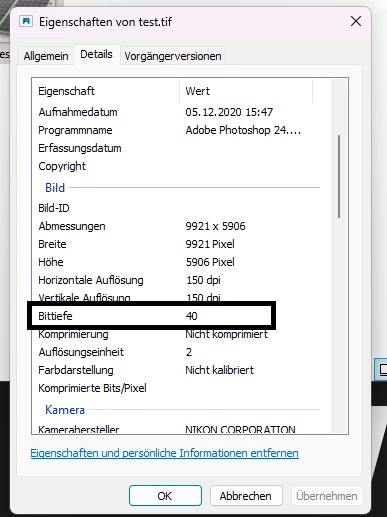
 

This topic has been closed for replies.

2 replies

Jeff Arola
Community Expert
Community Expert
August 12, 2023

Does your CMYK have transparency and/or alpha channel(s)?

Inspiring
August 12, 2023

Einen Alphakanal hat das Bild nicht, jedoch habe ich von dem Bild den Hintergrund entfernt. Liegt es etwa daran? 

Per Berntsen
Community Expert
Community Expert
August 12, 2023
quote

I'm currently reviewing an image that I exported from Photoshop in Tiff format. In the details, I am shown a bit depth of 40. In Photoshop I have the setting with 8bit/channel. The image is in CMYK color mode. Accordingly, the bit depth should be 32. Where do these 40 come from?

By @Alex-Mediengestalter


Photoshop can only export in RGB, so I assume that you did a Save or Save As.

Open the file in Photoshop, and check the bit depth in the Info panel.

If it says 8-bit, everything is OK.


You seem to be using Windows 11. I have Windows 10, which is correctly reporting an 8-bit CMYK file as 32-bit.

Maybe a bug in Windows 11?


Inspiring
August 12, 2023

Hey Per, vielen Dank für deine Nachricht. Ich habe das Bedienfeld in Photoshop geöffnet (anbei das Bild). 

Dort scheint alles in Ordnung zu sein. Nach dem Speichern als Tiff Datei wird mir jedoch 40 Bittiefe angezeigt. Wenn ich die Datei als PNG exportiere ist es dann bei 32..? 😄 Das sollte doch eigentlich bei einem 8/Bit Kanal, eine Bittiefe von 24 haben.


Ja ich nutze Windows 11 aber könnte es wirklich daran liegen? Ist es dann ein Anzeigefehler?

D Fosse
Community Expert
Community Expert
August 12, 2023

If you have an alpha channel, it's 8 extra bits, so for a CMYK file that's 8x5=40.


In RGB it would be 32.