
Legend
July 23, 2023
Answered

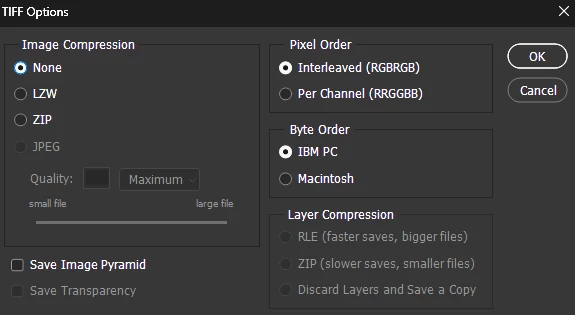
Tiff Options Image Compression" None VS LZW "

  • July 23, 2023
  • 1 reply
  • 16812 views

Hello Everyone.


When saving my Images as a Tiff Format, I choose the Image Compression: None. I heard using LZW is the same as None, but smaller File Size, without any Image Loss Quality. Is that True?

Which one you recommend

Thanks
This topic has been closed for replies.
Correct answer Stephen Marsh

LZW is clearly not the same as NONE, but just like ZIP it is lossless compression (no data is discarded).


LZW has wider support in other applications, however, ZIP may provide better compression with less compatibility.


Lossy JPEG compression inside a TIFF is often avoided as it may not be obvious and multiple open/saves may degrade the image, whereas saving as a JPEG format file at least makes it obvious that JPEG lossy compression is naturally applied.

1 reply

Stephen Marsh
Community Expert
Stephen MarshCommunity ExpertCorrect answer
Community Expert
July 24, 2023

LZW is clearly not the same as NONE, but just like ZIP it is lossless compression (no data is discarded).


LZW has wider support in other applications, however, ZIP may provide better compression with less compatibility.


Lossy JPEG compression inside a TIFF is often avoided as it may not be obvious and multiple open/saves may degrade the image, whereas saving as a JPEG format file at least makes it obvious that JPEG lossy compression is naturally applied.

Legend
July 24, 2023

Dear Stephen.

Thanks for the answer. Let's say I want to save the TIFF files inside my computer, and I have enough space, so technically there is no reason to go LZW. Then I should use None?

Thanks


D Fosse
Community Expert
Community Expert
July 24, 2023

Thank you very much


Some of us prefer to never use any compression at all, because it extends open/save times. Not an issue for small files, but with really big files the impact can be dramatic - as in several minutes compressed vs. 15 seconds uncompressed.


LZW should not be used on 16 bit files. It was written for 8 bit data and doesn't work well with 16 bit data. Very often, it will just increase file size.