idjev
Known Participant
November 21, 2021
Answered

tiff to pdf converter

  • November 21, 2021
  • 3 replies
  • 2146 views

Hi Good day,

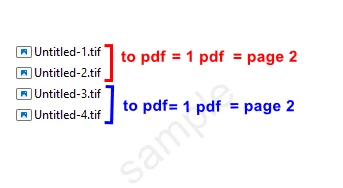
Thousands of tiff files available
it is necessary to convert them to two-page pdfs 

Automation-Scripting I look forward to your help and opinions on this matter .

Thanks
This topic has been closed for replies.
Correct answer Stephen Marsh

Let me know how this goes...


/* 

Batch x2 File Sets to Multi-page PDF.jsx

tiff to pdf converter
https://community.adobe.com/t5/photoshop-ecosystem-discussions/tiff-to-pdf-converter/td-p/12540527

Stephen Marsh
22nd November 2021, Version 1.0
(Based on: Stack N Number of Docs to Layers.jsx)

Notes:
A minimum of 2 or more files per stack is required. The quantity of input files must be evenly divisible by the stack quantity.
This script assumes that input TIFF files from a single folder to be alpha/numeric sorting, such as:
File-01.jpg File-02.jpg etc, FileA1.tif FileA2.tif etc...

*/

#target photoshop

if (!app.documents.length) {

    try {

        // Save and disable dialogs
        var restoreDialogMode = app.displayDialogs;
        app.displayDialogs = DialogModes.NO;

        // Main script function
        (function () {

            // Select the input folder
            var inputFolder = Folder.selectDialog('Please select the input folder with TIFF files to process:');
            if (inputFolder === null) return;

            // Limit the file format input to TIFF
            var fileList = inputFolder.getFiles(/\.(tif|tiff)$/i);

            // Force alpha-numeric list sort in reverse order
            fileList.sort().reverse();

            // Set quantity
            var setQty = 2;

            // Validate that the file list is not empty
            var inputCount = fileList.length;
            var cancelScript1 = (inputCount === 0);
            if (cancelScript1 === true) {
                alert('Zero input files found, script cancelled!');
                return;
            }

            // Validate the input count vs. output count - Thanks to Kukurykus for the advice to test using % modulus
            var cancelScript2 = !(inputCount % setQty);
            alert(inputCount + ' input files combined into sets of ' + setQty + ' will produce ' + inputCount / setQty + ' output files.');
            if (cancelScript2 === false) {
                alert('Script cancelled as the quantity of input files are not evenly divisible by the set quantity!');
                return;
            }

            // Set the output folder
            var outputFolder = inputFolder;

            // Loop through and open the file sets
            while (fileList.length) {

                // Sets quantity
                for (var a = 0; a < setQty; a++) {
                    try {
                        app.open(fileList.pop());
                    } catch (e) { }

                    // Remove document ancestors metadata
                    deleteDocumentAncestorsMetadata();

                    function deleteDocumentAncestorsMetadata() {
                        // https://prepression.blogspot.com/2017/06/metadata-bloat-photoshopdocumentancestors.html
                        if (ExternalObject.AdobeXMPScript === undefined) ExternalObject.AdobeXMPScript = new ExternalObject("lib:AdobeXMPScript");
                        var xmp = new XMPMeta(activeDocument.xmpMetadata.rawData);
                        xmp.deleteProperty(XMPConst.NS_PHOTOSHOP, "DocumentAncestors");
                        app.activeDocument.xmpMetadata.rawData = xmp.serialize();
                    }
                }

                // Loop open files
                var openFiles = [];
                for (var a = 0; a < app.documents.length; a++) {
                    openFiles.push(app.documents[a].fullName);
                }

                // Doc name parts
                var docOne = app.documents[0].name.replace(/\.[^\.]+$/, '');
                var docTwo = app.documents[1].name.replace(/\.[^\.]+$/, '');

                // Save location and file name
                var saveFile = File(outputFolder + '/' + docOne + '_' + docTwo + '.pdf');

                // PDF options
                var pdfPresOptions = new PresentationOptions();
                pdfPresOptions.presentation = false;

                // Save the file pairs as a multi-page PDF
                app.makePDFPresentation(openFiles, saveFile, pdfPresOptions);

                // Close all open docs without saving
                while (app.documents.length) {
                    app.activeDocument.close(SaveOptions.DONOTSAVECHANGES);
                }

            }

            // Restore saved dialogs
            app.displayDialogs = restoreDialogMode;

            // End of script notifications
            app.beep();
            var outputList = outputFolder.getFiles(/\.pdf$/i);
            alert('Script completed!' + '\n' + outputList.length + ' multi-page PDF files saved to:' + '\n' + outputFolder.fsName);

            // Open the output folder in the Finder or Explorer
            outputFolder.execute();

        }());

    } catch (e) {
        // Restore saved dialogs
        app.displayDialogs = restoreDialogMode;
        alert("Oops! Something went wrong...");
    }

} else {
    alert('Batch x2 File Sets to Multi-page PDF:' + '\n' + 'Please close all open documents before running this script!');
}


3 replies

Stephen Marsh
Community Expert
Community Expert
November 22, 2021
idjev
idjevAuthor
Known Participant
November 27, 2021

teacher , script
are these possible


Compress :jpeg
Jpeg Quality :75%

Viewer :
Fit one full page

Stephen Marsh
Community Expert
Community Expert
November 27, 2021

@idjev wrote:

teacher , script
are these possible


Compress :jpeg
Jpeg Quality :75%

Viewer :
Fit one full page


The following options work:


https://theiviaxx.github.io/photoshop-docs/Photoshop/PresentationOptions.html#presentationoptions


I have not been able to get general PDF options to work, as per the <placeholder> topic above that has not had any replies.

Stephen Marsh
Community Expert
Stephen MarshCommunity ExpertCorrect answer
Community Expert
November 22, 2021

Let me know how this goes...


/* 

Batch x2 File Sets to Multi-page PDF.jsx

tiff to pdf converter
https://community.adobe.com/t5/photoshop-ecosystem-discussions/tiff-to-pdf-converter/td-p/12540527

Stephen Marsh
22nd November 2021, Version 1.0
(Based on: Stack N Number of Docs to Layers.jsx)

Notes:
A minimum of 2 or more files per stack is required. The quantity of input files must be evenly divisible by the stack quantity.
This script assumes that input TIFF files from a single folder to be alpha/numeric sorting, such as:
File-01.jpg File-02.jpg etc, FileA1.tif FileA2.tif etc...

*/

#target photoshop

if (!app.documents.length) {

    try {

        // Save and disable dialogs
        var restoreDialogMode = app.displayDialogs;
        app.displayDialogs = DialogModes.NO;

        // Main script function
        (function () {

            // Select the input folder
            var inputFolder = Folder.selectDialog('Please select the input folder with TIFF files to process:');
            if (inputFolder === null) return;

            // Limit the file format input to TIFF
            var fileList = inputFolder.getFiles(/\.(tif|tiff)$/i);

            // Force alpha-numeric list sort in reverse order
            fileList.sort().reverse();

            // Set quantity
            var setQty = 2;

            // Validate that the file list is not empty
            var inputCount = fileList.length;
            var cancelScript1 = (inputCount === 0);
            if (cancelScript1 === true) {
                alert('Zero input files found, script cancelled!');
                return;
            }

            // Validate the input count vs. output count - Thanks to Kukurykus for the advice to test using % modulus
            var cancelScript2 = !(inputCount % setQty);
            alert(inputCount + ' input files combined into sets of ' + setQty + ' will produce ' + inputCount / setQty + ' output files.');
            if (cancelScript2 === false) {
                alert('Script cancelled as the quantity of input files are not evenly divisible by the set quantity!');
                return;
            }

            // Set the output folder
            var outputFolder = inputFolder;

            // Loop through and open the file sets
            while (fileList.length) {

                // Sets quantity
                for (var a = 0; a < setQty; a++) {
                    try {
                        app.open(fileList.pop());
                    } catch (e) { }

                    // Remove document ancestors metadata
                    deleteDocumentAncestorsMetadata();

                    function deleteDocumentAncestorsMetadata() {
                        // https://prepression.blogspot.com/2017/06/metadata-bloat-photoshopdocumentancestors.html
                        if (ExternalObject.AdobeXMPScript === undefined) ExternalObject.AdobeXMPScript = new ExternalObject("lib:AdobeXMPScript");
                        var xmp = new XMPMeta(activeDocument.xmpMetadata.rawData);
                        xmp.deleteProperty(XMPConst.NS_PHOTOSHOP, "DocumentAncestors");
                        app.activeDocument.xmpMetadata.rawData = xmp.serialize();
                    }
                }

                // Loop open files
                var openFiles = [];
                for (var a = 0; a < app.documents.length; a++) {
                    openFiles.push(app.documents[a].fullName);
                }

                // Doc name parts
                var docOne = app.documents[0].name.replace(/\.[^\.]+$/, '');
                var docTwo = app.documents[1].name.replace(/\.[^\.]+$/, '');

                // Save location and file name
                var saveFile = File(outputFolder + '/' + docOne + '_' + docTwo + '.pdf');

                // PDF options
                var pdfPresOptions = new PresentationOptions();
                pdfPresOptions.presentation = false;

                // Save the file pairs as a multi-page PDF
                app.makePDFPresentation(openFiles, saveFile, pdfPresOptions);

                // Close all open docs without saving
                while (app.documents.length) {
                    app.activeDocument.close(SaveOptions.DONOTSAVECHANGES);
                }

            }

            // Restore saved dialogs
            app.displayDialogs = restoreDialogMode;

            // End of script notifications
            app.beep();
            var outputList = outputFolder.getFiles(/\.pdf$/i);
            alert('Script completed!' + '\n' + outputList.length + ' multi-page PDF files saved to:' + '\n' + outputFolder.fsName);

            // Open the output folder in the Finder or Explorer
            outputFolder.execute();

        }());

    } catch (e) {
        // Restore saved dialogs
        app.displayDialogs = restoreDialogMode;
        alert("Oops! Something went wrong...");
    }

} else {
    alert('Batch x2 File Sets to Multi-page PDF:' + '\n' + 'Please close all open documents before running this script!');
}


idjev
idjevAuthor
Known Participant
November 22, 2021

you are great , you are great
thank you so much, thanksssss

Stephen Marsh
Community Expert
Community Expert
November 22, 2021

You're welcome!

Stephen Marsh
Community Expert
Community Expert
November 22, 2021


I have adjusted one of my existing file set scripts to use  .makePDFPresentation()  for a multi-page output...


(A): Where will the 2 page PDF file be saved? Same folder as originals (no GUI)? A named sub-folder in the original folder (no GUI)? A user defined location when the script is run (GUI)? Somewhere else?


(B): In your example filenames, what would the final PDF filename look like for the two output files?


i.e.:

Untitled-1_Untitled_2.pdf

Untitled-3_Untitled_4.pdf

etc?


Anything else?


idjev
idjevAuthor
Known Participant
November 22, 2021


first of all you are amazing , thank you so much


(A) : To the same folder as the original


(B) : yes , it should definitely be like this

Untitled-1_Untitled_2.pdf

Untitled-3_Untitled_4.pdf

....

....


Thank you so much
