

Daniel_s_Design
Known Participant
August 2, 2019
Answered

Tilt-shift of the Blur gallery doesn't show me the adjustable lines

  • August 2, 2019
  • 4 replies
  • 7358 views

Hi, I'm stuck in PS, I don't see any adjustable lines of the TILT-SHIFT(blur). How can I get those adjustable lines back?

Here is a clear example below(See there are no lines to adjust).
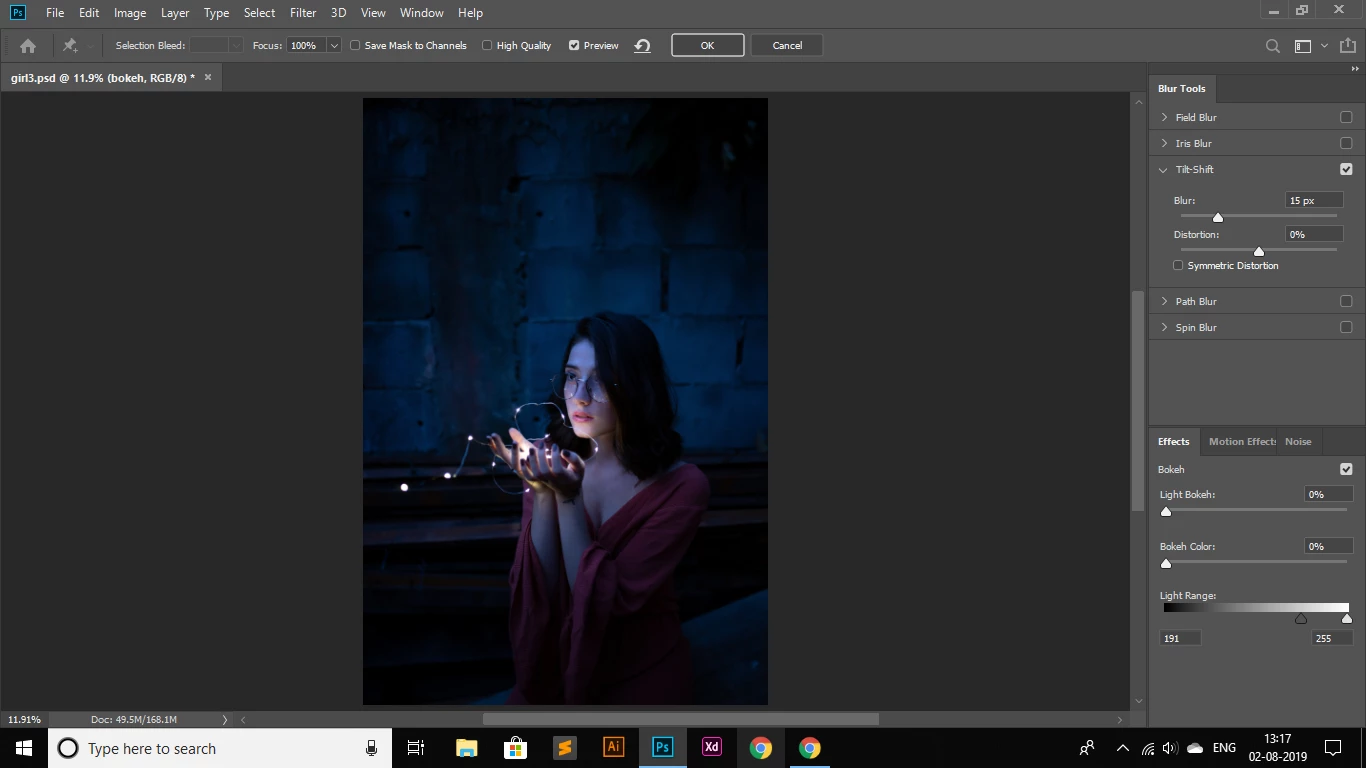
Thanks

    Correct answer c.pfaffenbichler

    View > Show > Edit Pins might be another one.

    4 replies

    Participant
    February 25, 2020

    I've clicked the Edit Pins and I still do not see the bars.

    c.pfaffenbichler
    Community Expert
    Community Expert
    February 10, 2021

    Please post meaningful screenshots. 

    c.pfaffenbichler
    Community Expert
    c.pfaffenbichlerCommunity ExpertCorrect answer
    Community Expert
    August 2, 2019

    View > Show > Edit Pins might be another one.

    franzv19091434
    Participant
    March 25, 2023

    Thank you, this worked for me


    Mohammad.Harb
    Community Expert
    Community Expert
    August 2, 2019

    Press ctrl + H

    August 2, 2019

    Forgot about that option

    August 2, 2019

    Hi

    Try resetting you Photoshop preferences, you may want to backup your settings first

    Migrate presets, actions, and settings