
Exit
  • Global community
    • Language:
      • Deutsch
      • English
      • Español
      • Français
      • Português
  • 日本語コミュニティ
  • 한국 커뮤니티
0

Timeline Animation

Explorer ,
Jun 01, 2017 Jun 01, 2017

I am running Photoshop CC 2017 1.1. I am trying to make a new timeline animation. However it will not allow me to add new frames. I can take an older timeline animation and work with that. I notice that in the old file I have the option of: "New Layers Visible in all Frames." I do not have this option in the newer file. Any ideas what I am doing wrong or how to fix?

Thanks,

Doug
666
Translate
Report
Community guidelines
Be kind and respectful, give credit to the original source of content, and search for duplicates before posting. Learn more
community guidelines

correct answers 1 Correct answer

Community Expert , Jun 02, 2017 Jun 02, 2017

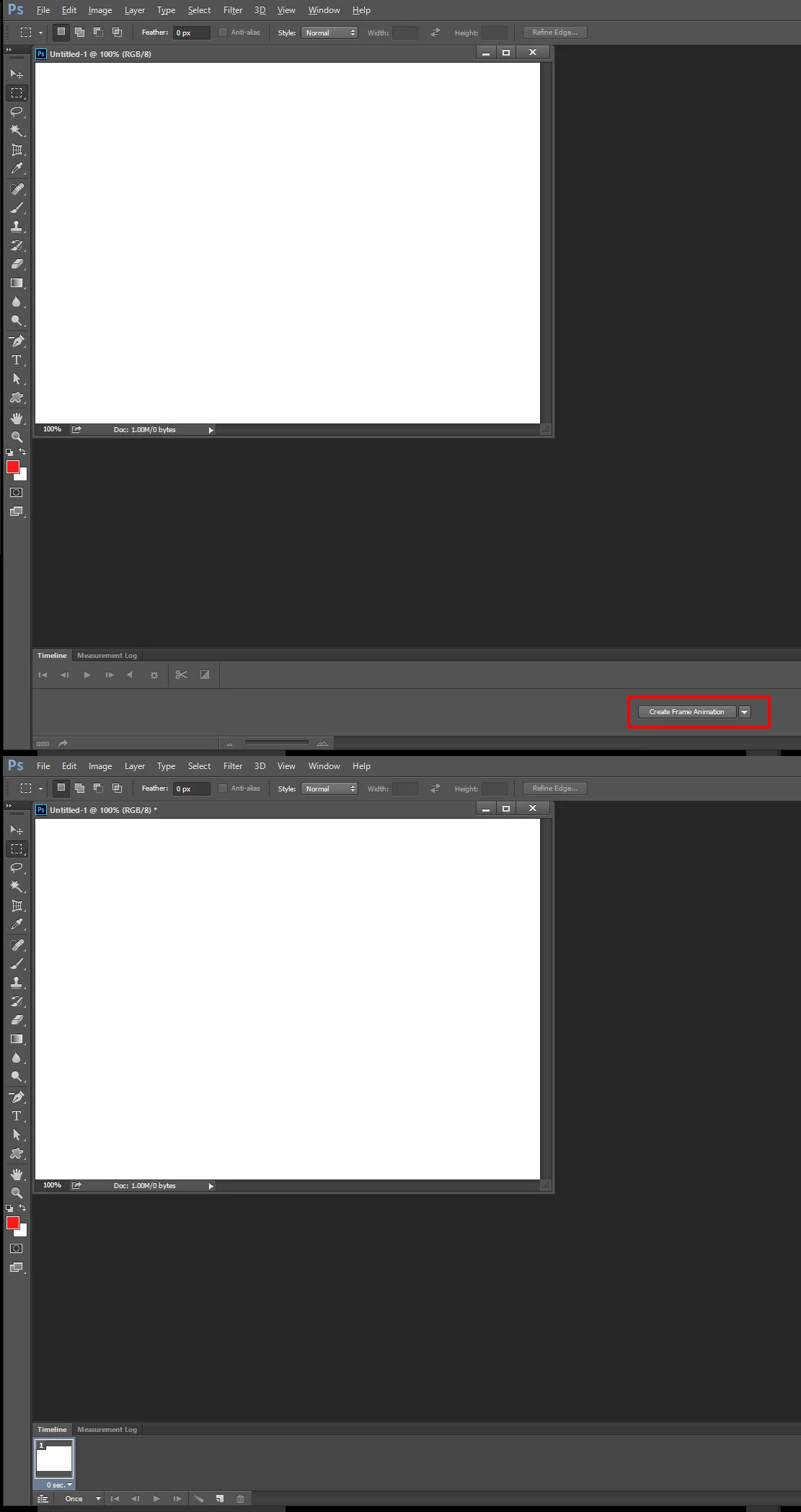
You have to first click on the Create Frame Animation button to create the Frame animation timeline.

Capture.jpg

Translate
Adobe
Community Expert ,
Jun 01, 2017 Jun 01, 2017

It sound like you may have created a video timeline when you actually want to create a frame animation timeline.

Capture.jpg

JJMack
Translate
Report
Community guidelines
Be kind and respectful, give credit to the original source of content, and search for duplicates before posting. Learn more
community guidelines
Explorer ,
Jun 02, 2017 Jun 02, 2017

DJJMack,

Thank you for answering. Unfortunately no I did select a frame animation. Any other ideas?

Doug

Translate
Report
Community guidelines
Be kind and respectful, give credit to the original source of content, and search for duplicates before posting. Learn more
community guidelines
LEGEND ,
Jun 01, 2017 Jun 01, 2017

Did JJMack's post solve it for you?

Translate
Report
Community guidelines
Be kind and respectful, give credit to the original source of content, and search for duplicates before posting. Learn more
community guidelines
Community Expert ,
Jun 02, 2017 Jun 02, 2017

Can you post a screen capture that shows the problem you are having in Photoshop? You should only need to do is click on the add frame Icon in the Frame animation timeline.

Capture.jpg

JJMack
Translate
Report
Community guidelines
Be kind and respectful, give credit to the original source of content, and search for duplicates before posting. Learn more
community guidelines
Explorer ,
Jun 02, 2017 Jun 02, 2017

Dear JJMack,

I can not click on the add frame icon as it is greyed out on all new files. When I work on an older file and change anything in it like size and images, etc. Everything works correctly.

timeline+animation.jpg

Translate
Report
Community guidelines
Be kind and respectful, give credit to the original source of content, and search for duplicates before posting. Learn more
community guidelines
Community Expert ,
Jun 02, 2017 Jun 02, 2017

You have to first click on the Create Frame Animation button to create the Frame animation timeline.

Capture.jpg

JJMack
Translate
Report
Community guidelines
Be kind and respectful, give credit to the original source of content, and search for duplicates before posting. Learn more
community guidelines
Explorer ,
Jun 02, 2017 Jun 02, 2017
LATEST

JJMack,

Duh it worked. Now i feel like an idiot.

Thank you every so much.

Doug

Translate
Report
Community guidelines
Be kind and respectful, give credit to the original source of content, and search for duplicates before posting. Learn more
community guidelines