
Inspiring
September 9, 2025
Answered

Toggle between brushes

  • September 9, 2025
  • 2 replies
  • 255 views

I've got a script that allow me to toggle between brushes. Big blurry, soft brush and tiny precise opaque brush. Go me!


Is there no easy way to do this otherwise? 


I'm not talking about setting up two brushes and then using them, but going back and forth continually between two brush & their settings without having to re-load or re-paramterise things each time.


Correct answer Trevor.Dennis

It's a shame that there is not an option to apply a shortcut to Previous Brush Preset.

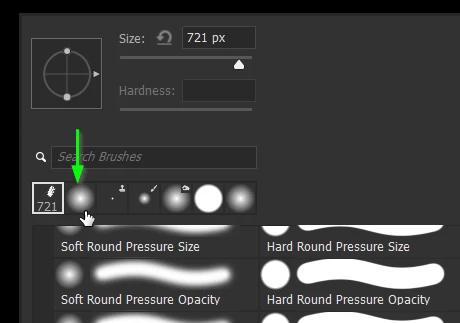
You can apply a shortcut to Recent Brushes but that esentially just opens the brush panel which is the same as using F5 (unless you have reassigned F5). So the best I can think of is to right click inside the document window to open the brush right click panel, and clicking on the second preset in Recent Brushes 


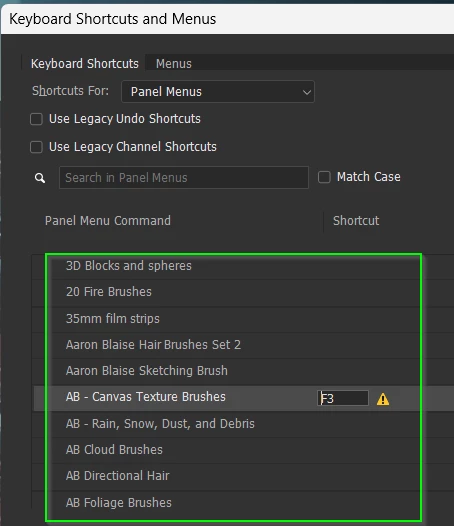
One thing we can do with shortcuts, is to apply them to brush (.abr) groups.

It can get cluttered if you have too many groups in the main panel area and bet we all collect a crazy number of brush groups over the years.  


2 replies

Trevor.Dennis
Community Expert
Trevor.DennisCommunity ExpertCorrect answer
Community Expert
September 12, 2025

It's a shame that there is not an option to apply a shortcut to Previous Brush Preset.

You can apply a shortcut to Recent Brushes but that esentially just opens the brush panel which is the same as using F5 (unless you have reassigned F5). So the best I can think of is to right click inside the document window to open the brush right click panel, and clicking on the second preset in Recent Brushes 


One thing we can do with shortcuts, is to apply them to brush (.abr) groups.

It can get cluttered if you have too many groups in the main panel area and bet we all collect a crazy number of brush groups over the years.  


Inspiring
September 12, 2025

You're absolutely right, it is a shame. 😞

For all the time/effort/money/coffee spent faffing about trying to enhance Photoshop, whilst something so fundamental as to be able to swap over two brushes/pencils/tools that has gone unnoticed ... is a shame really.

c.pfaffenbichler
Community Expert
Community Expert
September 12, 2025

But you managed to do it, so I am not sure I understand … 

c.pfaffenbichler
Community Expert
Community Expert
September 11, 2025

What do you mean exactly? Something more convenient than one Script for the task?