
tonsure
Participant
July 29, 2021
Answered

Toggle off "Save changes?" alert

  • July 29, 2021
  • 1 reply
  • 578 views

I've been meaning to ask this for years. Is there anyway to get Photoshop (on MacOS) to stop asking whether you want to "Save changes... before closing?" If I have multiple tabs open, and want to close them all down, it takes a needless amount of time to click "don't save" for every single tab (which each have their own prompts). Alternatively: is there a way to "close all tabs without saving"? Seems like a trivial matter, but it adds up.
This topic has been closed for replies.
Correct answer TheDigitalDog

@tonsure wrote:

Alternatively: is there a way to "close all tabs without saving"? Seems like a trivial matter, but it adds up.


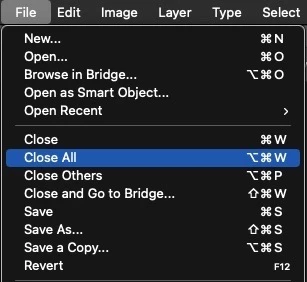
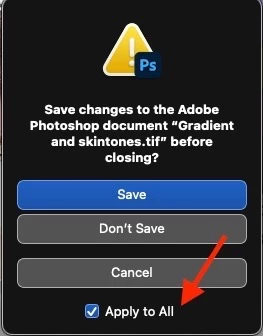
Try this:


EDIT: This does work so try it next:

1 reply

TheDigitalDog
TheDigitalDogCorrect answer
Inspiring
July 29, 2021

@tonsure wrote:

Alternatively: is there a way to "close all tabs without saving"? Seems like a trivial matter, but it adds up.


Try this:


EDIT: This does work so try it next:

Author “Color Management for Photographers" & "Photoshop CC Color Management/pluralsight"
tonsure
tonsureAuthor
Participant
July 30, 2021

Thank you thank you. Can't believe I've lost so many seconds over the years for something that was hiding in the File menu. Super glad I finally stopped procrastinating & took advantage of the Support Community. Thanks again..

[Message from moderator: Do not add URLs/websites to your signature or your account will be banned]