Participant
July 16, 2023
Question

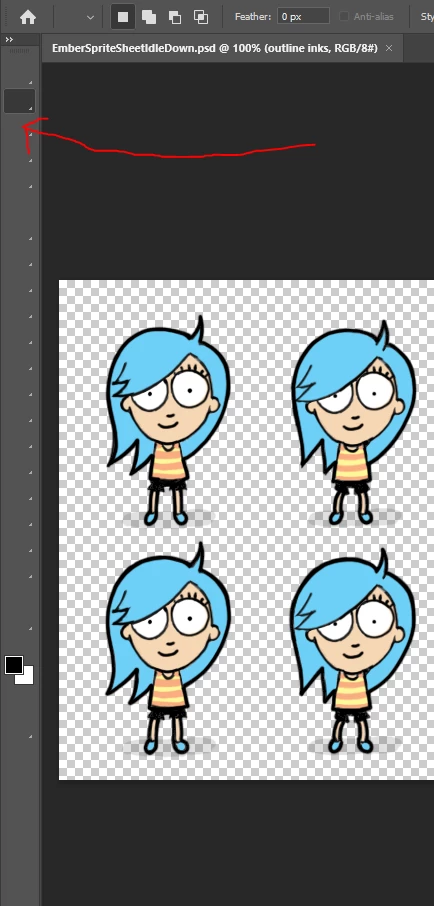
Toolbars default icons are gone.

  • July 16, 2023
  • 1 reply
  • 703 views

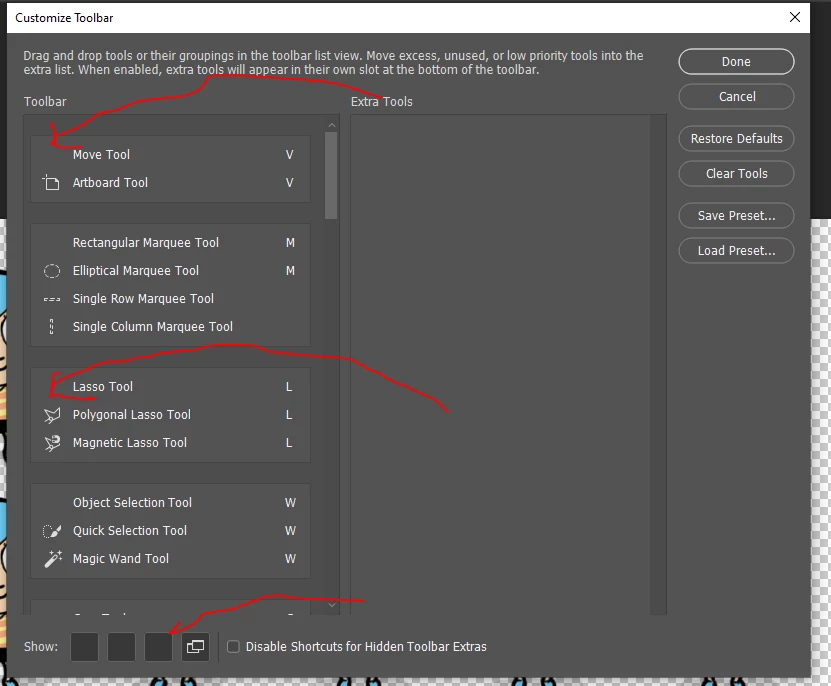
Hi. My toolbar icons have disapeared. If I go into the tools group the other tools icon are there, just not the default ones. I have uninstalled photoshop and reinstalled it but there still are not there. 

Any help would be awesome!
 

This topic has been closed for replies.

1 reply

Trevor.Dennis
Community Expert
Community Expert
July 16, 2023

Is this the full release or beta version Daniel?  I have had icons disappear from panels in the beta version (I think) three times now.  The firsat two times I reset Preferences, which is annoying, so the third time it happened I tried restarting, and that fixed it.


Otherwise, do you definitely have tools in the unused right side of that panel?

Have you tried dragging tools to the right side?

Have you tried restarting Photoshop?

Try Deactivate Native Canvas in Preferences > Technology Previews and restarting Photoshop

Try resetting Preferences.

Participant
July 16, 2023

Its the full release.

I tried all that apart from resetting preferences and it didn't fix it.

How do I reset the preferences? 

Participant
July 25, 2023

Hi Trevor.
I Reset the Essentials workspace, restored defualts on the toolbar and I am running 24.6.0 but the icons are still missing for first tool in every group. I can still use the tool but I have to remember which ones are which. If I change to another tool in a group that Icon works, but when I change it back to the defuat tool in th egroup its still not there. 
Is there a library somewhere that stores the tool icons that I can replace?


I have this exact issue too. reloading photoshop used to work, but it gets worse day by day. Also the image presets are all gone.