
nicholasr99941588
Participant
December 20, 2018
Answered

tops of images/graphics/text are cut off in Photoshop CC

  • December 20, 2018
  • 6 replies
  • 10133 views

Having a weird problem that started somewhere in the last few updates to Photoshop CC.

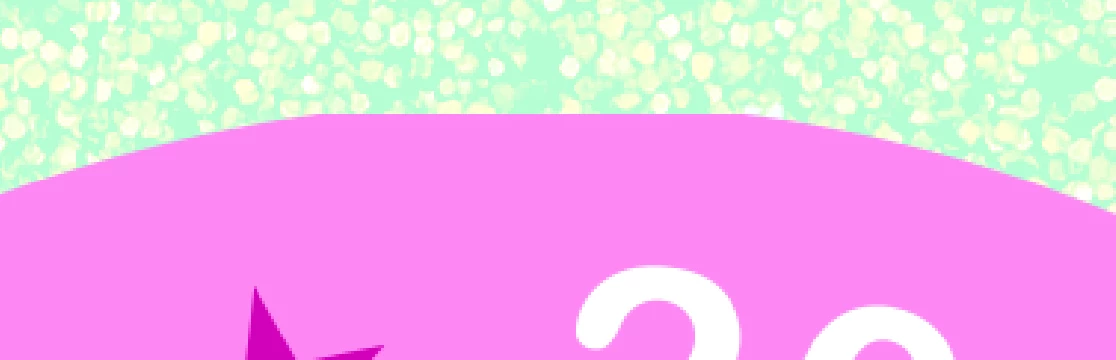
I do a lot of GIF'd party flyers. For some reason, Photoshop is slicing off the top of my graphics & occasionally text boxes. The only fix is if I move the image and then drag it back in place. It's as if there is an invisible boundary box that is cutting off the top of certain text boxes/graphic/etc.

Example:

circle graphic that is cut off:
same graphic, just moved and then placed back in the same location:

This topic has been closed for replies.
Correct answer

Hi

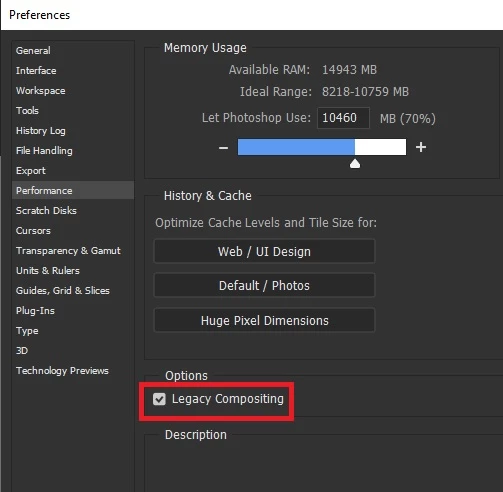
Try enabling this option and restarting Photoshop

6 replies

Participating Frequently
September 28, 2023

I started having the same problem today with the new update. The suggested solution (enable Legacy Compositing) is no longer available in the preferences.

Trevor.Dennis
Community Expert
Community Expert
September 28, 2023

You could try Deactivate Native Canvas and restart Photoshop, and if your stsem is getting on in years older GPU mode but I am not so sure they are a good fit for your issue if it's the same as in the top of this thread.  


Give them a go, and if no good, start a new thread and tell us:

Operating system and version? 

Photoshop version and if full release or beta?

Paste a full res screen shot of your entire workspace showing image and layers panel with the problem layer selected.

Trevor.Dennis
Community Expert
Community Expert
September 28, 2023

I meant to add, that if the Preference changes do work, please let us know (in this thread).

Thanks.

Participant
May 24, 2021

This has not worked for me it is still cutting off my text and I was hoping to use a certain font. It's making it impossible to finish

War Unicorn
Community Expert
Community Expert
May 24, 2021

This is an old thread. Can you tell us what version of Photoshop you're using? Does turning the GPU off help? (If the latter, try updating the GPU's drivers.)

michaelk77795482
Participant
February 5, 2021

Creative Cloud allows you to go back to a previous version of Photoshop. Click on the 3 dots at the right hand side and then "Other Versions" and you can select how far back you want to go. I went back to v.22.0 and this problem was resolved. I'll wait for Adobe to sort things out before updating again.

Participant
November 30, 2020

I'm having this issue, but it says there no longer is the option to enable Legacy Compositing! Super frustrating.

Participant
December 23, 2020

Same here! 


Adobe any thoughts to this?

Participant
May 10, 2020

Hi Ged

I tried restarting twice after clicking legacy compositing and it's still not working?

Participant
May 16, 2020

I'm having this same issue!

Correct answer
December 20, 2018

Hi

Try enabling this option and restarting Photoshop

nicholasr99941588
Participant
December 20, 2018

That did it! cannot thank you enough

December 20, 2018

No worries, glad you got it sorted