
Inspiring
February 20, 2025
Answered

Transform: Proportional Scale w/Shift Key

  • February 20, 2025
  • 2 replies
  • 560 views

I'm used to use the Transform function (command+T) to scale proportonally by holding the shift key while dragging any corner.

Now it seems this functionality has been reversed so if I hold the shift key while dragging the corner the object gets distorted.

How do I reverse this back to how it was?
Correct answer jane-e

@Mariano– 


There are two ways to go back to the old behavior

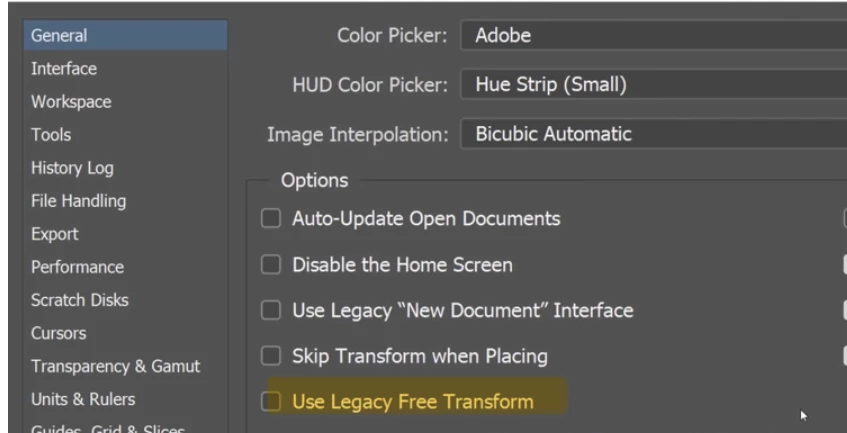
  • Go to preferences > General > Use Legacy Free Transform
  • In the options bar for free transform, there is a link icon to control whether scaling will be proportional or will distort your image.


Jane


2 replies

Conrad_C
Community Expert
Community Expert
February 21, 2025

If you’re using Free Transform, you can toggle this at any time by clicking the Maintain Aspect Ratio button in the options bar. Also, it can be toggled interactively using the Shift key. So…


If Maintain Aspect Ratio is enabled, Shift temporarily disables it, and…

if Maintain Aspect Ratio is disabled, Shift temporarily enables it.


So set the button you want you want, and if you ever want to temporarily make it work the other way just add the Shift key.


I find this much easier than remembering where the preference option is.

Inspiring
February 21, 2025

Thank you. I'm familiar with this option, I just wanted the previous behaviour back as it's my preferred scaling method.

jane-e
Community Expert
jane-eCommunity ExpertCorrect answer
Community Expert
February 20, 2025

@Mariano– 


There are two ways to go back to the old behavior

  • Go to preferences > General > Use Legacy Free Transform
  • In the options bar for free transform, there is a link icon to control whether scaling will be proportional or will distort your image.


Jane


Inspiring
February 20, 2025

Thank you for your swift reply. I"m combed thtough the preferences looking for any other Legacy option and turning them on.

jane-e
Community Expert
Community Expert
February 21, 2025

You're welcome @Mariano– and I'm glad this fixes it for you.


Jane