
Inspiring
November 6, 2021
Answered

Transform tool - Shift constrain

  • November 6, 2021
  • 2 replies
  • 813 views

Once again Adobe makes changes to legacy functions that throw a wrench into my workflow. Using Shift to constrain proportions has been the standard for decades (in all applications) and now they remove it in v.23. Can you please implement a preference that allows us to disable this change?
This topic has been closed for replies.
Correct answer Jeff Arola

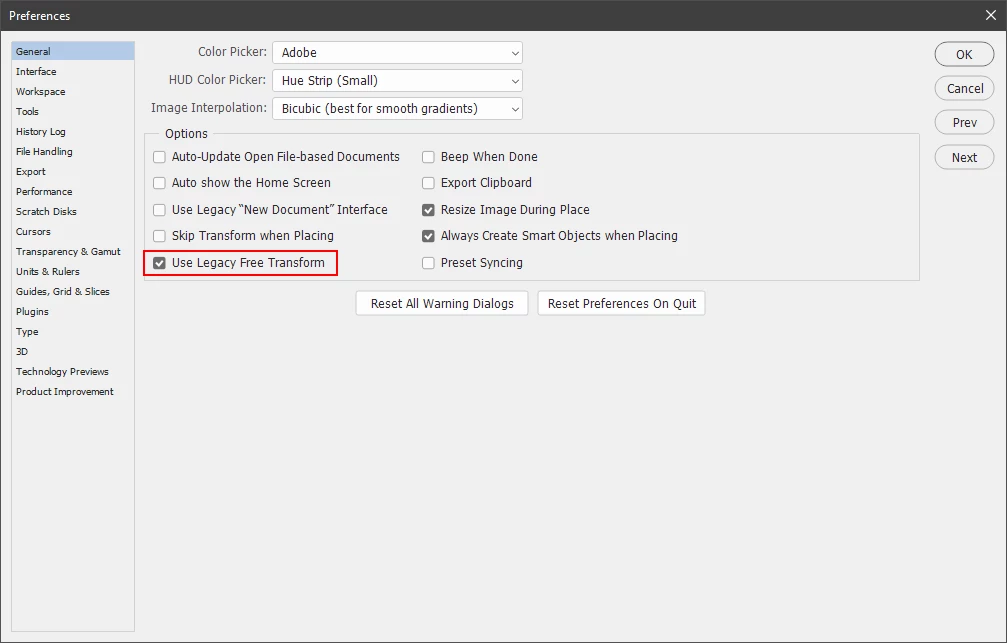
In photoshop go to Photoshop>Preferences>General and check Use Legacy Free Transform

(Edit>Preferences>General on windows).


2 replies

Jeff Arola
Community Expert
Jeff ArolaCommunity ExpertCorrect answer
Community Expert
November 6, 2021

In photoshop go to Photoshop>Preferences>General and check Use Legacy Free Transform

(Edit>Preferences>General on windows).


Foto-Grafika2
Participant
November 29, 2022

23.5.3 is not working even after "Use Legacy transform" [ON]

lambiloon
Community Expert
Community Expert
November 6, 2021

Hi if its not in preferences then its permanent so this will be easy for new people to understand...regards

Ali Sajjad / Graphic Design Trainer / Freelancer / Adobe Certified Professional