

Antonín Mika
Known Participant
February 23, 2019
Question

Transformation of smart object

  • February 23, 2019
  • 3 replies
  • 1227 views

Hi, I have a problem with transformation of smart object. I create mockups of floors and I need to change perspective of texture of new floor. And the texture have to be a smart object.

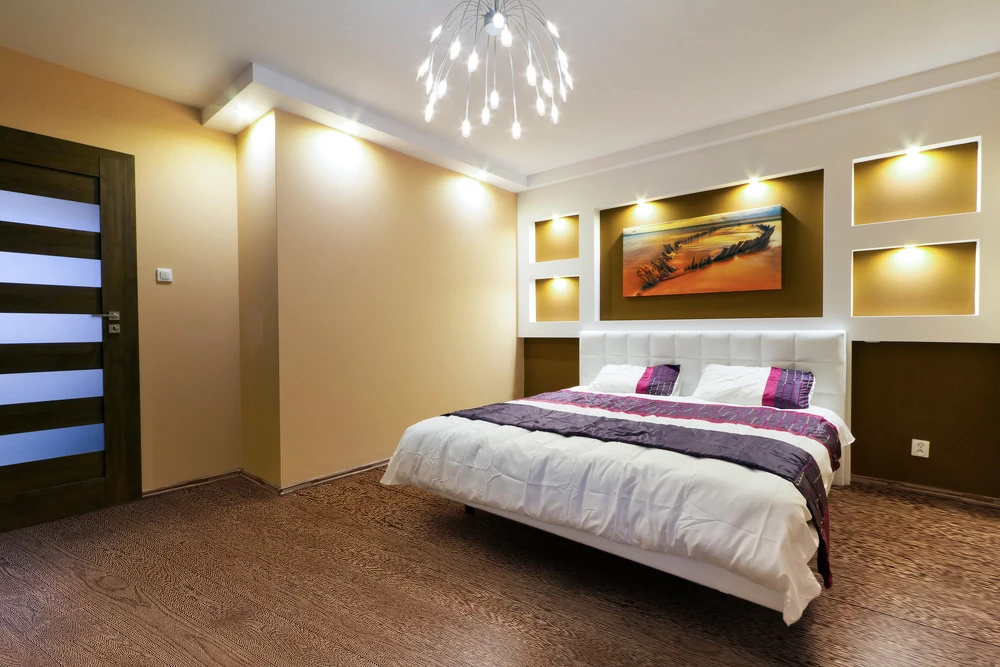
But when I use transformation to change perspective of new floor, the texture is very harsh and ugly:
If I transform the texture as a raster layer everything is OK:
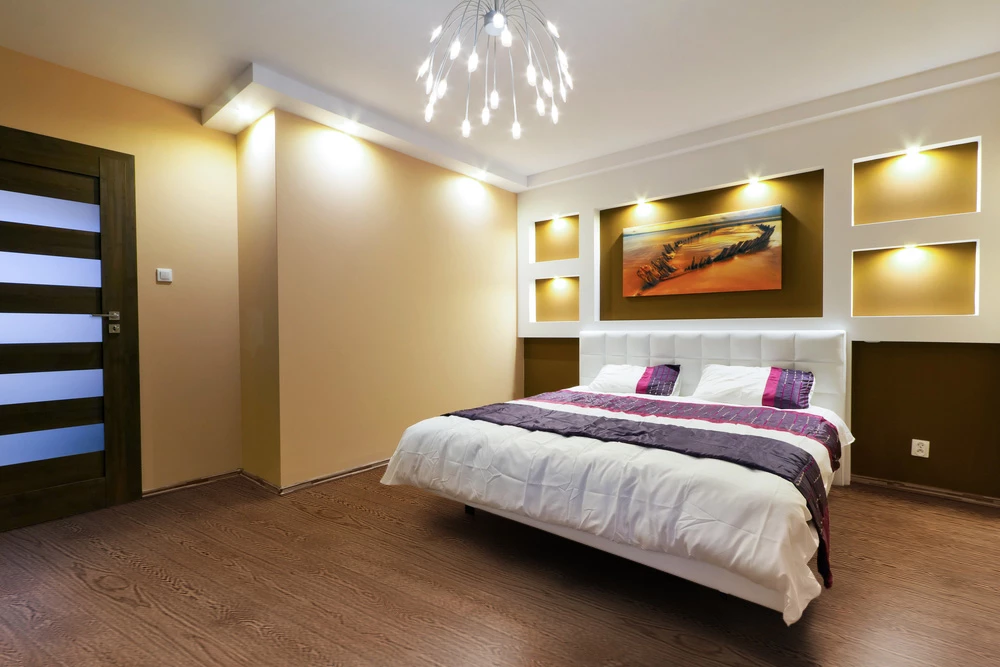
Is there any way of choosing interpolation (for example bicubic) of smart object? Or how to solve this problem?

Thank you very much for your help.

This topic has been closed for replies.

3 replies

JJMack
Community Expert
Community Expert
February 23, 2019

If you try hard and start with a square tiled floor replacement you should be able to come up with a distorted transform that will work quite well.

JJMack
JJMack
Community Expert
Community Expert
February 23, 2019

I would also change pictures above the bed

JJMack
davescm
Community Expert
Community Expert
February 23, 2019

What do the comparisons look like when both are viewed at 100% zoom?

Dave

Antonín Mika
Known Participant
February 23, 2019

Thank you for your reply, zoom is not the problem. It looks the same at 100%, 50%, 200%...

JJMack
Community Expert
Community Expert
February 23, 2019

If the interpolation method is not available in the tool option bar for transform I would expect Photoshop to use the method you set as your default in your Photoshop Preferences.  When I script Transforming a smart Object  layers I save the users interpolation Preference for Transform, Set what I want used transform the layer then restore the users preference. For the interporation method isn niu in Adobet DOM resize method.

var userResampleMethod = app.preferences.interpolation; // Save interpolation settings

app.preferences.interpolation = ResampleMethod.BICUBIC; // resample interpolation bicubic

if (LWidth/LHeight<SWidth/SHeight) { // Smart Object layer Aspect Ratio less the Canvas area Aspect Ratio

var percentageChange = ((SWidth/LWidth)*100);  // Resize to canvas area width

activeDocument.activeLayer.resize(percentageChange,percentageChange,AnchorPosition.MIDDLECENTER);

}

else {

var percentageChange = ((SHeight/LHeight)*100); // resize to canvas area height

activeDocument.activeLayer.resize(percentageChange,percentageChange,AnchorPosition.MIDDLECENTER);

}

app.preferences.interpolation = userResampleMethod; // Reset interpolation setting

JJMack
Antonín Mika
Known Participant
February 23, 2019

Thank you for your reply, if I set Bicubic (best for smooth gradients) in Preferences, nothing happen. I think that Photoshop just try to keep the original picture of smart objects in its own way...

JJMack
Community Expert
Community Expert
February 23, 2019

Gizzer  wrote

Thank you for your reply, if I set Bicubic (best for smooth gradients) in Preferences, nothing happen. I think that Photoshop just try to keep the original picture of smart objects in its own way...

Transform should resize the  Smart object layer content. The Smart object itself is never change by any Photoshop tool.   Those pixels are set in concrete.  They can only be changed  by opening the object and updating the object or replacing the object content.  The  Pixels used for the layers contents will be  generated from the Pixels rendered by Photoshop for the smart object.  Transformed by the Layer's  associated  transform and filtered by any attached smart filter through a filter mask.  When you transform a smart Object layer you are actually editing the layers associated transform.  Every smart object layer has an associated transform.  The smart Object is not  transformed the pixels used for the layer are  generated by transforming the smart pixels for the layer content.  The smart object pixels are not changed.

Your problem is most like not the interpolation method its more likely caused the the distortion you add for the perspective you want the object to have relative the floor perspective.

The room floor has a diagonal perspective. You replacement Object most likely has a straight on perspective. When you distort the transform to add the diagonal perspective you do not like the results of the perspective distorrion added.

JJMack