
Glitterhorse
Known Participant
November 13, 2019
Answered

Transitioning from Elements to Ps 2020 - where is 5 sided brush tool?

  • November 13, 2019
  • 3 replies
  • 1207 views

Hi - I hav recently got back to using Creative Suite but I am unabel to find the 5-sided brush in Elements that made lovely "stars" within Ps 2020 when clicked in sttaic position.  Can anyone point me in the right direceion please?
This topic has been closed for replies.
Correct answer Jeff Arola

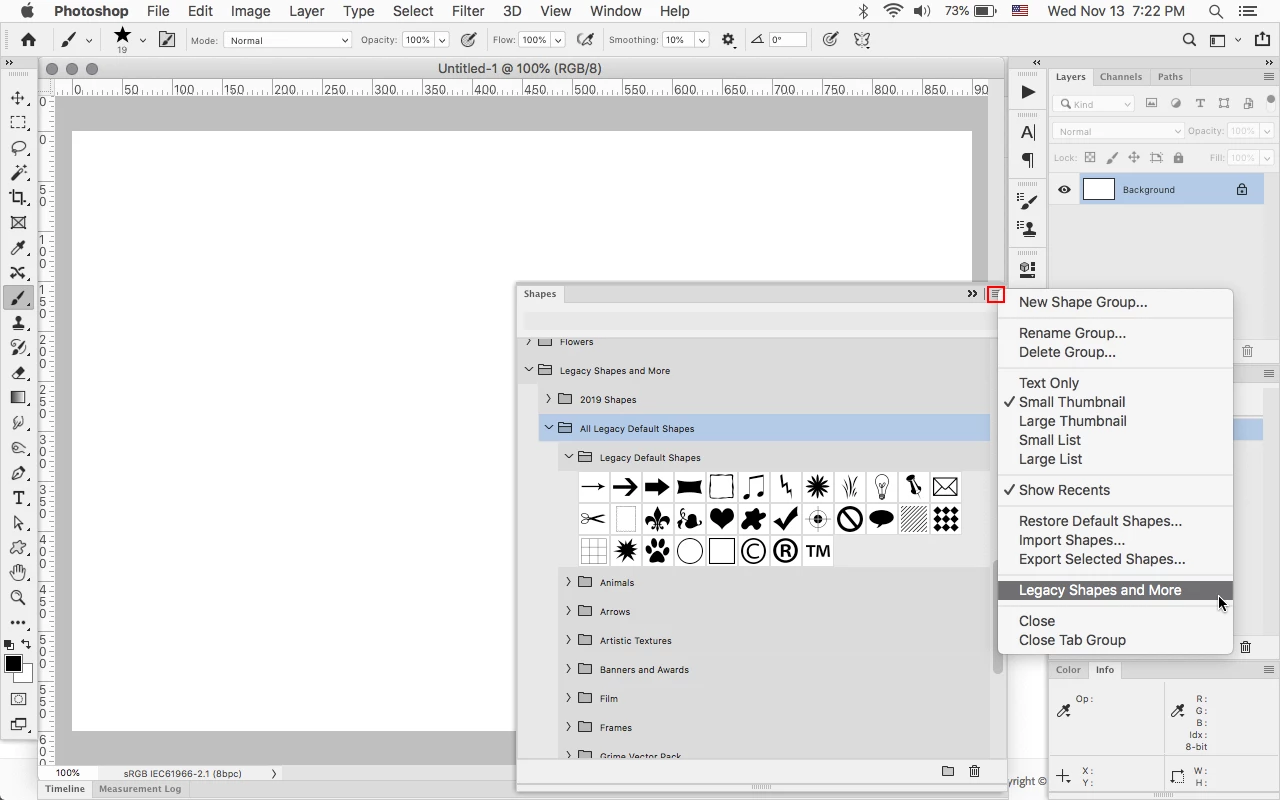
In photoshop go to Window>Shapes and load the Legacy Shapes and More.


3 replies

Jeff Arola
Community Expert
Jeff ArolaCommunity ExpertCorrect answer
Community Expert
November 14, 2019

In photoshop go to Window>Shapes and load the Legacy Shapes and More.


Glitterhorse
Known Participant
November 14, 2019

Thank you - I have found the legacy shapes!  Which is marvellous. 

Unfortunately, I still don't see (it may be me as its late) the 5-point star brush.  Is this something I can download from Elements?

Glitterhorse
Known Participant
November 14, 2019

And that's womderful for the heart shapes as I need that reguarly!  That is so kind of you.

Jeff Arola
Community Expert
Community Expert
November 14, 2019

Are you talking about the Flowing Stars brush in the Default Brushes in photoshop elements?


Do you still have access to photoshop elements?


What operating system are you using?


Glitterhorse
Known Participant
November 14, 2019

Yes I still have access to Elements! 

Glitterhorse
Known Participant
November 13, 2019

Also - where is the heart shaped tool, pawprints & snowflakes please?  They are also very useful for me, particularly the hearts & stars!

Glitterhorse
Known Participant
November 14, 2019

And I recall someone showing me a website where you can download free 'objects/shapes' for use in Illustrator - can someone receommend which site that might be please?