kimb98084150
Participant
December 27, 2021
Question

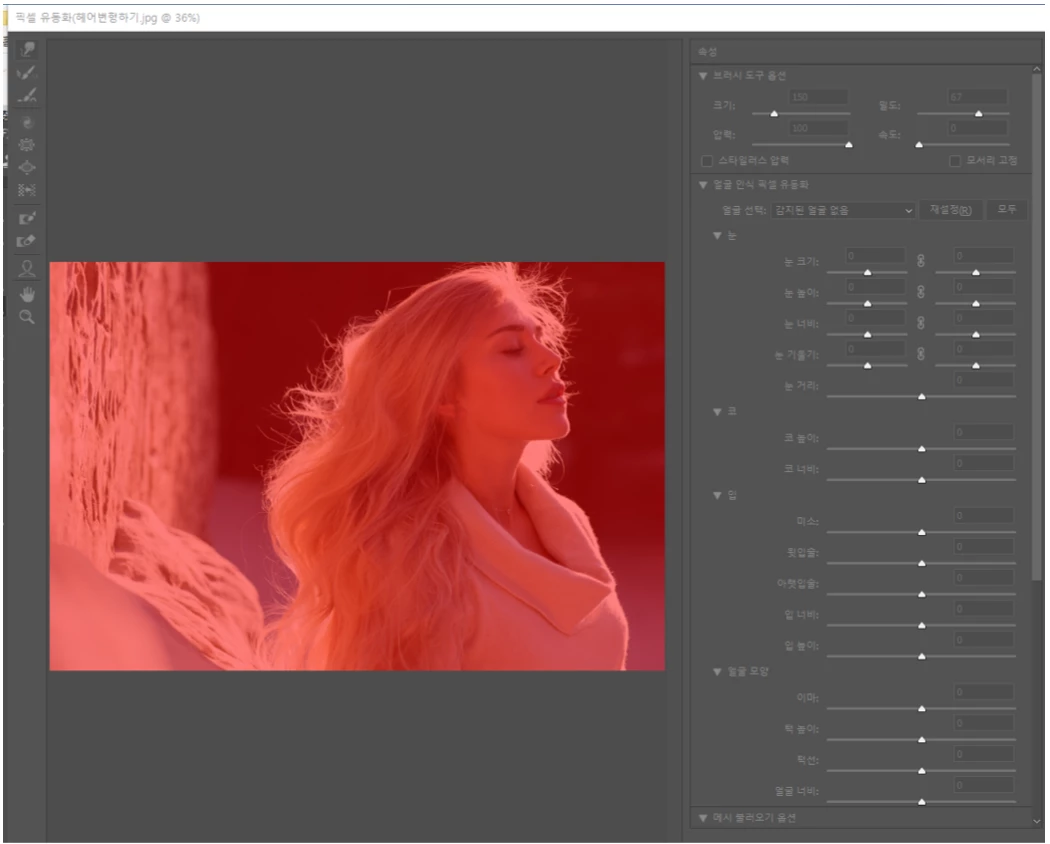
Translucent red overlay when using Liquify [was: please give me answer.]
  • December 27, 2021
  • 4 replies
  • 941 views


when I try to do liquefy 

It's full of red screens.

what's wrong?

This topic has been closed for replies.

4 replies

Derek Cross
Community Expert
Community Expert
December 27, 2021

It looks like you've inadvertently selected Quick Mask Mode.

mglush
Community Expert
Community Expert
December 27, 2021

Hi!

What happens when you select another tool? Anything? If you cannot make any changes in the Liqufy dialog box, I would suggest resetting your prefernces:

https://helpx.adobe.com/photoshop/using/preferences.html


Note: Make sure that you back up all your custom presets, brushes & actions before restoring Photoshop's preferences. Migrate presets, actions, and settings


Let us know if that works or if you are still having the issue?

Michelle

Bojan Živković11378569
Community Expert
Community Expert
December 27, 2021

It seems that you have Show Mask > Red turned on and that Freeze Mask Tool was used. Can you alter image in Liquify dialogue?

JJMack
Community Expert
Community Expert
December 27, 2021

Some information is needed PC|Macs. OS version. PS Version. Update Status GPU info etc. My car will not start please give me an answer. 

JJMack