Participant
February 19, 2018
Answered

transparent layer creation

  • February 19, 2018
  • 1 reply
  • 1389 views

I have been trying to create a photo logo. Lots of info on You Tube. Seems simple enough, open a new image, click on the lock symbol and then open a new layer. I have tried and the new image does not come up as a transparent layer.

my solution was to go use my lap top. It works exactly as I described and creates a transparent layer.

What is the difference?  Desktop is on the new update I just got - 19.1.1. My laptop is 19.1.0.

Can anyone verify my findings? I would be very happy to find our what I am doing wrong with the 19.1.1 version.

Thank you
    This topic has been closed for replies.
    Correct answer bobrick24

    I can't see anything wrong with your methods.

    Go to Preferences- General and click Reset Preferences on Quit. Then close and restart Photoshop.

    The preferences, which are more than just the user set preferences,  are saved each time Photoshop closes. If they get corrupted, for example if Photoshop at some point does not close down correctly, it can lead to unusual behaviour such as that you are seeing.

    Dave


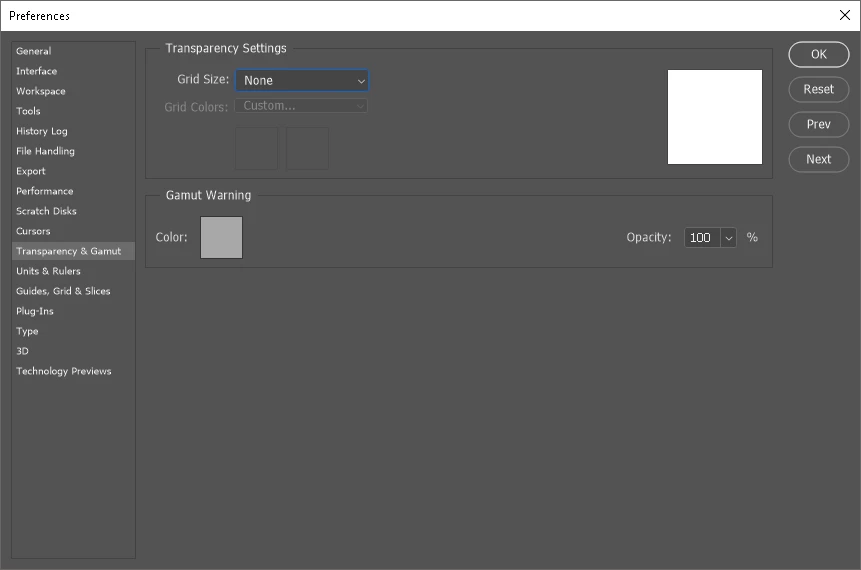
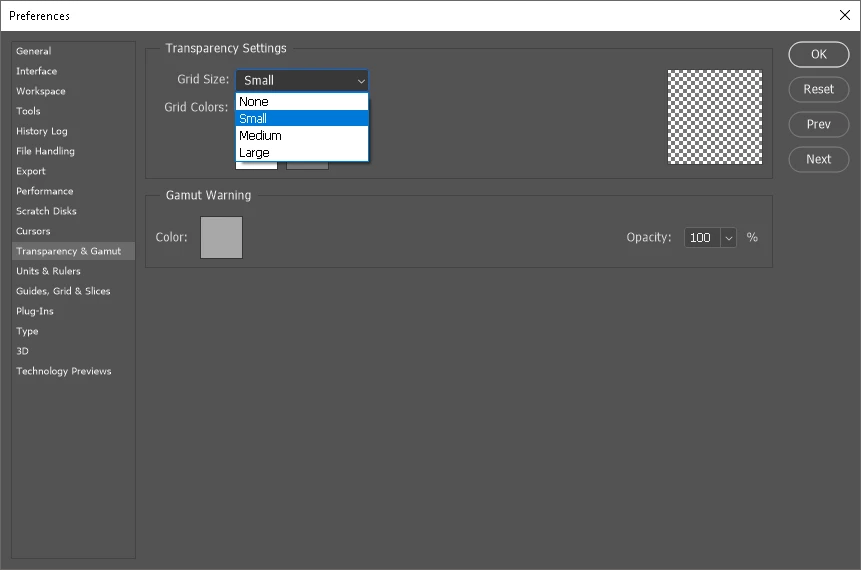
    I went into preferences and was just trying to locate changes I made before doing the reset. In transparency settings and gamut, I found that the grid size was set to none. I changed that and I am getting what we expect to see - a new layer with a grid. I can't imagine me changing it to none. I do know I lost electric a couple of weeks ago, so Photoshop would have not close down correctly.

    Following is the grid set to small, giving us what we expect to see. The second is when the setting is set to none.

    Now I will go back and try creating that photo logo for my images again. Thanks for the help!. I will close this discussion

    1 reply

    davescm
    Community Expert
    Community Expert
    February 19, 2018

    That does not sound normal.

    Can you show a screenshot of your New Layer dialogue then another of your layer panel immediately after creating the new layer

    Dave

    bobrick24Author
    Participant
    February 20, 2018

    I hope this is what you are were requesting.

    bobrick24Author
    Participant
    February 20, 2018

    I work with a dual monitor setup and moved the layers window onto the primary screen. I resized the panel, but the lettering stayed small and hard to read. made a second attempt by cropping the screen. Before creating the new layer, I saved the image as a PNG. I read that was one file type that allowed transparency. I hope this one is better.