

Transparent layers that looks 'gray'?
Hello, I have a question on photoshop .
I'm watching and taking notes about a video tutorial to create a background overlay and the tutorial
For example the tutorial create a background. Then , it create from the panel a new layer, but the icon looks like this in the certain different tutorial video:

This button it's for create a new layer.
Now, in the tutorial, the icon is like if there's a tiny tiny 'square' in the center of the icon of this 'paper' or something like this.
And I noticed that when a new layer is created, it's in gray color, and opacity it's 100% and fill 100%, and even the blending mode it's "Normal". So , there's no transparency, as it's filled in grey.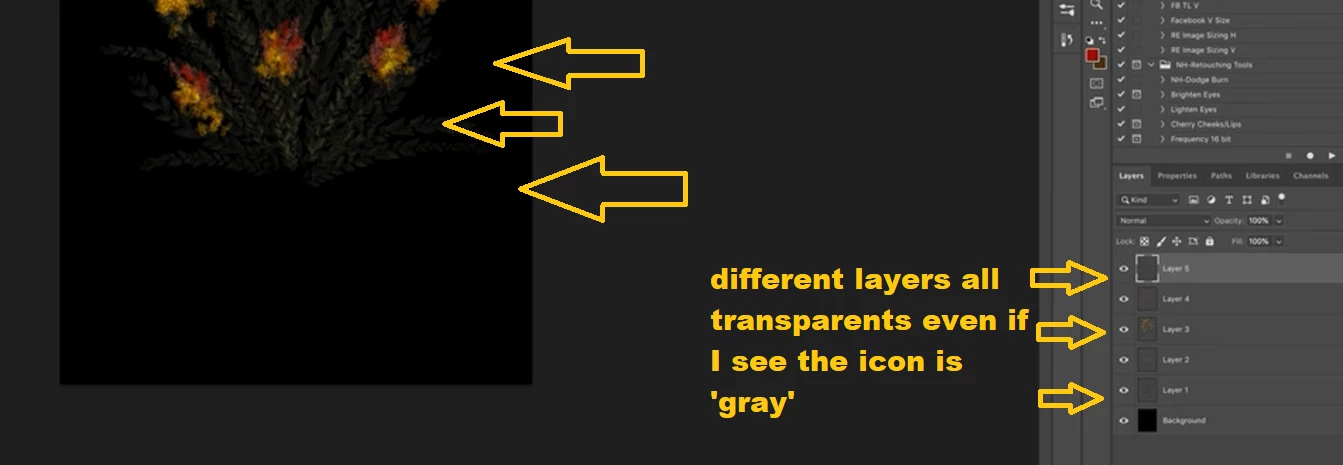
So you actually see a gray layer but in the truth it's like transparent. In fact, with the layer gray, you are able to buld up the background (shabby) effect, by created many layers with different paints brushes 'blobs', and since it's grey (and not transparent) you can see better what happen below the other layers (but without touch the opacity or mode, I mean , all it's always in normal mode and opacity 100% as I said!)
How is possible that is grey and in other videos when doing the similar things it's not grey?
 AdChoices