

SharpTattoos
Participant
April 26, 2017
Answered

Trouble with clear layers????????????

  • April 26, 2017
  • 3 replies
  • 665 views

I have no idea where I'm supposed to ask this and I keep getting the run around on this site.  I don't know how to easily phrase what I want to know so just bear with me.  I'm frustrated enough with this. 

Ages ago, I used to open a blank layer and use Inner Glow to make a gradient around said blank layer.  I'd set it to normal and shift it to black so that whatever image on the layer I put underneath would fade out to black.  Nice and even.  Now, you can't do anything with a blank layer.  You can't get a stroke or a gradient around the edge unless that layer is filled in.  How do I get that back?  Or recreate it?    I'm totally lost and totally frustrated with trying to find anything on the adobe site because I'm unsure of how to easily phrase that question.  I've gotten answers for a million other things, none of what I need at this moment.  Please help?
This topic has been closed for replies.
Correct answer Trevor.Dennis

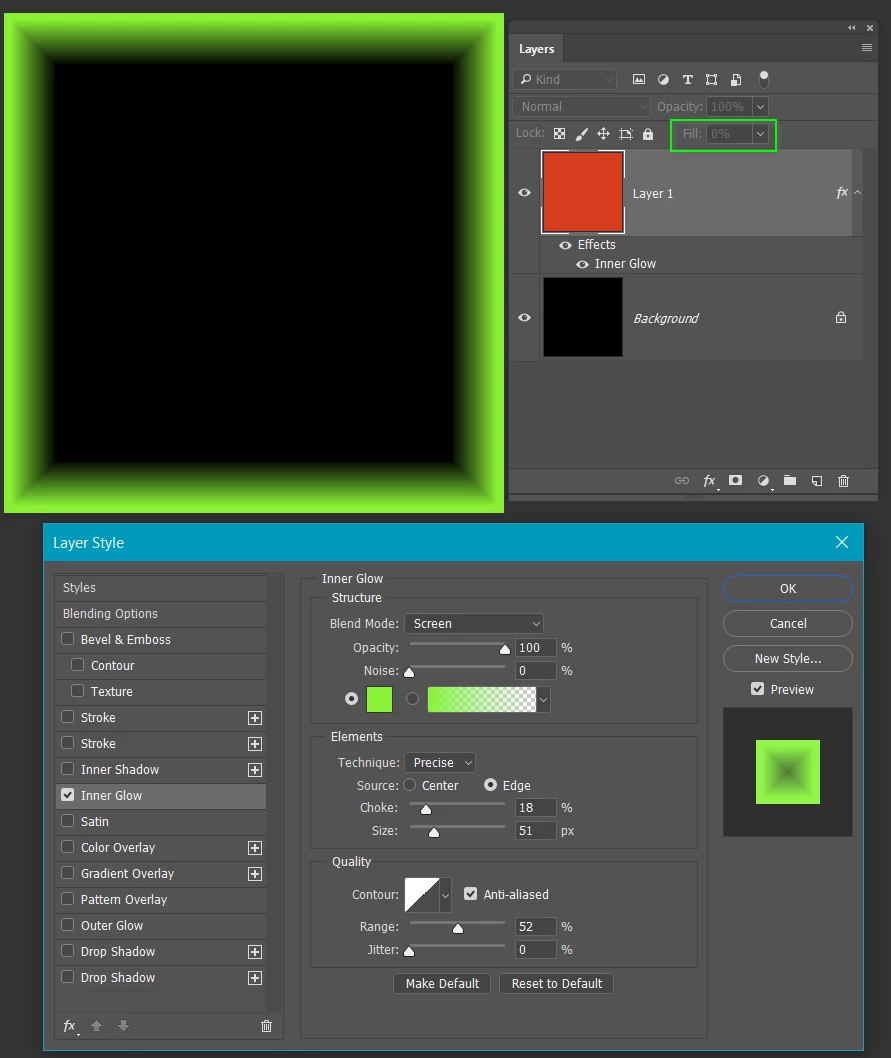
Fill your layer with a colour.  Any colour you like, as it makes no difference.

Adjust the layer's Fill to zero, so the colour becomes transparent.

Your layer styles will now work.

You can see from the layers panel that Layer 1 is filled with red, but with Fill set to zero, the red is transparent.

The inner glow (green) is working nicely

3 replies

Michael Riordan
Inspiring
April 29, 2017

If I understand what you are trying to do, and assuming you want to do this in Photoshop, You can use an adaptation of the technique you are using. Create the blank layer but fill it with 50% gray (so it has some pixels to work with) then change the blend mode to overlay instead of Normal (so the 50% gray disappears) then go ahead and add your layer effect.

Hope that helps.

Michael

SharpTattoos
Participant
September 27, 2019
Thanks so much! I didn't see this until now.
Trevor.Dennis
Community Expert
Trevor.DennisCommunity ExpertCorrect answer
Community Expert
April 29, 2017

Fill your layer with a colour.  Any colour you like, as it makes no difference.

Adjust the layer's Fill to zero, so the colour becomes transparent.

Your layer styles will now work.

You can see from the layers panel that Layer 1 is filled with red, but with Fill set to zero, the red is transparent.

The inner glow (green) is working nicely

Szalam
Community Expert
Community Expert
April 28, 2017

You've posted in the Forum Comments forum. I'm going to ping a moderator and have them move your thread to (I guess) the Photoshop forum. Is that right?