
Participant
April 17, 2020
Answered

troubleshoot toolbar
  • April 17, 2020
  • 2 replies
  • 499 views

HELP!

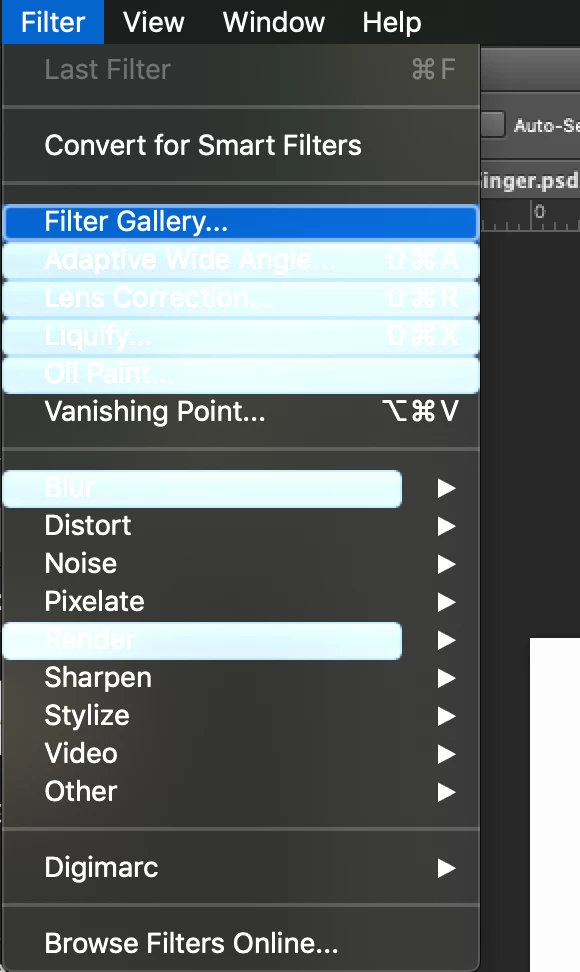
This showed up recently in my toolbar for Mac Photoshop CS6. The attached screenshot was one of the tabs with the most highlights, this is happening all across my toolbar. I'm not sure how to turn it off, it is kind of hard to see and distracting. 

Correct answer Jeff Arola

Check your Workspace under Window>Workspace and see if you have the New in CS6 checked.

If so, click on Essentials.


Or maybe your Workspace just needs to be reset by going to Window>Workspace>Reset Workspace.


Another thing you can do is go to Photoshop>Preferences>Interface and uncheck Show Menu Colors.


2 replies

PECourtejoie
Community Expert
Community Expert
April 25, 2020

Hello, BTW, what you showed was a menu, not a toolbar. the toolbar is the long vertical strip on the left hand side, the option bar lays below the menus, and the panels are docked on the right side.

Jeff Arola
Community Expert
Jeff ArolaCommunity ExpertCorrect answer
Community Expert
April 18, 2020

Check your Workspace under Window>Workspace and see if you have the New in CS6 checked.

If so, click on Essentials.


Or maybe your Workspace just needs to be reset by going to Window>Workspace>Reset Workspace.


Another thing you can do is go to Photoshop>Preferences>Interface and uncheck Show Menu Colors.


nehcannaAuthor
Participant
April 25, 2020

Thank you! I reset my workspace to default and that fixed the problem.