

Stephen Marsh
Community Expert
Community Expert
October 16, 2019
Answered

Try/Catch “Leak” Error

  • October 16, 2019
  • 4 replies
  • 1530 views

Hello,


I am testing a try/catch error check if there is no document open, however, after pressing OK on the window to clear the catch error alert, a script error box pops up, when the script should stop. I have tried both with and without using a return; however the error still pops up. Where have I gone wrong?  
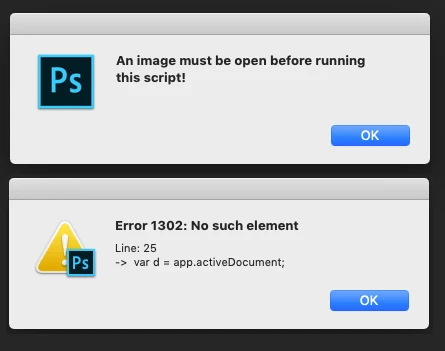


Here is a snippet of the code in question:


// Open Document Error Check 
aDoc();
var originalDoc

function aDoc() {
    try {
        originalDoc = app.activeDocument
    } catch (err) {
        alert("An image must be open before running this script!")
    }
}

// Save the current ruler units
var savedRuler = app.preferences.rulerUnits;

// File Naming Code
app.preferences.rulerUnits = Units.PIXELS;
var d = app.activeDocument;


Thank you!


This topic has been closed for replies.
Correct answer c.pfaffenbichler

The last line 

var d = app.activeDocument;

is not in the try-clause, 

4 replies

c.pfaffenbichler
Community Expert
Community Expert
October 16, 2019

Sorry, not used to those one-line replies yet … 


Anyway, you could use if-clauses like 

if (app.documents.length > 0) {}

depending on what you need to check for. 

And you could »wrap« those up in a function that returns »false« if any of the conditions is not met so you can put the main body of code within a single set of brackets. 


Why do you need a second try-clause exactly in this case? 

Stephen Marsh
Community Expert
Community Expert
October 16, 2019
The first try/catch was for an open document, not critical, just “nice to have”… The second was for an existence of doc.path as in one scenario the save location used later in the script relies on a backing file path to save into the same directory as the source file.
c.pfaffenbichler
Community Expert
Community Expert
October 16, 2019
Yeah, newly created and unsaved files can trip such a Script up and the try-clause seems like a valid approach to avoid that.
Stephen Marsh
Community Expert
Community Expert
October 16, 2019

Thank you for the replies... I obviously misunderstood how this works... Rather than being a stand-alone block of code, the rest of the script has to be in the braces as well. The last line of the snippet was the start of the full code. Damn, there is another try/catch block as well, all those nested braces are going to kill me!

c.pfaffenbichler
Community Expert
Community Expert
October 16, 2019
You could use other checks like
c.pfaffenbichler
Community Expert
c.pfaffenbichlerCommunity ExpertCorrect answer
Community Expert
October 16, 2019

The last line 

var d = app.activeDocument;

is not in the try-clause, 

Geppetto Luis
Legend
October 16, 2019

I think it has to go this way.


aDoc();
var originalDoc

function aDoc() {
    try {
        // Save the current ruler units
var savedRuler = app.preferences.rulerUnits;

        originalDoc = app.activeDocument
        
        // File Naming Code
app.preferences.rulerUnits = Units.PIXELS;

var d = app.activeDocument;
        
    } catch (err) {
        
        alert("An image must be open before running this script!")
    }

}
c.pfaffenbichler
Community Expert
Community Expert
October 16, 2019

Sorry; I had not noriced that this was a reply already and mistakenly thought the code in the original post had been changed.