
Participant
July 5, 2020
Question

trying to create a transparent - to - black mask

  • July 5, 2020
  • 4 replies
  • 1971 views

I am struggling to create a mask layer that is transparent on one side, then from the center to the other edge goes from transparent to black.  Is there a page that walks through how to do this?  BTW I am running Photoshop 12.  I am tryng to duplicate the effect a soft edge mask would make when dropped onto a 35mm slide, like this one...
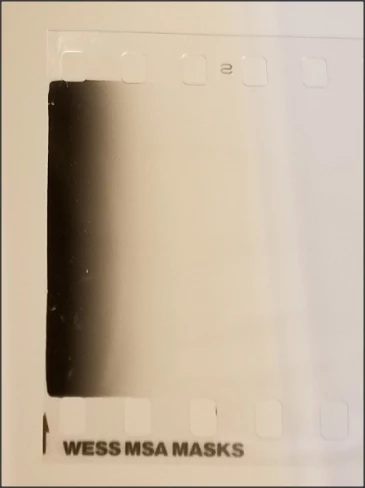


Thanks!

Steve

This topic has been closed for replies.

4 replies

JJMack
Community Expert
Community Expert
July 6, 2020

You can also  create that layer an other way.  Add an emty layer and fill the layer with  a gradient Black to transparent or Foreground  Color to transparent.   IE. a new document that is transparent fill the canvas with your Black to Transparent gradient.  No layer mask is required.

JJMack
Warren Heaton
Community Expert
Community Expert
July 6, 2020

In the Gradient Editor, set your 1st Color Stop to Black while leaving the default Stop Opacity set to 100%.  Set the second Color Stop to any color, but change the Stop Opacity to 0%.  While the Opacity Stop is selected in the Gradient Editor, you can slide the Opacity Midpoint left or right as desired (it defaults to 50%).


Ussnorway7605025
Legend
July 6, 2020

I think he means something like this

Participant
July 6, 2020

YES!  I am trying to create the top image, with black instead of blue, gradiating to transparent.  

JJMack
Community Expert
Community Expert
July 6, 2020

Note the layer is black fill layer the layer mask a gradient white to black

JJMack
JJMack
Community Expert
Community Expert
July 5, 2020

A mask is a gray scale channel  whites grays and blacks there is no transparency in a mask.   A mask, masks a layers pixels. White has no effect on pixels it mask they stay as is.  Pixels masked by grays have their opacity is lowered some percentage, and pixels masked by Black have their opacity set to 0 they become transparent.   Masks do not changes  a layer pixels colors just the opacity may be changed. A layer may not contain any black a layer mask can not turn pixels black.


It sounds like you may be running Photoshop Elements version 12. Photoshop version 12 is CS5. There is a Photoshop Element forum however, masking in Elements and Photoshop will be the same.

JJMack