
Hey Evgenii
Inspiring
March 6, 2023
Answered

turn off layer isolation via script

  • March 6, 2023
  • 1 reply
  • 3348 views

Guys is there a way to turn off layer filtering in photoshop via script? I used script listener to run menu item: select-isolate layers, if I run action again it cancels isolation - this is exactly what I need, but if I can the code from script listener again it doesn't cancels isolation, it only applies
This topic has been closed for replies.
Correct answer Stephen Marsh

@Hey Evgenii 


Some menu commands need to be inserted into an action step to be successfully recorded by ScriptListener. Here is the SL code cleaned and put into a function:


isolateLayers();

function isolateLayers() {
	function s2t(s) {
        return app.stringIDToTypeID(s);
    }
	var descriptor = new ActionDescriptor();
	var reference = new ActionReference();
	reference.putEnumerated( s2t( "layer" ), s2t( "ordinal" ), s2t( "targetEnum" ));
	descriptor.putReference( s2t( "null" ), reference );
	executeAction( s2t( "isolateLayers" ), descriptor, DialogModes.NO );
}


Or you can just call the menu item as follows:


app.runMenuItem(stringIDToTypeID('isolateLayers'));


Hope this helps!

1 reply

Stephen Marsh
Community Expert
Stephen MarshCommunity ExpertCorrect answer
Community Expert
March 6, 2023

@Hey Evgenii 


Some menu commands need to be inserted into an action step to be successfully recorded by ScriptListener. Here is the SL code cleaned and put into a function:


isolateLayers();

function isolateLayers() {
	function s2t(s) {
        return app.stringIDToTypeID(s);
    }
	var descriptor = new ActionDescriptor();
	var reference = new ActionReference();
	reference.putEnumerated( s2t( "layer" ), s2t( "ordinal" ), s2t( "targetEnum" ));
	descriptor.putReference( s2t( "null" ), reference );
	executeAction( s2t( "isolateLayers" ), descriptor, DialogModes.NO );
}


Or you can just call the menu item as follows:


app.runMenuItem(stringIDToTypeID('isolateLayers'));


Hope this helps!

Hey Evgenii
Inspiring
March 6, 2023

Thank you, Stephen, for clearing this up for me! However my question was on how to undo the isolation or clear filtering layers. The code you provided works in one way - it only enables the isolation, but doesn't disables, however if I run action with the menu item it will do both enable/disable

Known Participant
August 19, 2024

If layers are already isolated, there is nothing extra to do, the code should toggle the isolation off.


If isolation is already off, you need to select the applicable matching layers before using the isolate toggle.


As I mentioned, it works for me on an Intel Mac using 2024 (25.11.0).


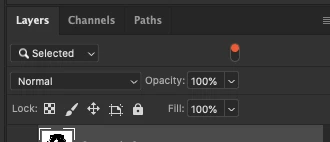
I'm using a custom AMD PC build and I tested it on my Mac M1. layes just desapear and leave the panel as below: 

No worries I was looking for a way I have back the standard view (All Layers) with the filter OFF without click the switch buttom.