
Known Participant
October 26, 2023
Question

Turn off layer mask thumbnail icon

  • October 26, 2023
  • 5 replies
  • 3651 views

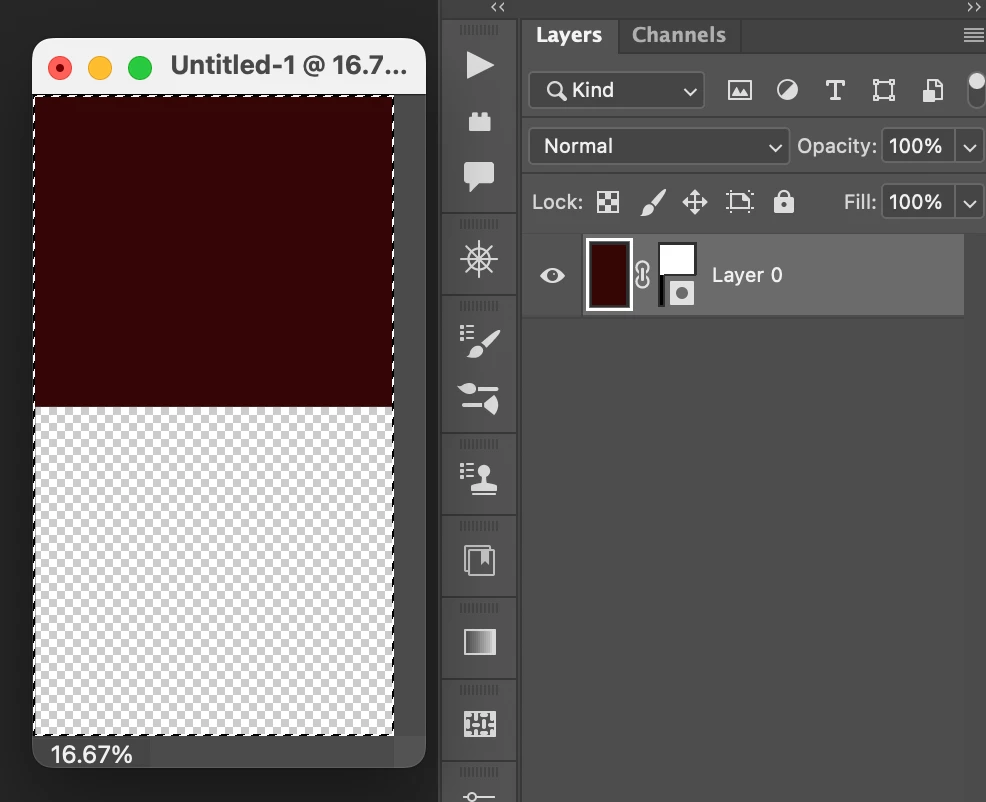
I just updated Photoshop and noticed that there was an icon added to the layer mask thumbnails. This icon obscures the lower-right, and sometimes the complete bottom half of the thumbnail. (see attached). Is there a way to turn this icon off? I work with many outsourced images with multiple layers and it really helps to view the thumbnails in their entireity during editing. Making the thumbnail larger can help, but that would limit the number of layers I could view at any time.


If anyone knows a way to also turn off the vector mask thumbnail icon I would like that too.
 

This topic has been closed for replies.

5 replies

Participating Frequently
November 10, 2023

As far as I know, there isn't a built-in option to turn it off. But one workaround I've found is to simply click on the thumbnail to select the layer mask, and then press the 'H' key on your keyboard to hide the selection edges. It won't remove the icon, but it'll give you a clearer view of the thumbnail.

Known Participant
November 10, 2023

Yeah, this is icon completely obscures the visual of the actual mask, so annoying.

The Art of Retouching
Inspiring
November 4, 2023

I just came across this "bug". It's the same type of Adjustment Preset "bug". I miss the old days when they used to update once every year and half, and it was worth the wait. Companies have nothing new (and good!) to add, so they make pointless interface changes that nobody wants. This is just added lutter.

Trevor.Dennis
Community Expert
Community Expert
November 4, 2023

Don't you people check through the thread before posting?  Pete Green told you how to disable it five posts above yours.  You can also set thumbnail size to large which greatly reduces the imact of the badges, or just turn them off, if you are using the 25.2 beta version.  I am sure this option will be included in the full release version in a future update.


BTW They are called 'badges' and they indicate whether the mask is rastor or vector.


Shangara Singh
Inspiring
November 5, 2023

If it's not in Photoshop "proper", then it doesn't exist. Therefore Peter Green's answer is welcome hope when it is released (and reset glitch fixed), I was just looking to see if it was available now somewhere. They introduced a feature, but not the ability to turn it off.


And despite this open topic, I "still" want that Adjustment Presets to disappear. I'm constantly needing to scroll down to see the bottom of my Adjustments Palette.


Just the other day I was explaining to my IT client why there are 3 completely different views for Control Settings still available in Windows. But as I think about it, I really don't know. It worked fine back in '95. Maybe I'm old, but I still feel the same about Photoshop. While I love to play with new features and tools (and often reject them due to the unreliability), I see no need to change long established interfaces or procedures.


As a professional, I have stuff I need to work "ON". I hate when updates require me to work "around". Think they would have learned with that Lightroom Import screen mess several years back. How long did that last? One week?


On 5 Nov 2023, at 03:08, Adobe Support Community Mailer <noreply@mail.community.adobe.com> wrote:


And despite this open topic, I "still" want that Adjustment Presets to disappear. I'm constantly needing to scroll down to see the bottom of my Adjustments Palette.


That’s another topic. You can always use classic mode! LOL & ROTF.

Apart from using custom presets, I see no reason to have the Adjustments panel even open.

I only opened it for testing when it was, erm, modernised. It’s been closed ever since (YMMV).

It worked fine back in ’95.


And that’s where Photoshop UX has been stuck. Photoshop hasn’t had a “real” UX designer assigned to it since…well, circa 1995. It’s had the occasional hug, but no real love.

While I love to play with new features and tools (and often reject them due to the unreliability), I see no need to change long established interfaces or procedures.


You haven’t noticed the drive to dumb down? Features that pros rely on have been sidelined in favour of newbies needs to use a juggernaut to drive to the local supermarket.

The Remove tool is a great asset. I use it frequently. Select Sky is useful too, as is Replace Sky, or Sky Replacement. However, the UX for SR sucks, and feature abandoned. Generative Fill is another great addition but, again, the UX sucks.

As a professional, I have stuff I need to work "ON". I hate when updates require me to work "around”.


Couldn’t agree more. Though now retired, I still use Photoshop almost daily for processing my images, though majority of that is now done in ACR.

Shangara.

Shangara SINGH.
Participant
October 26, 2023

you are right...

I need to see what is happening on the mask.

so were can we turn it off? I did not find it yet.

JanduzaAuthor
Known Participant
November 3, 2023

The option to turn them off is only in the beta version of Photoshop. It works but unfortunately it resets back to on each time Photoshop beta is reopened. This is really awful for my workflow.

Shangara Singh
Inspiring
November 3, 2023

Preference being ignored on relaunch is annoying. 


The badges should be enabled when Thumbnail Size is set to None in panel options, and OFF by default when thumbnails are enabled.


Don't know a single person who finds them useful as implemented.

Shangara SINGH.
Ged_Traynor
Community Expert
Community Expert
October 26, 2023

@Janduza not sure why Adobe decided to push out this option without the ability to turn it off, but you will be able to disable it in a future release

https://community.adobe.com/t5/photoshop-beta-discussions/layer-mask-icons-in-25-1/m-p/14186617

JanduzaAuthor
Known Participant
October 26, 2023

Thank you Ged for the lightning quick response! I appreciate it. –Jeff