
Participant
September 22, 2017
Answered

Turning EVERY Shape into a Path on Accident?

  • September 22, 2017
  • 1 reply
  • 223 views

I'm running Photoshop CS6 and suddenly my program seems to be turning every shape I make into a shape path, despite being set to make a "shape" and not a "path" (selection located in the left hand side of the top bar).

I select any shape from the tool bar, then when I draw it on my canvas it creates a path in the "Paths" panel. I do not want this to happen and I'm not sure why it's suddenly happening now. Please help! Thanks!
This topic has been closed for replies.
Correct answer gener7

First, Restart your PC. Many problems clear up on that alone.

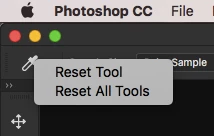
If not, right click on the Tool and Reset it (example below)

Finally, try a preferences reset.

If you need a quick and dirty way to restore your preferences, here's a way you can do it using a keyboard shortcut on launch:

Windows - double-click the PS icon to start Photoshop

                  Immediately Hold down CTRL-SHIFT-ALT

                  You will see a delete preferences dialog. Click “yes".

Macintosh - Hold down CMD-SHIFT-OPTION instead.

Gene

1 reply

gener7
Community Expert
gener7Community ExpertCorrect answer
Community Expert
September 22, 2017

First, Restart your PC. Many problems clear up on that alone.

If not, right click on the Tool and Reset it (example below)

Finally, try a preferences reset.

If you need a quick and dirty way to restore your preferences, here's a way you can do it using a keyboard shortcut on launch:

Windows - double-click the PS icon to start Photoshop

                  Immediately Hold down CTRL-SHIFT-ALT

                  You will see a delete preferences dialog. Click “yes".

Macintosh - Hold down CMD-SHIFT-OPTION instead.

Gene