

Rebecca5E3B
Known Participant
March 3, 2022
Answered

Turning my path into a selection not working the same!

  • March 3, 2022
  • 2 replies
  • 1648 views

I used to be able to create two paths on the same layer and create a selection that way. Photoshop would know to remove that 2nd selection within a selection when I would turn it into a layer mask. Now, when I go to turn my path into a selection, that secondary path disapears. Why is this happening?!


Please help. 
This topic has been closed for replies.
Correct answer Bojan Živković11378569

"Photoshop would know to remove that 2nd selection within a selection when I would turn it into a layer mask."


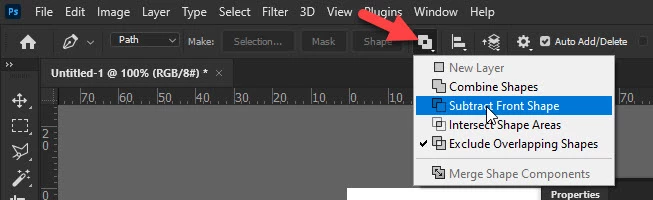
This part is confusing. Photoshop does not know until you tell him in proper way. If you want to exclude or include/intersect some path parts then use path operations from the Options bar while creating path to let Photoshop know what to do exactly.


2 replies

Bojan Živković11378569
Community Expert
Community Expert
March 4, 2022

"Photoshop would know to remove that 2nd selection within a selection when I would turn it into a layer mask."


This part is confusing. Photoshop does not know until you tell him in proper way. If you want to exclude or include/intersect some path parts then use path operations from the Options bar while creating path to let Photoshop know what to do exactly.


Rebecca5E3B
Known Participant
March 4, 2022

Thank you for responding Bojan! 


Yeah, I was playing with that opereration yesterday and still Photoshop was not responding to any of them!


I actually needed the Exclude Overlapping Shapes opperation to work. Not sure why, but it's working now! Looks like the bug fixed itself? Very frusterating.


Thank you again and for referance image!

Have a grand day. : )

Community Expert
March 4, 2022

I am able to create two paths on the same layer... then you can go into the Paths Panel and click on the thumbnail preview while holding down the Command key (Ctrl on Win) and that should give you a selection of BOTH your paths.


Hope that helps!
mark

headTrix, Inc. | Adobe Certified Training & Consulting