

Twain Driver Issue With Canon LiDE25 Scanner
I am running an older version of Photoshop - Version: 19.0 (32 Bit) with Windows 10 (64 Bit).
I have an older Canon LiDE25 Scanner that used to work fine with this version of Photoshop and Windows.
But recently, when I try and run the scanner in Photoshop from File > Import > LiDE25, I get the following error message in Photoshop:
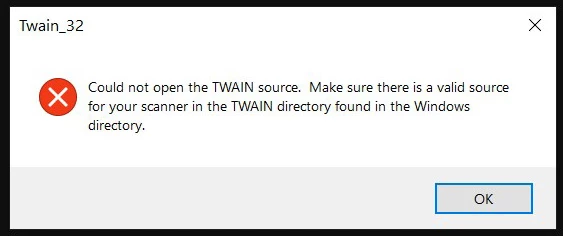
I am guessing this started happening after a recent update of Windows 10 because nothing else has changed on my system.
The Twain driver file is called "Twain_32.8BA" and normally the Twain driver for this scanner needs to be installed in C:\Program Files (x86)\AdobeAdobe Photoshop CC 2018 (32 Bit)\Plug-ins for this scanner to work with Photoshop.
But after I got the above error message, I also went into the Windows folder and there was a folder called: C:\Windows\twain_32 and so I put a copy of the Twain driver file in there too. I also created the folder C:\Windows\TWAIN and put a copy of the Twain driver file in there too.
So now I have the the "Twain_32.8BA" file in 3 different folders and I still get the same error message in Photoshop when I try to uise the scanner.
If anyone knows how I can possibly fix this problem so that the scanner will work with Photoshop again, then I would greatly appreciate it.
 AdChoices