
Exit
  • Global community
    • Language:
      • Deutsch
      • English
      • Español
      • Français
      • Português
  • 日本語コミュニティ
  • 한국 커뮤니티
3

Type cursor covers several lines of text. Photoshop CS6

Community Beginner ,
Aug 05, 2013 Aug 05, 2013

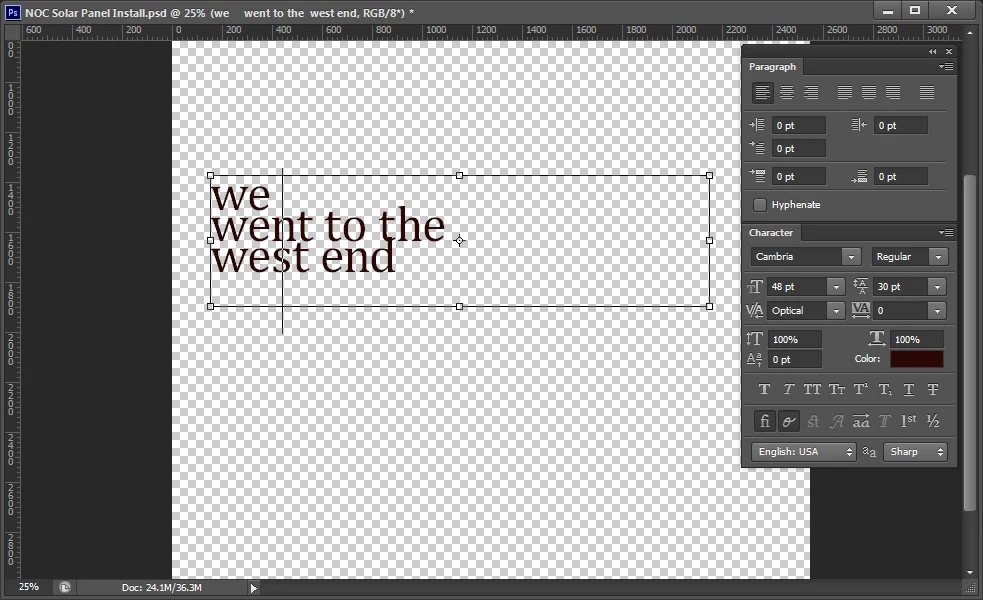
In Photoshop CS6 the flashing type cursor cuts through several lines of text (see image). 
typecursor.jpg

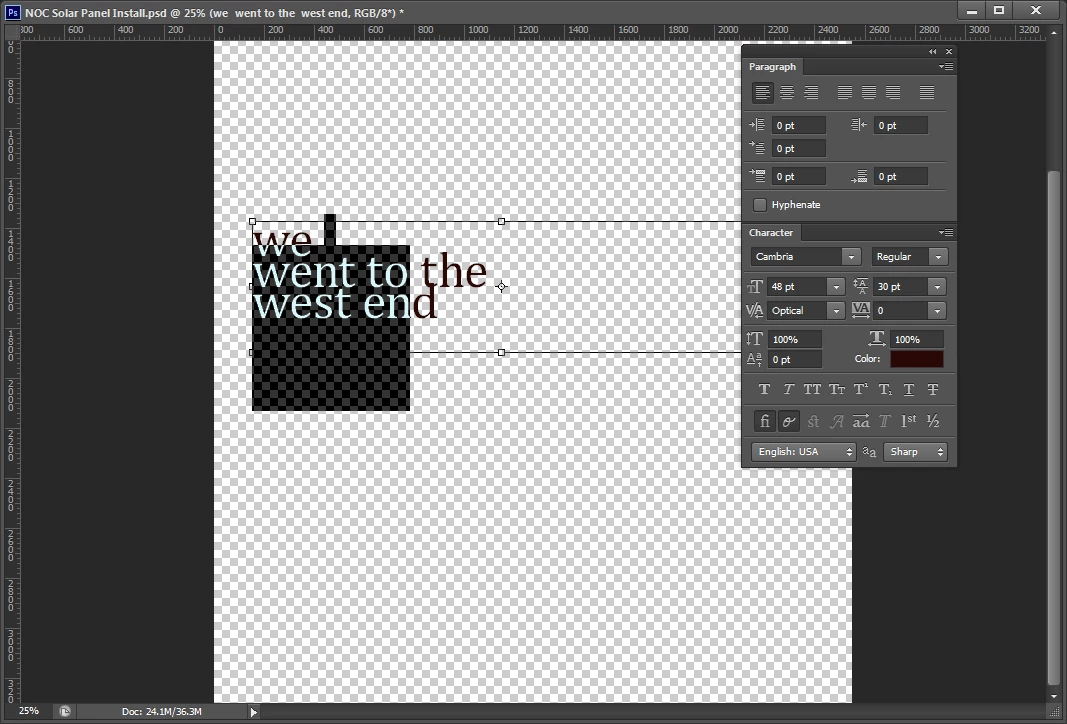
This makes it hard to select text since it is hard to tell which line the cursor will select (see image). 
type_highlighted.jpg

Can the text cursor be resized?  This happens no matter what type size is used or what paragraph settings are selected.  Is anyone else experiencing this problem?  I am using Windows 7 professional, service pack 1 on a Dell Precision T3500 with 8.0 GB RAM.

22.4K
Translate
Report
Community guidelines
Be kind and respectful, give credit to the original source of content, and search for duplicates before posting. Learn more
community guidelines

correct answers 3 Correct answers

Community Expert , Aug 05, 2013 Aug 05, 2013

Yes, the problem is Cambria. I've included a link in post 4 with the details. You'll have to find a similar font.

Gene

Translate
Community Beginner , Jan 01, 2019 Jan 01, 2019

dude,

confirm solution is as follows.

1. click on the icon " toggle the character and paragraph panels"

2. set the baseline shift as “ 0 pt”

problem solved

Image 001.jpg

Translate
New Here , Sep 06, 2021 Sep 06, 2021

Okay.. In 2021 I find the way to fix this problem too.

and After I find it by myself. I'll leave how I fix this here.


Please Try this.

- Click [Type tool] 

- One click on page

- Press [Shift] + then press [Alt]

- Tap tap +++ [ ↓ arrow down key] until text cursor is fine.

Translate
Adobe
Community Expert ,
Aug 05, 2013 Aug 05, 2013

Set the Leading in the Character panel from 30% to Auto and try again. Let me know how that works.

Gene

Translate
Report
Community guidelines
Be kind and respectful, give credit to the original source of content, and search for duplicates before posting. Learn more
community guidelines
LEGEND ,
Aug 05, 2013 Aug 05, 2013

gener7 wrote:

Set the Leading in the Character panel from 30%…

I thought the screen shot shows the leading at 30 pt, not 30% ?

Translate
Report
Community guidelines
Be kind and respectful, give credit to the original source of content, and search for duplicates before posting. Learn more
community guidelines
Community Expert ,
Aug 05, 2013 Aug 05, 2013

Yes, that's correct Station. However going to Auto does not fix the problem for the Cambria font. For some unknown reason it the cursor stays the same.

It's a problem with the font file and not with Photoshop. He'll have to try some other font.

http://graphicdesign.stackexchange.com/questions/13031/what-is-wrong-with-the-type-tool-with-cambria...

Translate
Report
Community guidelines
Be kind and respectful, give credit to the original source of content, and search for duplicates before posting. Learn more
community guidelines
LEGEND ,
Aug 05, 2013 Aug 05, 2013

I would expect the cursor to vary with the size of the font, not with the leading.

Maybe that font has huge ascenders and/or descenders and a relatively short x-height.

Try it with thefont size at 48 pt and the leading at something like 53 pt or larger.

Translate
Report
Community guidelines
Be kind and respectful, give credit to the original source of content, and search for duplicates before posting. Learn more
community guidelines
Community Beginner ,
Aug 05, 2013 Aug 05, 2013

Thanks,

I selected Auto leading and typed a new paragraph but still get the same oversized cursor.

oversizedcursor.jpg

Translate
Report
Community guidelines
Be kind and respectful, give credit to the original source of content, and search for duplicates before posting. Learn more
community guidelines
Community Expert ,
Aug 05, 2013 Aug 05, 2013

Yes, the problem is Cambria. I've included a link in post 4 with the details. You'll have to find a similar font.

Gene

Translate
Report
Community guidelines
Be kind and respectful, give credit to the original source of content, and search for duplicates before posting. Learn more
community guidelines
Community Beginner ,
Aug 05, 2013 Aug 05, 2013

Thanks,

The probelm is with the font.  Choosing a different font solved the problem.

Translate
Report
Community guidelines
Be kind and respectful, give credit to the original source of content, and search for duplicates before posting. Learn more
community guidelines
LEGEND ,
Aug 05, 2013 Aug 05, 2013

So, plains dweller, you mark your own post as correct instead of giving gener7 the points for solving your issue?

Translate
Report
Community guidelines
Be kind and respectful, give credit to the original source of content, and search for duplicates before posting. Learn more
community guidelines
Community Beginner ,
Aug 05, 2013 Aug 05, 2013

Sorry gener7.

I marked my own answer as correct by mistake.  I have unmarked my answer and marked your answer as correct.

Thanks for the help.

Translate
Report
Community guidelines
Be kind and respectful, give credit to the original source of content, and search for duplicates before posting. Learn more
community guidelines
Community Expert ,
Aug 05, 2013 Aug 05, 2013

Thanks!

Translate
Report
Community guidelines
Be kind and respectful, give credit to the original source of content, and search for duplicates before posting. Learn more
community guidelines
LEGEND ,
Aug 05, 2013 Aug 05, 2013

gener7 wrote:

Yes, the problem is Cambria…

It is indeed Cambria's Font Metrics. 

Here's the lower case a in Cambria opened with Fontographer.  Just look at where the top of the ascenders guide is in relation to the baseline where the a sits:

Cambria_in_Fontographer.png

Translate
Report
Community guidelines
Be kind and respectful, give credit to the original source of content, and search for duplicates before posting. Learn more
community guidelines
LEGEND ,
Aug 05, 2013 Aug 05, 2013

Wow, I wonder what the font designer was thinking there?

From time to time, I see fonts that just do not work well in some Adobe programs, and will add Cambria to that list, along with the old OpenOffice DejaVu, and several versions of Isabelle and Isabella. Odd, but thank you for pointing out the issue.

Hunt

Translate
Report
Community guidelines
Be kind and respectful, give credit to the original source of content, and search for duplicates before posting. Learn more
community guidelines
LEGEND ,
Aug 05, 2013 Aug 05, 2013

Bill Hunt wrote:

Wow, I wonder what the font designer was thinking there?…

Probably just happy to be paid by MS. 

Translate
Report
Community guidelines
Be kind and respectful, give credit to the original source of content, and search for duplicates before posting. Learn more
community guidelines
LEGEND ,
Aug 05, 2013 Aug 05, 2013

Seriously, it's one of those fonts that try to do everything and does few things well. 

I can see that it includes all kinds of built-in superscripted characters, gigantic Cyrillic capitals, unfathomable über-dimensional symbols and drawing elements, support for other than Indoeuropean languages, etc.

Translate
Report
Community guidelines
Be kind and respectful, give credit to the original source of content, and search for duplicates before posting. Learn more
community guidelines
New Here ,
Nov 10, 2014 Nov 10, 2014

I don't know, I'm having the exact same problem while using any font, currently...Univers. I don't think Univers is the problem!

Translate
Report
Community guidelines
Be kind and respectful, give credit to the original source of content, and search for duplicates before posting. Learn more
community guidelines
Community Beginner ,
Oct 27, 2021 Oct 27, 2021

Thank you so much! I was searching for the answer more than an hour!

Translate
Report
Community guidelines
Be kind and respectful, give credit to the original source of content, and search for duplicates before posting. Learn more
community guidelines
New Here ,
Aug 27, 2016 Aug 27, 2016

What is Leading in the Character panel?
How to set the leading in the Character panel?
Please help me

Translate
Report
Community guidelines
Be kind and respectful, give credit to the original source of content, and search for duplicates before posting. Learn more
community guidelines
LEGEND ,
Aug 05, 2013 Aug 05, 2013

Well, you seem to have the font size at 48 pt while your leading is 30 pt. 

The cursor is bound to be larger and overlap lines of text because your font size is larger than your leading.

Try working with a larger leading and reduce that to suit your needs once you are done edting and have no need to select any of text.

Translate
Report
Community guidelines
Be kind and respectful, give credit to the original source of content, and search for duplicates before posting. Learn more
community guidelines
Community Beginner ,
Mar 03, 2015 Mar 03, 2015

I have this issue with every font, as well, Mario. The cursor is much longer than the descenders, but lines up with the top of the ascenders just fine.

I thought the baseline shift may have been a factor, but it didn't improve when I set that back to zero.

Any ideas?

Cursor Trouble.jpg

Translate
Report
Community guidelines
Be kind and respectful, give credit to the original source of content, and search for duplicates before posting. Learn more
community guidelines
New Here ,
Mar 02, 2016 Mar 02, 2016

While there may be a font with Cambria (I've never used it in PS), the size of your type tool is also influenced by you setting of the baseline shift (aka the superscript setting). I set mine to zero, and my text cursor returned to normal size.

Translate
Report
Community guidelines
Be kind and respectful, give credit to the original source of content, and search for duplicates before posting. Learn more
community guidelines
New Here ,
Jun 14, 2017 Jun 14, 2017

Set baseline to zero a couple of times and BAM!!! I'm back! YES! YES! YES!

Translate
Report
Community guidelines
Be kind and respectful, give credit to the original source of content, and search for duplicates before posting. Learn more
community guidelines
New Here ,
Sep 16, 2022 Sep 16, 2022

Baseline shift was the issue for me as,  I inadvertently expanded the height differential (baselinesft.) of the whole row while, at the same time dealing with font sizes that were larger than the space allowed with leading settings.

Great explaination!

ED.

Translate
Report
Community guidelines
Be kind and respectful, give credit to the original source of content, and search for duplicates before posting. Learn more
community guidelines
Community Expert ,
Mar 04, 2016 Mar 04, 2016

smittensteph wrote:

I have this issue with every font, as well, Mario. The cursor is much longer than the descenders, but lines up with the top of the ascenders just fine.

I thought the baseline shift may have been a factor, but it didn't improve when I set that back to zero.

Any ideas?

Cursor Trouble.jpg

That's strange.  I'd have expected bringing the baseline shift to zero would fix things.

Have you tried resetting the Type tool?  I usually reset All Tools when this sort of thing crops up, because unlike Preferences, I can't think of any downsides.

[EDIT]  BTW  I doubt there is any point in referring to Mario.  I don't think he has used this forum since that post in 2014.  If you really want to let other posters know you referred to them, click on their user name to open their profile page, and paste that link into the thread.  The user will then get an email saying they have been mentioned, with a link to the relative thread.  There you go.  You an expert poster now and will have to keep using the forum to make use of all that knowledge.

Translate
Report
Community guidelines
Be kind and respectful, give credit to the original source of content, and search for duplicates before posting. Learn more
community guidelines
New Here ,
Jun 03, 2016 Jun 03, 2016

I have the very same issue with every font - and the reset didn't help.

Any other ideas. Frustrating........

Translate
Report
Community guidelines
Be kind and respectful, give credit to the original source of content, and search for duplicates before posting. Learn more
community guidelines