
Exit
  • Global community
    • Language:
      • Deutsch
      • English
      • Español
      • Français
      • Português
  • 日本語コミュニティ
  • 한국 커뮤니티
0

Unable to access Photoshop (beta) within the Beta apps. Option appears there, but nothing happens.

New Here ,
May 25, 2023 May 25, 2023

I'm trying to access Photoshop (beta), and an option for it is shown (red box in photo) in the "beta apps" section. However, when I click the "Try the Photoshop (beta) app," nothing happens. It's also not listed under the options for "Desktop Apps" under the "Beta apps" tab (see photo below).


Specs:

- Version 5.10.0.573 of the Creative Cloud Desktop App

- Windows 10 64-bit OS


Any help is appreciated!
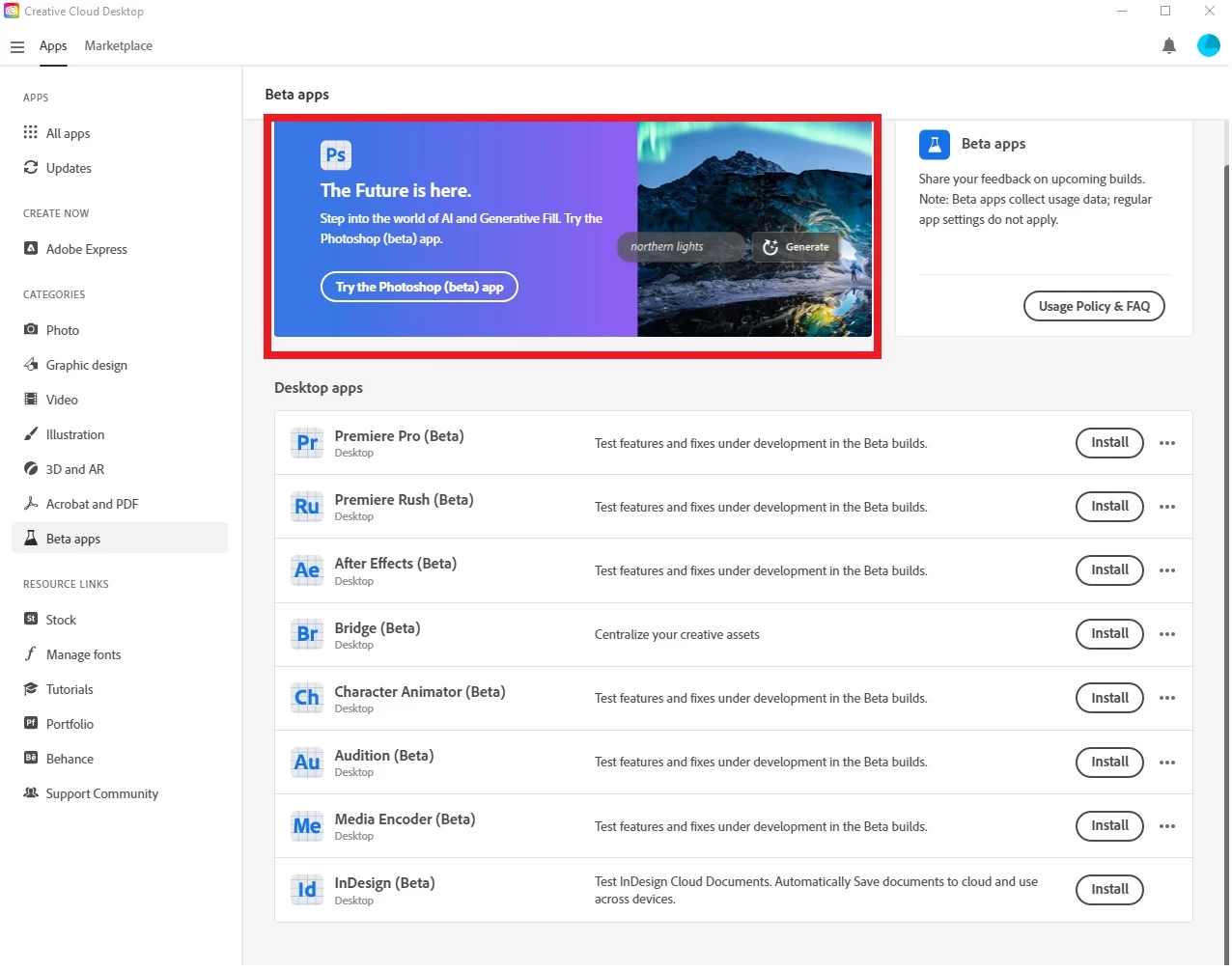
 

Untitled.jpg

TOPICS
Windows
710
Translate
Report
Community guidelines
Be kind and respectful, give credit to the original source of content, and search for duplicates before posting. Learn more
community guidelines
Adobe
Community Expert ,
May 25, 2023 May 25, 2023

@Scubatiger 

What happens (if anything) when you click the link at the top?


janee_0-1685065410913.png

Jane


Translate
Report
Community guidelines
Be kind and respectful, give credit to the original source of content, and search for duplicates before posting. Learn more
community guidelines
New Here ,
May 25, 2023 May 25, 2023

Unfortunately nothing happens when I click the link. Photoshop doesn't open and no link to an Adobe website opens or anything.

Translate
Report
Community guidelines
Be kind and respectful, give credit to the original source of content, and search for duplicates before posting. Learn more
community guidelines
New Here ,
May 25, 2023 May 25, 2023

Unfortunately nothing happens when I click the link. Photoshop doesn't open and no link to an Adobe website opens or anything.

Translate
Report
Community guidelines
Be kind and respectful, give credit to the original source of content, and search for duplicates before posting. Learn more
community guidelines
Community Expert ,
May 25, 2023 May 25, 2023


@Scubatiger 


The only other things I can think of are:

  • Sign out of Creative Cloud and sign in again
  • Check for updates

I'm sure staff will see this tomorrow, or other volunteers may chime in with additional ideas.


Jane


Translate
Report
Community guidelines
Be kind and respectful, give credit to the original source of content, and search for duplicates before posting. Learn more
community guidelines
New Here ,
May 25, 2023 May 25, 2023
LATEST

@jane-e 


Thank you for the suggestion. I tried it, but I'm unfortunately still having the same issue. 😞 

Translate
Report
Community guidelines
Be kind and respectful, give credit to the original source of content, and search for duplicates before posting. Learn more
community guidelines