
ashimg23377171
Inspiring
November 10, 2017
Answered

Unable to change hue/saturation

  • November 10, 2017
  • 1 reply
  • 21703 views

Hello

I am looking to change a color of a part of an image ... basically I want the string of text 'a pose' in red and the rest as is:
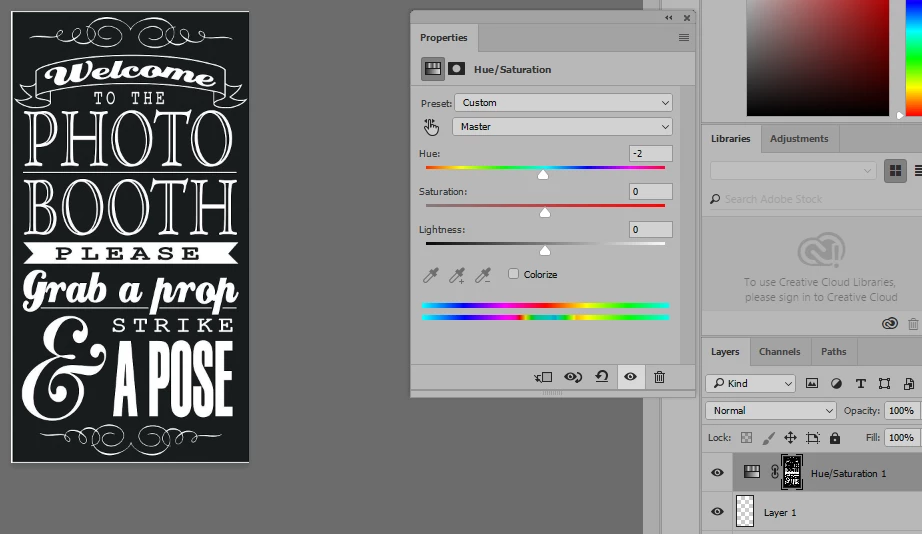
so im basically following the layer masking workflow established by Phlearn video:

How to Select and Change Colors in Photoshop - YouTube

However, I am getting stuck around the 5:00 min mark... I am able to select my color range (whites)... however when I load a hue/saturation adjustment layer, and try to change the hue slider, I am unable to see any results.

can you please guide as to where I am going wrong here.

Regards

    This topic has been closed for replies.
    Correct answer davescm

    You are trying to change white which has no colour information to change with the Hue/Saturation sliders. So you need to click "Colorize" just below the Lightness slider.

    Dave

    1 reply

    davescm
    Community Expert
    davescmCommunity ExpertCorrect answer
    Community Expert
    November 10, 2017

    You are trying to change white which has no colour information to change with the Hue/Saturation sliders. So you need to click "Colorize" just below the Lightness slider.

    Dave

    ashimg23377171
    Inspiring
    November 10, 2017

    Hi Dave

    Thanks, but that didn't work. The hue did not change:

    davescm
    Community Expert
    Community Expert
    November 10, 2017

    You need to move all three controls - start by reducing  the lightness, and increasing the saturation.

    Dave