
Inspiring
June 23, 2022
Answered

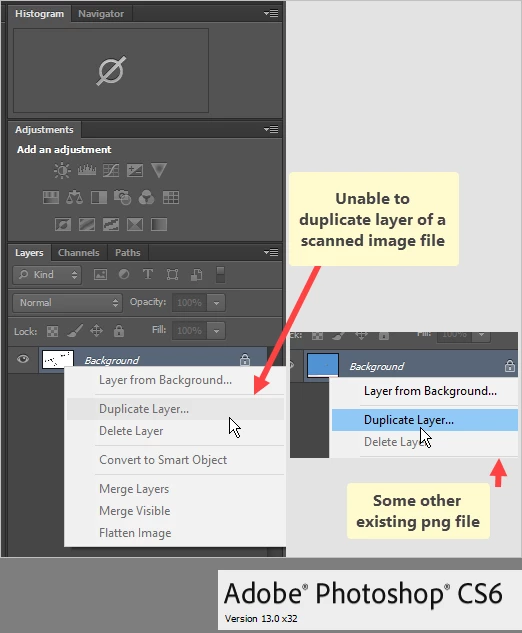
Unable to create a duplicate layer scanned image file

  • June 23, 2022
  • 1 reply
  • 937 views

I just have scanned a few documents, tif, bmp and png in various resolutions.
Regretfully duplicate layer is greyed out, no matter which one I select.
OTOH when selecting some other (non-scanned) png file, duplicate layer is not greyed out.
Within the same 'Photoshop session'
(scanner software not running, the scanner us shut down, the file is not read only)


Any suggestions?

Thanks!

(Photoshop CS6)
 

This topic has been closed for replies.
Correct answer Stephen Marsh

Are your scans indexed-colour or 1-bit per channel lineart scans? In other words, are they not in RGB?

1 reply

Stephen Marsh
Community Expert
Stephen MarshCommunity ExpertCorrect answer
Community Expert
June 23, 2022

Are your scans indexed-colour or 1-bit per channel lineart scans? In other words, are they not in RGB?

adwul62Author
Inspiring
June 23, 2022

Ehm ... ?? No offense meant, really not,  ehm.. frankly speaking, due to lack of knowledge on my part, for which I am realy sorry, but I have to confess that I am not sure what you mean. I have this Epson printer with scan features, use the Epson software to scan the name of my wife and me so I might use them as a 'signature' in birthday cards that I created.


Later... after posting the above, I have been trying to figure out how to get the handwritten names on a transparent background. Note: I also have a Microsoft Surface Pro device and I can use the Microsoft pen to write the names.

In Publisher, or Powerpoint, and have that saved as a .png, but there is still the white background. 
I have no idea how to get handwritten names into Photoshop, without the white background and, actually, I have no idea what forum to use for this question. The quality of the handwritten names on Microsoft Surface Pro (through Powerpoint) are so much better than the scanned version.


Anyway, that aside, I started out with the problem with these image files. Maybe what I am asking for is technically impossible. No idea...

c.pfaffenbichler
Community Expert
Community Expert
June 23, 2022

Check the Color Mode and Bit Depth under Image > Mode. 

Could you please post screenshots with the pertinent Panels (Toolbar, Layers, Options Bar, …) visible?