
MattInBoise
Participant
April 27, 2017
Answered

Unable to drag file from Desktop to Photoshop Icon on desktop to open

  • April 27, 2017
  • 1 reply
  • 807 views

I'm running Windows 10 and Adobe Photoshop CC 2017.

I used to be able to drag a file (jpeg, png, psd, etc) that was on my desktop to the Photoshop icon on my desktop and it would open the file in Photoshop.

This was helpful when dragging multiple files to open all at once.

Now, when I drag a file to the icon, I get the red circle with a line through it and nothing else happens.

Any help?
    This topic has been closed for replies.
    Correct answer JJMack

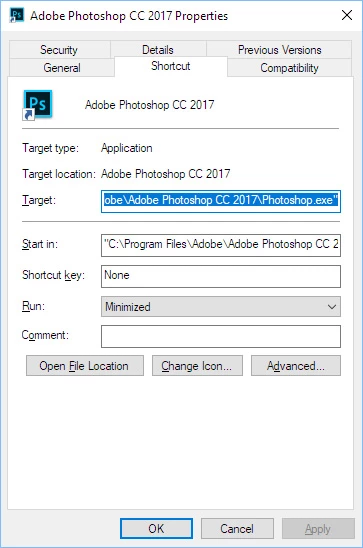
    I have the latest Windows 10 Preview build installed and do not see your  problem. If Photoshop is open and I drop an image file on any Photoshop version icon on the desktop the current running version of Photoshop will open the image file.  If Photoshop is not up and running   The Photoshop Version for the ICON I drop the image file on will open and open the image file.  Be it CS2, CS6, CC, CC 2014, CC 2015, CC 2015.5 or CC 2017.  Right click on the Photoshop ICON on you desktop and click on Properties.   The shortcrust should open for edit it should look like this.

    1 reply

    JJMack
    Community Expert
    JJMackCommunity ExpertCorrect answer
    Community Expert
    April 28, 2017

    I have the latest Windows 10 Preview build installed and do not see your  problem. If Photoshop is open and I drop an image file on any Photoshop version icon on the desktop the current running version of Photoshop will open the image file.  If Photoshop is not up and running   The Photoshop Version for the ICON I drop the image file on will open and open the image file.  Be it CS2, CS6, CC, CC 2014, CC 2015, CC 2015.5 or CC 2017.  Right click on the Photoshop ICON on you desktop and click on Properties.   The shortcrust should open for edit it should look like this.

    JJMack