mattr3203245
Participant
April 29, 2017
Answered

Unable to find the shapes tool?

  • April 29, 2017
  • 2 replies
  • 675 views

Hello,

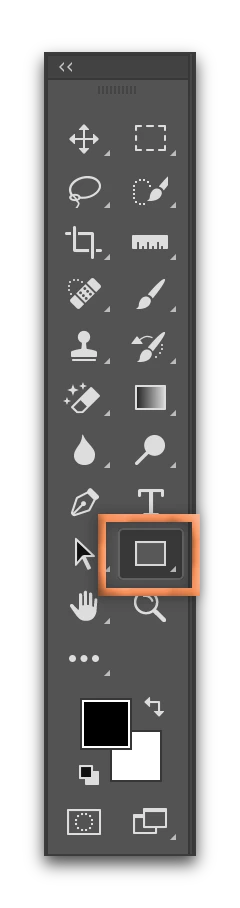
Rookie Question - I am having trouble locating the shapes tool icon- more specifically, the rectangle tool.  From the research I've done, you need to locate the "create shapes tool", but my PS doesn't have this.  Any ideas?  Here is a screenshot of it:

    This topic has been closed for replies.
    Correct answer Barb Binder

    You are working with a custom toolbar. Go to Edit > Toolbars > Restore Defaults. In the two-column view, it should then be sitting right above the Magnifying Glass.

    2 replies

    Nancy OShea
    Community Expert
    Community Expert
    April 29, 2017

    Click & hold the little triangle to show more tools.

    If you don't see an icon for shapes, click on the 3 dots icon to customize your toolbar.

    Nancy O'Shea— Product User & Community Expert
    mattr3203245
    Participant
    April 30, 2017

    Thanks Nancy!

    Barb Binder
    Community Expert
    Barb BinderCommunity ExpertCorrect answer
    Community Expert
    April 29, 2017

    You are working with a custom toolbar. Go to Edit > Toolbars > Restore Defaults. In the two-column view, it should then be sitting right above the Magnifying Glass.

    ~Barb at Rocky Mountain Training
    mattr3203245
    Participant
    April 30, 2017

    That did the trick, thank you Barb!

    Barb Binder
    Community Expert
    Community Expert
    April 30, 2017

    You are welcome, Matt. Glad I could help.

    ~Barb at Rocky Mountain Training