

Chris Panny
Inspiring
January 10, 2023
Question

Unable To Increase Saturation With Untagged CMYK File

  • January 10, 2023
  • 3 replies
  • 1525 views

I'm laying out a children's book for print in InDesign. The print shop is in China and the rep made the unusual request of stripping the ICC profiles for all of the illustrations in the book. I had to make new CYMK files and choose Don't Color Manage for each. The problem I'm having is a pretty severe loss of saturation on one of the image files. I've attached a screenshot with the RGB original on the left and the CMYK untagged on the right. Look at the difference at the sky in both examples. Anything that had a hue of 296 in the rgb loses saturation and shifts hue towards pink, when moved to the untagged. I need to pump up the saturation for the 296 so I created a mask to isloate the sky and have tried the following:


Applied a Hue Sat adjustment to the untagged file try to recover the saturation, but shifting the Sat slider all the way to +100 affects everything else but the sky. 


I tried converting the RGB original to Lab, applied Hue Sat with mask to boost sat without clipping it and then copy/paste to the untagged file - still loses saturation. 


Untagged - duplicated the layer, applied mask and tried changing the Blend to Color Burn. Dropped opacity to 50% and added a clipped Levels and shifted Black output to brighten the shadows introduced by Color Burn. This helped recover some saturation but it's still too weak. The screenshot you're seeing is a result of this step.
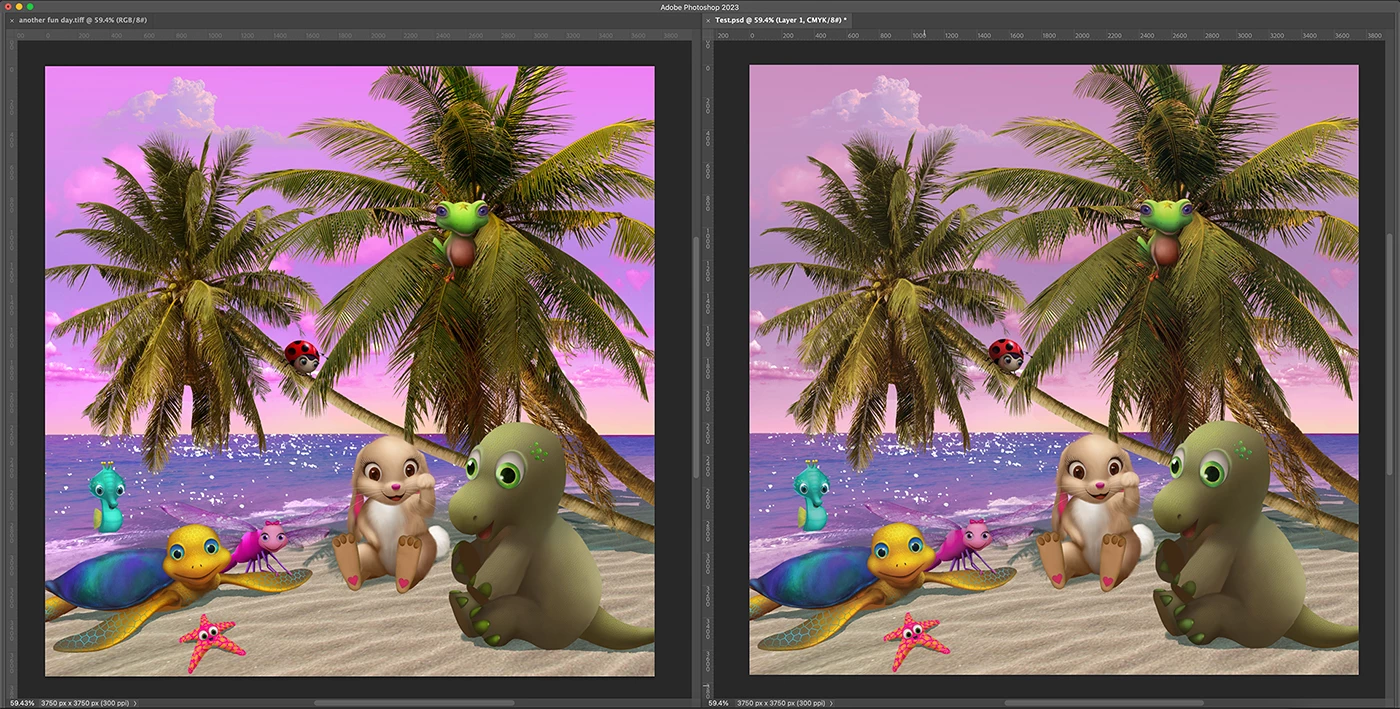


This topic has been closed for replies.

3 replies

NB, colourmanagement
Community Expert
Community Expert
January 11, 2023

Digitaldog is right, "Don't Color Manage" IS bad.

AND there's no such thing as viewing in Photoshop without colour management, when you open an untagged file the default ICC profile from color settings u is used - in this case the default CMYK - if you're seeing significantly unexpected colour on just one image then that image was probably separated differently. 


Providing untagged CMYK as a last stage of delivery is OK BUT the CMYK image files must have been generated correctly from the RGB originals.

The recipient (printer?) should really tell you

"separate to XXXCMYK.icc and, when saving a copy to send to us, remove the ICC profile. (i.e. save untagged)"


The separation (conversion) of RGB to CMYK sets the vital ink recipes, the colour accuracy depends on those ink recipes - if the wrong CMYK profile is used then the ink recipes differ and the printed result could be very poor.

SO, as I wrote its OK to strip the profile (but that does remove the ability of a subsequent viewer to look at the image digitally with confidence that they see what you saw) - BUT the CMYK file MUST have been made using the right CMYK profile.

There's no "generic" CMYK, a CMYK ICC profile is a set of instructions to hit a target. Wrong instructions, target missed!


I hope this helps
neil barstow, colourmanagement net - adobe forum volunteer - co-author: 'getting colour right'
google me "neil barstow colourmanagement" for lots of free articles on colour management


Jumpenjax
Community Expert
Community Expert
January 10, 2023

Can you fiddle with the saturation on the RGB? Is the printer wanting an RGB file? If so they are using a copier not a press to print. Copiers tend to make images more saturated. Will you get a proof?

Lee- Graphic Designer, Print Specialist, Photographer
TheDigitalDog
Inspiring
January 10, 2023

First: Don't Color Manage is bad! 

Next, the color gamut of many CMYK color spaces is much smaller than many RGB color spaces. You can't up saturation that can't exist! What was the color space of the RGB original? 

Think the color gamut of most RGB color spaces as having a range from 0 to 10 and CMYK as 0 to 8; you can't go any higher than 8. You converted from RGB to CMYK and that's the limit. 

And then there's the huge disconnect between the shape of the gamut and size of the gamut of your display, and CMYK. 

Even with RGB alone, depending on the output device, some Working Space gamuts are better than others for output:


The benefits of wide gamut working spaces on printed output:

This three-part, 32-minute video covers why a wide gamut RGB working space like ProPhoto RGB can produce superior quality output to print.

Part 1 discusses how the supplied Gamut Test File was created and shows two prints output to an Epson 3880 using ProPhoto RGB and sRGB, how the deficiencies of sRGB gamut affect final output quality. Part 1 discusses what to look for on your own prints in terms of better color output. It also covers Photoshop’s Assign Profile command and how wide gamut spaces mishandled produce dull or oversaturated colors due to user error.

Part 2 goes into detail about how to print two versions of the properly converted Gamut Test File file in Photoshop using Photoshop’s Print command to correctly setup the test files for output. It covers the Convert to Profile command for preparing test files for output to a lab.

Part 3 goes into color theory and illustrates why a wide gamut space produces not only move vibrant and saturated color but detail and color separation compared to a small gamut working space like sRGB. 


High Resolution Video: http://digitaldog.net/files/WideGamutPrintVideo.mov
Low Resolution (YouTube): https://www.youtube.com/watch?v=vLlr7wpAZKs&feature=youtu.be

Author “Color Management for Photographers" & "Photoshop CC Color Management/pluralsight"
Chris Panny
Inspiring
January 10, 2023

Thanks for your info! I'm going to watch the video now. So, the print shop in China is the one who made the request for providing them with untagged CMYK images. I've never had a print shop make such a request. We got a hard copy proof (book) delievered from this printer and everything looks good except for the one image with the sky, particulary the magenta-ish hue where the vibrancy isn't even close to the original rgb file.


The original RGB is tagged as sRGB which came from a digital illustrator. It was done with this gamut because the book will also be made into an ePUB. 

It's only an island if you look at it from the water.
D Fosse
Community Expert
Community Expert
January 10, 2023
quote

made the request for providing them with untagged CMYK images


By @Chris Panny


That doesn't mean you can ignore the CMYK profile. Every CMYK profile describes a specific set of printing conditions - a press calibrated to a certain standard, using certain inks on certain paper stock. This is defined by the CMYK profile.


You need to prepare the file according to the actual print conditions. If you do that, by working in the CMYK profile that corresponds with those conditions, the profile has done its job and is no longer strictly needed. The numbers will already be correct for the process.


It's not uncommon that printers want untagged files for various reasons, especially if they have older equipment that doesn't handle profiles well. But there will still be a profile describing the process. You need to know which one.


By just sending them "untagged", you're really sending whatever is your working CMYK. If you haven't changed it, it will be US Web Coated (SWOP), because that happens to be the default in Photoshop out of the box. That will certainly be wrong in China.


Photoshop can't work "untagged". Some profile will always be assumed, and if there is none embedded, it will be the working space. That's what you see on screen.


And with all that said, there's the gamut limit. That's a brick wall! When you push saturation as far as it goes, that's the end of that. There is no more. At the gamut limit, one or more channels go to 0, and one or more channels go to 100 (or 255 for RGB). They can't go further.