
Known Participant
April 14, 2019
Answered

Unable to save 2.4 G Tiff Photoshop CC

  • April 14, 2019
  • 2 replies
  • 2568 views

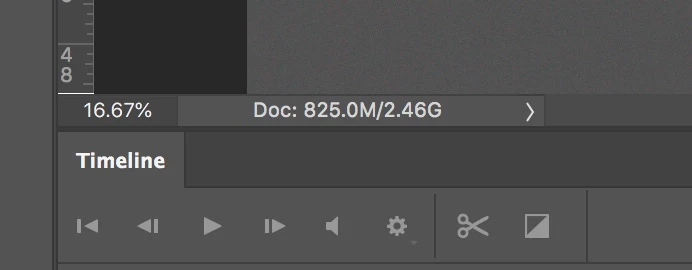
I am working on a series of relatively the same size images, I want the highest resolution possible. Photoshop starts throwing a warning after saving three or four without issue. The problem is getting an error cannot save tiff larger than 4.0 GB. This is showing 2.46 not 4.0.
This topic has been closed for replies.
Correct answer davescm

Hi

That number at the bottom corner is the memory size in RAM. It is calculated from each layer pixel size multiplied by 3 for RGB 8 bit and 6 for RGB 16 bit.   However any smart objects are only counted as a single pixel layer at the main doc resolution. The contents of a smart object can be much bigger and have to be saved in the file to disk, resulting in a file size on disk higher than that number in the corner.

Dave

2 replies

davescm
Community Expert
davescmCommunity ExpertCorrect answer
Community Expert
April 14, 2019

Hi

That number at the bottom corner is the memory size in RAM. It is calculated from each layer pixel size multiplied by 3 for RGB 8 bit and 6 for RGB 16 bit.   However any smart objects are only counted as a single pixel layer at the main doc resolution. The contents of a smart object can be much bigger and have to be saved in the file to disk, resulting in a file size on disk higher than that number in the corner.

Dave

RLBostonAuthor
Known Participant
April 14, 2019

There are no smart objects in these files. Bottom line, the number doesn't reflect file size of the file and is therefore pretty much useless. And the large file format is not recognized in Lightroom. Another gold star Adobe!

Legend
April 14, 2019

Absolutely correct. The number doesn’t reflect the size of the file, and wasn’t supposed to. Because compression does a different job every time, the only way to know the size is do a complete dummy run of the save. I doubt you’d want to wait around for that after each edit. Suggest you switch to PSB.

rayek.elfin
Legend
April 14, 2019

Tiff has an upper limit of 4Gb. If you need to save larger files, use PSB.

A newer version of the tiff format (BigTiff) exists, but it is (as far as I am aware) not supported in Photoshop or most other image editing software.

*edit* I wouldn't trust those values too much. According to this thread other issues might be the cause:

Unable to save file as PSD - PS says the file is over 2GB when it's not