Participant
October 24, 2018
Answered

Unable to turn off new proportional scaling

  • October 24, 2018
  • 9 replies
  • 20120 views

I would like to revert to the legacy transform behavior in photoshop. I have found how to turn it off here but I can not find the folder to place the plain text file.

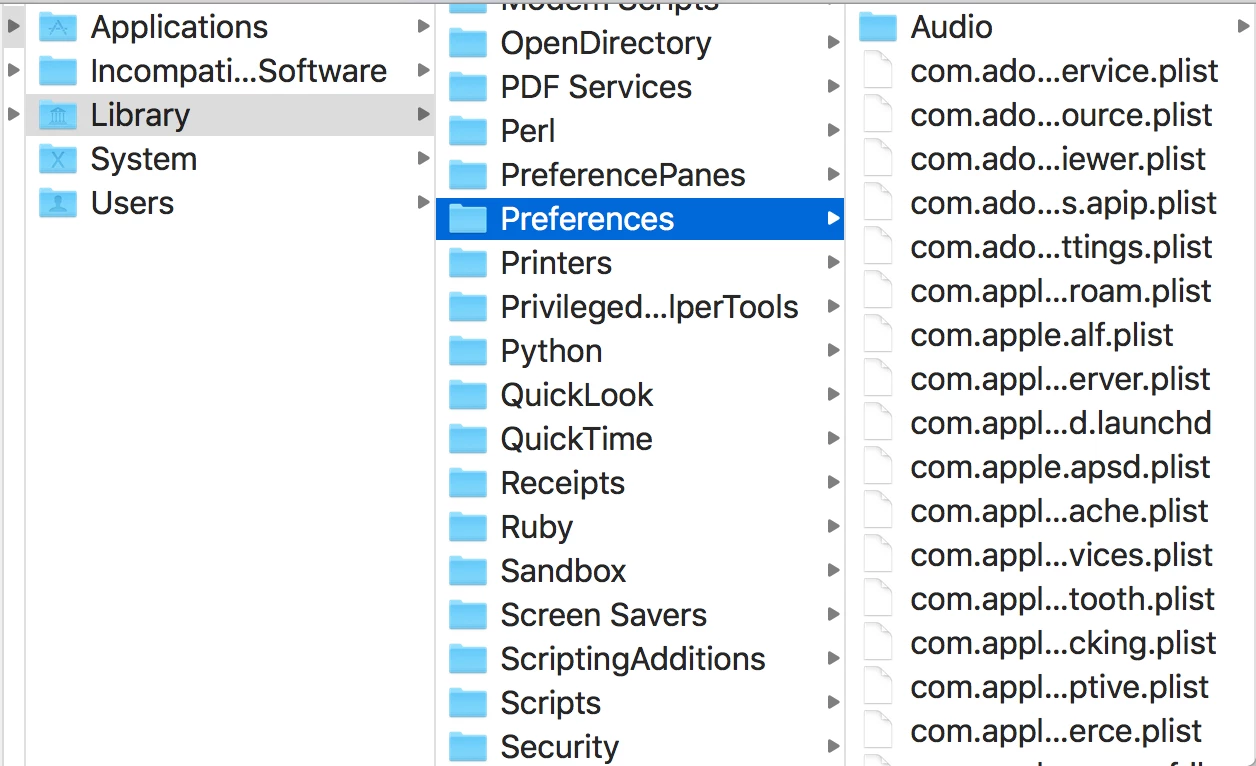
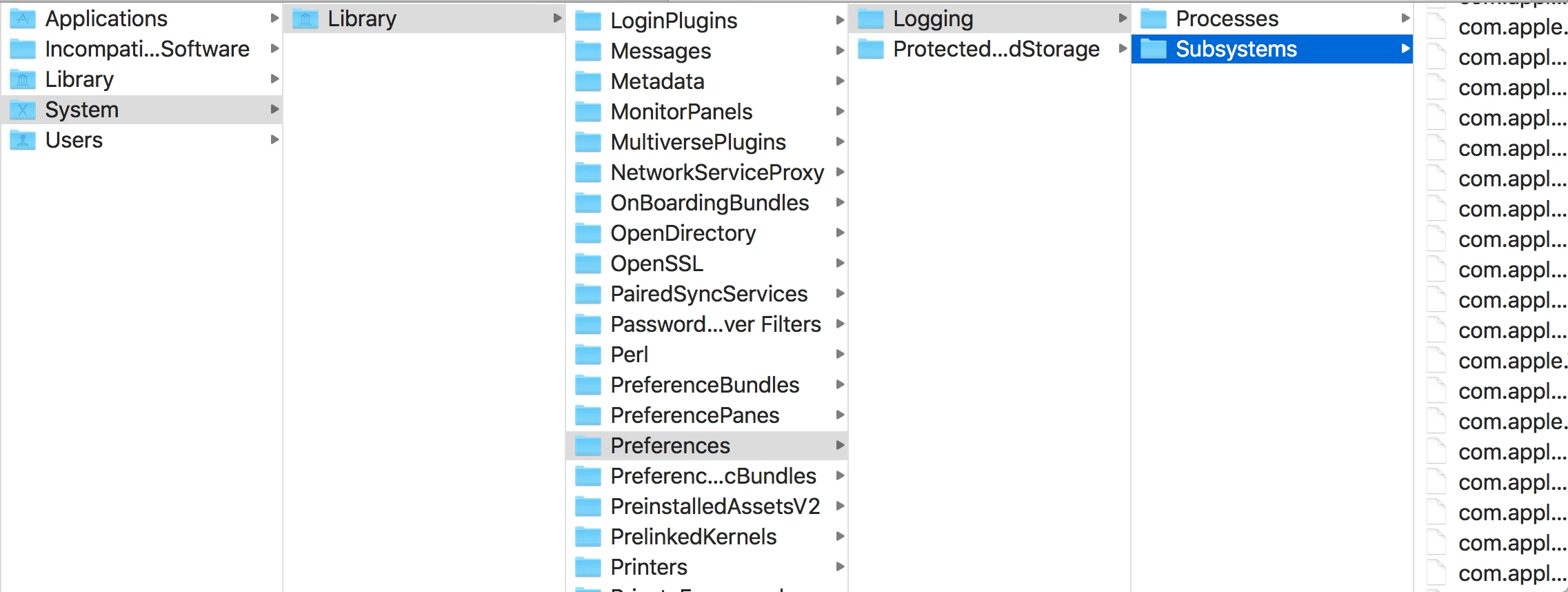
I have a MacBook and this folder sequence does not appear on my computer.

//Users/[User Name]/Library/Preferences/Adobe Photoshop CC 2019 Settings/

I have attached a few screenshots to show my folder system.

Am I simply looking in the wrong place?

This topic has been closed for replies.
Correct answer Jeff Arola

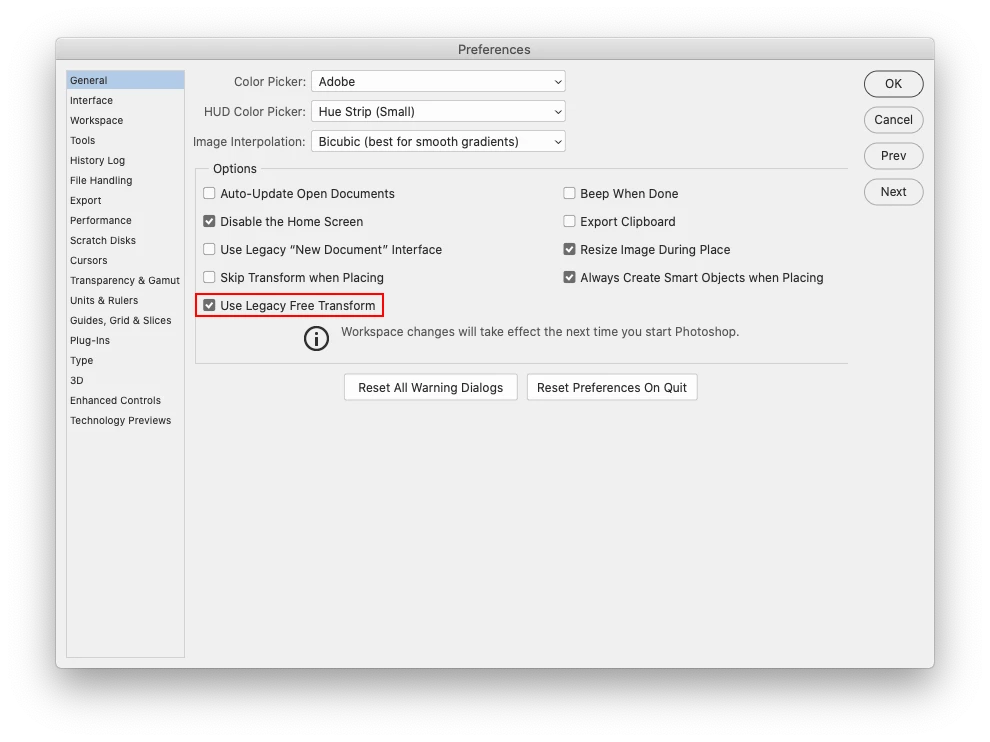
Photoshop 20.0.6 now includes a setting in the Preferences so users don't have tio worry about making a PSUserConfig.txt file.


Look under Photoshop CC>Preferences>General (mac) or Edit>Preferences>Genertal (windows) and check Use Legacy Free Transform.


9 replies

Jeff Arola
Community Expert
Jeff ArolaCommunity ExpertCorrect answer
Community Expert
October 11, 2019

Photoshop 20.0.6 now includes a setting in the Preferences so users don't have tio worry about making a PSUserConfig.txt file.


Look under Photoshop CC>Preferences>General (mac) or Edit>Preferences>Genertal (windows) and check Use Legacy Free Transform.


dejaliyah
Participating Frequently
July 26, 2019

Ok so i didn't read all the comments but based on what i read - there is no fix for this unless you downgrade but I figured out holding the SHIFT key while scaling does what it used to do when you didn't hold the shift key so looks like i'll just have to relearn all these new shortcuts.

Participating Frequently
July 18, 2019

Great to see there's a re-solve for Adobe engineers "solving" problems users don't have – like scaling working consistently across all Adobe apps.

Inspiring
June 1, 2019

I will add my voice to the chorus.  Switching to proportional cropping, particularly without having a simple and obvious way to use freehand cropping instead when you need it, was a really, really, really, really bad idea!  And having to play with a config file to turn the !@#$% thing off . Come on guys!

Participant
April 12, 2019

Agreed.  STOP messing with our shortcuts!!!  in a recent update, you also messed with CTRL +ALT + Z.... Sure while this was originally a dumb setup, it's what we know and have muscle memory to use.... now, we changed it back since we are able to change this hotkey and continue with an efficient workflow.  Keyword... workflow... you are messing with it which cost us time... which cost us money.

STOP MESSING WITH KEYBINDINGS!!! It kills workflow!

dejaliyah
Participating Frequently
July 26, 2019

i know right they literally took like 20 years to fix this. they should have done that back in 1995 lol and now it's super annoying to relearn

Known Participant
November 8, 2018

I too hate this change. I'm a full time photographer and the changes make things far worse for quickly changing the size and fixing lines in photos.

I want to go back to the old way, but the steps above don't work. For a start Text Edit will not let me save a .txt file, it says it has to be a .rtf. I have an iMac.

Any idea on how to change this on a Mac?

And why does the little button to "maintain aspect ratio" not toggle this nonsense on and off? It does nothing on my PS.

Free Transform should mean you are free to do what you want (within the confines of how it works - i.e. not to Distort). And Why can't distort have an option to move the central points too. I want to quickly fix my straight lines and also to move the central points - why should I need to change tools to do this?

Given that this is a supremely basic PS function their "Let's put everything one step further away from the user" (a very modern) approach is not helpful. Having to copy and paste some obscure command into an obscure location to switch it off is plain silliness. And it doesn't even work.

Known Participant
November 8, 2018

I'll update my rant (or possibly downgrade it) due to the very helpful response by 2975782 above.

6.  Re: Unable to turn off new proportional scaling

   2975782 Level 1


It looks like we've (the alleged 10%) been downgraded simply to press Shift to go back to legacy behaviour. Far better than it first seemed and makes my tantrum slightly obsolete!

Participant
June 19, 2019

THANKS

gener7
Community Expert
Community Expert
October 25, 2018

You are trying to place PSUserConfig.txt into your Mac's System directory. It needs to go in your Home directory.

Some files and folders are hidden by default to protect the users. To open it in the Finder, first use the Go > Go to Folder command and copy/paste this path:  ~/Library/Preferences/Adobe Photoshop CC 2019 Settings/  into the dialog like so.

~/ is your Home directory.

When you click on the Go button, the CC 2019 Finder Window will open and you can drop the PSUserConfig.txt right into the Finder window. Restart Photoshop and the Legacy behavior will return.

Should you want to go back to the default, rename PSUserConfig.txt to ~PSUserConfig.txt, which will tell Photoshop to ignore it. You can also delete it.

I really don't want to debate whether you should or should not revert the default behavior, I just want you to know how to do it and how to get out of it. What you want should be your own decision.

Gene

Participant
October 25, 2018

This worked for me. I appreciate your help!

Martin_Bns
Inspiring
October 24, 2018

Hi there,

If I may suggest, do not revert it.
The reason why Adobe took this decision is that in the 90% of cases, we need to keep the proportions of the image we are scaling.

You will get to use it very soon. Another cool bonus is that now you can transform and keep the proportions also with the side handles.

Use it for few days and it will feel very natural.

Cheers,
Martin

Participant
October 31, 2018

Sorry Martin,

I think the proportional tool adjustment is a disgrace. I've been using photoshop as my main professional tool since 1991 (version 2.0) and I don't want to be forced to use what amounts to training wheels, leg braces, guard rails, straight jacket... I depend on  free transformation and distortion as much as any tool in the kit. I'd go as far as saying it is the cornerstone of my skill set. because bending objects to my creative professional will is how I get paid.

Regards,

Charles