
Johnny Sokko
Inspiring
December 29, 2016
Answered

Units set to Inches, but Properties panel shows pixels

  • December 29, 2016
  • 5 replies
  • 44227 views

(Photoshop CC 2017)

Hello, how can I get my Properties panel to display in inches, rather than pixels? I have set my rulers to inches under the Units & Rulers Preferences, but when I draw a rectangle (Rectangle Tool), and I want to numerically modify its size in the Properties panel, the panel fields display pixels. How can I change this to decimal inches? Thanks-
    This topic has been closed for replies.
    Correct answer sonnyho_whitewater

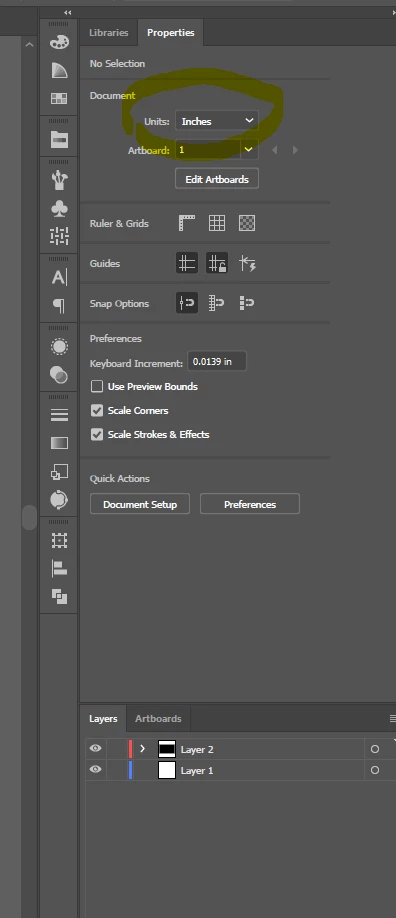
    Deselect everything on the layer panel, your "Properties" panel should have a document units drop-down menu. Change to your desired units.  Done.

    5 replies

    Barefoot22
    Inspiring
    December 19, 2020

    None of the above worked for me.  Pixel values changing to inches in my case.  The only solution I found was to delete the artwork which I'd imported from another project, which had dimensions set in inches.  Otherwise, even layers which had been created in pixels would change their values to inches in the properties panel.  

    Participating Frequently
    September 17, 2021

    I have the same issue when adding a shape - everyhing is set to inches elsewhere, but when I add shape - PIXELS.

    I just found right click in the palette to change though.


    lgi-gfx
    Participant
    July 20, 2023

    Right click over the "UNITS" get you access to change them when you are creating a new shape from scratch.

    Thanks for sharing nicks3609780

    Issue solved!!!


    Known Participant
    December 6, 2019

    Hey, my properties tab looks like this below. Im trying to make my shapes, rectangle in particular display in inches and its only showing in CM. Please help!

    Participant
    September 10, 2020

    had same issue as keeley and then solved by accident.... create a shape with rectangle tool and once you deselect it, the "Document" option shows up in Properties Panel and then you can select the Units in dropdown. worked for me!

    Inspiring
    September 20, 2020

    Addition note to Nicole0D44 -  I had to rasterize the rectangle shape before I could see the change from pixels to inches.

    sonnyho_whitewater
    sonnyho_whitewaterCorrect answer
    Participant
    June 8, 2018

    Deselect everything on the layer panel, your "Properties" panel should have a document units drop-down menu. Change to your desired units.  Done.

    Participant
    August 1, 2018

    Thank you so much!

    Dan Rodney
    Community Expert
    Community Expert
    December 29, 2016

    As shown below, Right-click (or Control-click on Mac) on the measurement field and you can change the measurement type.

    Correction: While this works, sadly it doesn't stay when you leave and come back.

    — Adobe Certified Expert & Instructor at Noble Desktop | Web Developer, Designer, InDesign Scriptor
    Johnny Sokko
    Inspiring
    December 29, 2016

    Dan, I'm getting it to stick. Even when I close out of the doc, then re-launch it. If I click on a rectangle (made with Rectangle Tool) created in a previous session, the Properties panel remembers I set that rectangle for inches. Thanks for the suggestion.

    War Unicorn
    Community Expert
    Community Expert
    December 30, 2016

    Now, that's weird. When I set it to inches myself, it sticks. When I set it per Dan's tip and go to, say, choose another layer and come back, it resets to pixels. The same applies if I go to save, close, then re-open.  : /

    Bug, maybe?

    War Unicorn
    Community Expert
    Community Expert
    December 29, 2016

    You can enter it yourself. (e.g., "7 in")    The unit of measurement should stick, too, until you decide otherwise.

    Johnny Sokko
    Inspiring
    December 29, 2016

    Ok that's cool, I see how that can work, thanks, I didn't know I could do that. But now, if I deselect that rectangle, then re-select it, the Properties panel only tells me the value in pixels. Is there a way to set it to display in decimal inches always?

    War Unicorn
    Community Expert
    Community Expert
    December 29, 2016

    Weird. It should stick with that particular layer (at least it does with mine). Even when I close the document and re-open it, the unit of measurement sticks with what I had before.

    ON EDIT: I'm using Photoshop CC 2017 as well but on a Windows 10 x64 system.