
Participant
April 6, 2022
Answered

unknown symbol

  • April 6, 2022
  • 1 reply
  • 210 views

Hi all,

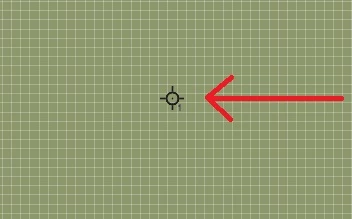
This symbol suddenly appeared. Not related to any layer. I can only get rid of it by unselecting the Extra options in View, but as I need the pixelgrid option in the Extra menu, I just can't unselect this 'symbol'. If I select the 'crop' tool (or rectangular  marquee), it dissapears too, but the moment I use f.e. the pen tool it appears again. Must be some unknown setting I activated by accident I guess. Can anyone help, thanks!


Gerard


This topic has been closed for replies.
Correct answer gerards42607261

Solved: it is the Color Sampler tool and can be removed by choosing in its Options bar 'Clear All' 

1 reply

gerards42607261AuthorCorrect answer
Participant
April 6, 2022

Solved: it is the Color Sampler tool and can be removed by choosing in its Options bar 'Clear All' 

jane-e
Community Expert
Community Expert
April 6, 2022

I've marked your answer "Correct" @gerards42607261 . The Color Sampler tool shares space with the Eyedropper tool, so you may have used it by mistake. You can also drag it off the canvas.


Jane