
June 27, 2016
Answered

Unwanted sharp edges with Magic Wand?

  • June 27, 2016
  • 3 replies
  • 24527 views

Hi guys,

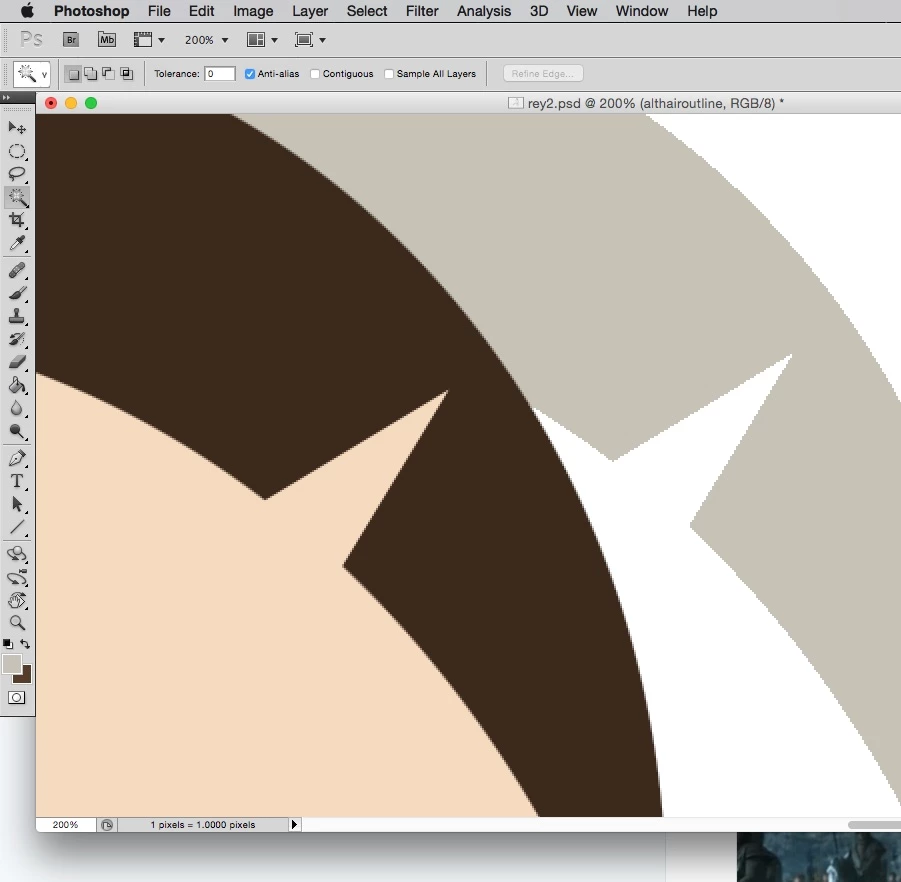
I feel like a newbie even though ive been using Photoshop for about 15 years. But as of yesterday, when i use the magic wand tool on a selection and then fill it in, im not getting anti-aliasing! I think I accidentally hit a shortcut key that i don't know about. I'm used to Photoshop on a PC, but im now using mac and yesterday i was fumbling around for the new layer shortcut, so it probably happened then. The Anti-aliasing box is ticked on everything, tolerance at 0 (and 32 for the wand). Bicubic/smooth for gradients is on (sometimes i switch it to hard edges for Pixel art). Filling a selection through the marquee tool gives me smooth edges, but if i then select that same area with the magic wand it fills as a jagged pixelated edge. Im not using paths or anything like that, just basic selection and fill. What the heck have i done??

Here is where i first noticed it. Original selection made with the circular marquee on the left, nice smooth fill. Selected with the Magic wand and when i fill it again, it is suddenly jagged and hard.
This topic has been closed for replies.
Correct answer Bettina Di Virgilio

Well that worked! Thanks so much! So what does the Load Selection do exactly? I dont know if it will be a long-term solution, but it means that I can at least continue with this project.


Pressing Ctrl/Cmd on the thumbnail of a layer you load a selection that is equal to the visible content of that layer. I think it was what you wanted to obtain with the Magic Wand, but using the technique I explained to you you will have a more precise final selection.

3 replies

Chuck Uebele
Community Expert
Community Expert
June 27, 2016

The magic wand tool is a very crude selector. It doesn't take much to get harsh jagged lines.

June 27, 2016

That may be the case, but as you can see, its not a big complex selection i am trying to fill that has lots of colour gradients etc. It worked fine up until about an hour before i took this screenshot. I dont know what has changed. I tried resetting all the tools, but that didnt work

Terri Stevens
Legend
June 27, 2016

It might be quicker here just to jump in and delete your preference returning the system back to how it was at install time.

Hold down cmd-option-shift and with the keys depressed start Photoshop. In the dialog that appears opt to delete the preferences.

June 27, 2016

Thanks but i took this screengrab before I realised the tolerance for the Magic Wand was supposed to be 32 by default. When i changed it back to the 32 i still get the same problem. I tried turning the tolerance up on the fill tool too, but it also made no difference. I dont know what I could have pressed to change this.

Bettina Di Virgilio
Participating Frequently
June 27, 2016

Hello, try to reset the tool from the drop down menu of the tool preset and see if it get fixed.

One more idea: to check if the problem is the magic wand use the Refine edge tool to check the borders, I'm not sure if the problem can be the way you fill the area: p.e. you're using Dissolve bending mode.

June 27, 2016

Hmm, that didnt seem to work, and blending modes are all fine. But now i'm beginning to think its something to do with the block of colour i am trying to select, or maybe the file, or something to do with the resolution? I just tried using the wand in another picture that i drew as a doodle a few years ago (a lot smaller, and lower in resolution): Selected a single block of colour, filled that selection in on a new layer and sure enough it is completely smooth. I don't know what I could have done different. But every selection with the wand, on any layer, on this one particular file is giving me the hard edges.

I feel like this is something really simple and obvious and im just not seeing it!

Bettina Di Virgilio
Participating Frequently
June 27, 2016

Hi, I think the problem is that you set your Tolerance to 0. Increase the Tolerance and the Anti-Alias will be back.

Participating Frequently
March 1, 2020

God bless you.  I've had this issue for awhile