
rvdaele
Participating Frequently
February 21, 2019
Question

Unwanted white border around text [2019]

  • February 21, 2019
  • 4 replies
  • 4837 views

When converting my photoshop file to a pdf, I notice I have some small white borders around text that should not be there, as illustrated below. ('- French (i')
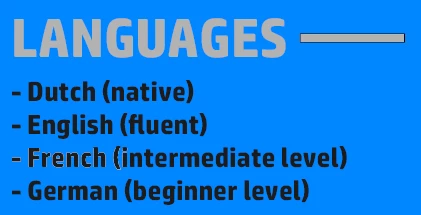


The border shows up only at about three small places across my entire file. These places are always the same, even after changing stuff. Most of the text is fine, but still the change in font is noticable when printing the pdf. I have no idea why this border is showing up. I tried to copy the layout from text where no border appears, but this does not work. Also, the border does not show in photoshop itself, only in the pdf version.


Is anybody familiar with this problem?

This topic has been closed for replies.

4 replies

Participant
November 5, 2023

I experienced the same thing. It occurs in random places (seemingly only on the first few characters or words of a line/paragraph) and is an absolute nightmare. But I worked around it by making each paragraph of text in its own text area (click and drag the text cursor in PS to make a text area).

Participant
July 17, 2023

I have this exact issue now. Did you ever find a fix?

jane-e
Community Expert
Community Expert
February 21, 2019

If Trevor.Dennis’s method doesn’t work, can you click an insertion point in the problem text and show the Character panel?

rvdaele
rvdaeleAuthor
Participating Frequently
February 21, 2019

This is what the character panel looks like for two different parts of the text. I observe no changes when selecting a part from 'English'. I can't show this because apparently I just saved and closed a completely merged file, and can't restore to previous versions. Weeks of work just thrown away in a few seconds :/

jane-e
Community Expert
Community Expert
February 21, 2019

Hi,

I have never heard of HP Simplifed, but as near as I can tell it is a typeface created for Hewlett Packard.

https://blog.daltonmaag.com/hp-simplify-with-new-font/

Need Help finding HP Font from HP website - forum | dafont.com

Two things to try:

  • What typeface is used in the good text?
  • What happens if you change the typeface in the bad text?

Jane

Trevor.Dennis
Community Expert
Community Expert
February 21, 2019

Can you tell us your Photoshop version and operating system please?

If CC, try enabling Legacy Compositing

rvdaele
rvdaeleAuthor
Participating Frequently
February 21, 2019

The version is Photoshop CC. I tried your suggestion, but the white border still shows up.

jane-e
Community Expert
Community Expert
February 21, 2019

Hi,

Photoshop CC first came out in 2013 and has named versions and patches since then, which is what Trevor is asking for. On a Mac, go to Photoshop > About or on Windows, it’s Help > About and give us that number.

For the operating system, he is asking for either the version of OSX or Windows, again with the numbers that show the patches. On a Mac, it’s in the Apple menu > About. On Windows, I think you type “ver” at the prompt.

The exact numbers become important if it’s a bug, although we haven’t determined that yet.

Jane