KennethMelvin
Participant
November 30, 2023
Question

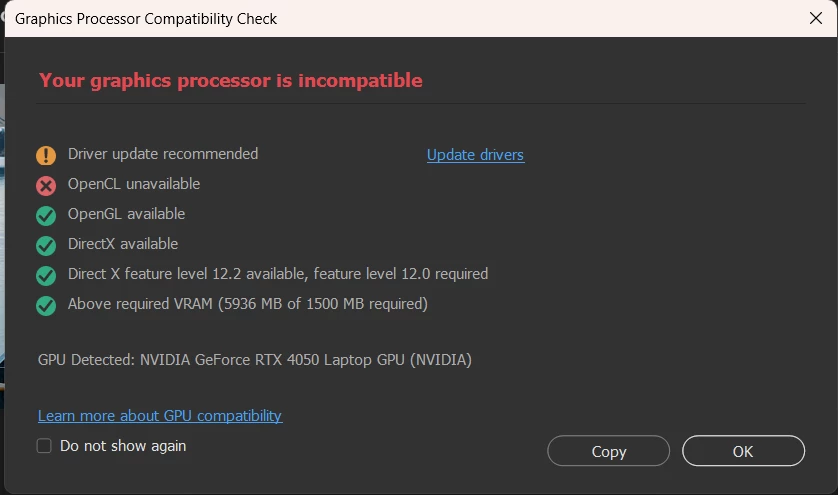
Update 25.2: OpenCL Unavailable option not resolved
  • November 30, 2023
  • 4 replies
  • 677 views

I invested in a new laptop, subscribed to Adobe's all package only to end up getting more issues.
DAMN!!!!
Fix this already....Adobe!!!!!!!

 

This topic has been closed for replies.

4 replies

KennethMelvin
Participant
December 1, 2023

Update: I just hard reset my laptop and reinstalled everything from scratch, now it's not showing anymore.

AxelMatt
Community Expert
Community Expert
November 30, 2023

Do you have check and follow my second auggested solution and disabled the CPU internal graphic unit?


Another try is to do a complete and clean reinstallation of the NVidia driver.

Clean Installation Of Nvidia Graphic | NVIDIA GeForce Forums


You can also try to reset the preferences of Photoshop using the steps described here:

https://helpx.adobe.com/photoshop/using/preferences.html#reset-preferences

Please backup your settings before resetting the preferences. You can check:

https://helpx.adobe.com/photoshop/using/preferences.html#backup-photoshop-preferences


Just I've found this. It seems it's problem with the new sniffer.exe. Here you'll find a workaround  

GPU Incompatibility Issues with RTX 4070!!! - Adobe Community - 14242925


My System: Intel i7-8700K - 64GB RAM - NVidia Geforce RTX 3060 - Windows 11 Pro 25H2 -- LR-Classic 15 - Photoshop 27 - Nik Collection 8 - PureRAW 5 - Topaz Photo
KennethMelvin
Participant
November 30, 2023

I have the lateststudio driver 


AxelMatt
Community Expert
Community Expert
November 30, 2023

As I see in the screenshot your graphic driver seems to be outdated. Please check if there's a new version available.

Make also sure that you have installed the Studio Version of the driver instead of the Game Ready version.


Dual graphics units are also a never-ending story, mostly in laptops. They will very often conflict. The standard advice is to disable the CPU integrated graphics completely. See section 6 & 7 here:

https://helpx.adobe.com/photoshop/kb/troubleshoot-gpu-graphics-card.html 


My System: Intel i7-8700K - 64GB RAM - NVidia Geforce RTX 3060 - Windows 11 Pro 25H2 -- LR-Classic 15 - Photoshop 27 - Nik Collection 8 - PureRAW 5 - Topaz Photo